创造力公式

最近学习新东西,常有浅尝辄止的感觉,不仅理论上没有深入,技术层面上的收获也很难可以心满意足。如何更踏实深入的学些东西是很重要的。通常来说,深入学习常是个不断提出问题、解决问题的过程,MIT的Larson教授就此给出这样三条规则:
1、你一定要觉得你自己的问题有趣而又重要,否则你就不会有激情,不会投入。
2、你一定要有能力解决问题。假如不能完全解决问题,起码你要问自己能够做些什么。
3、除了你自己的肯定,如果还有人也认为你的问题很重要,且这样的人越多越好。
最近学习新东西,常有浅尝辄止的感觉,不仅理论上没有深入,技术层面上的收获也很难可以心满意足。如何更踏实深入的学些东西是很重要的。通常来说,深入学习常是个不断提出问题、解决问题的过程,MIT的Larson教授就此给出这样三条规则:
1、你一定要觉得你自己的问题有趣而又重要,否则你就不会有激情,不会投入。
2、你一定要有能力解决问题。假如不能完全解决问题,起码你要问自己能够做些什么。
3、除了你自己的肯定,如果还有人也认为你的问题很重要,且这样的人越多越好。
回忆往事 Windows® 产品的预发布版本遵循相当标准的过程。首先是 alpha 版本,该版本供内部使用,并有可能与 Windows 产品团队之外的软件开发合作伙伴共享。
alpha 版本之后自然是 beta 版本,该版本将发送给更多用户使用。alpha 和 beta 版本用户之间的主要区别在于:beta 版本的发布对象包括非软件开发人员,例如喜欢测试预发布软件的最终用户,以及希望率先开始评估新 OS 以确定新产品不仅与关键的内部应用程序兼容,而且也与公司网络、标准硬件配置和系统管理工具兼容的公司。
fs2you.com是一个网盘,速度还是可以的,所以很多朋友会将软件或者资料上传到这里面来,但是我们会发现在fs2you.com下载有一些问题,就是有些时候我们下载的时候会要求安装RaySource这个软件。怎么样才能不安装RaySource就可以下载呢?
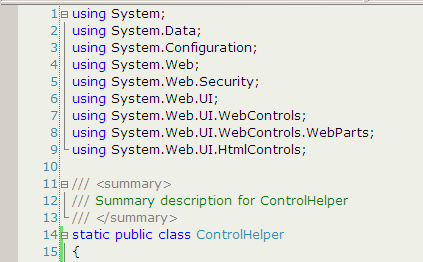
环境:VS2005
字体:Verdana, 10pt
普通文本背景色:238,239,230 (#E6EFEE)
EditPlus 也可以照此配置。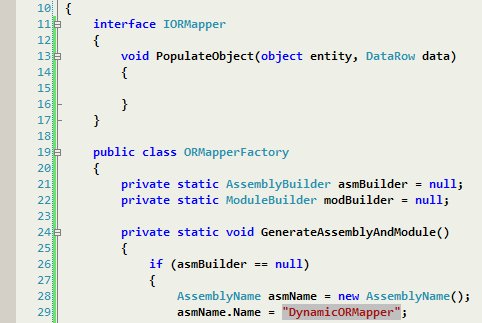
这个是我的最新字体探索结果:
Consolas 10pt bold + ClearType font 支持(XP, 2003)
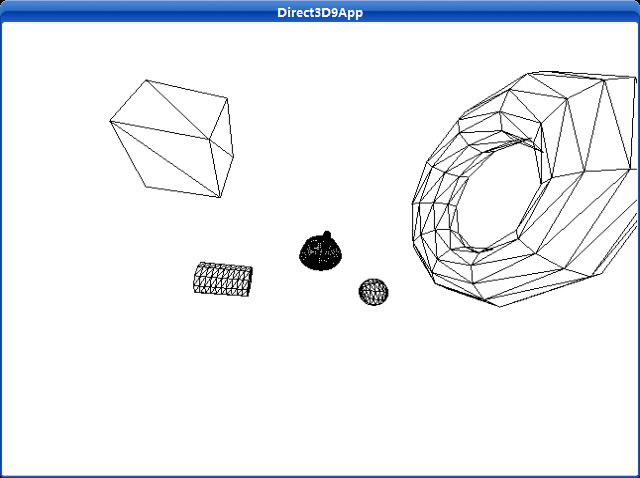
这个程序创建并渲染几种不同的能够使用D3DXCreate*函数创建的3D物体。
Uses a left-handed coordinate system to create a mesh containing an axis-aligned box.
HRESULT D3DXCreateBox(
  LPDIRECT3DDEVICE9 pDevice,
  FLOAT Width,
  FLOAT Height,
  FLOAT Depth,
  LPD3DXMESH * ppMesh,
  LPD3DXBUFFER * ppAdjacency
);
If the function succeeds, the return value is D3D_OK. If the function fails, the return value can be one of the following: D3DERR_INVALIDCALL, D3DXERR_INVALIDDATA, E_OUTOFMEMORY.
The created box is centered at the origin.
This function creates a mesh with the D3DXMESH_MANAGED creation option and D3DFVF_XYZ | D3DFVF_NORMAL flexible vertex format (FVF).
Uses a left-handed coordinate system to create a mesh containing a cylinder.
HRESULT D3DXCreateCylinder(
  LPDIRECT3DDEVICE9 pDevice,
  FLOAT Radius1,
  FLOAT Radius2,
  FLOAT Length,
  UINT Slices,
  UINT Stacks,
  LPD3DXMESH * ppMesh,
  LPD3DXBUFFER * ppAdjacency
);
If the function succeeds, the return value is D3D_OK. If the function fails, the return value can be one of the following: D3DERR_INVALIDCALL, D3DXERR_INVALIDDATA, E_OUTOFMEMORY.
The created cylinder is centered at the origin, and its axis is aligned with the z-axis.
This function creates a mesh with the D3DXMESH_MANAGED creation option and D3DFVF_XYZ | D3DFVF_NORMAL flexible vertex format (FVF).
Uses a left-handed coordinate system to create a mesh containing a torus.
HRESULT D3DXCreateTorus(
  LPDIRECT3DDEVICE9 pDevice,
  FLOAT InnerRadius,
  FLOAT OuterRadius,
  UINT Sides,
  UINT Rings,
  LPD3DXMESH * ppMesh,
  LPD3DXBUFFER * ppAdjacency
);
If the function succeeds, the return value is D3D_OK. If the function fails, the return value can be one of the following: D3DERR_INVALIDCALL, D3DXERR_INVALIDDATA, E_OUTOFMEMORY.
The created torus is centered at the origin, and its axis is aligned with the z-axis. The inner radius of the torus is the radius of the cross-section (the minor radius), and the outer radius of the torus is the radius of the central hole.
This function returns a mesh that can be used later for drawing or manipulation by the application.
This function creates a mesh with the D3DXMESH_MANAGED creation option and D3DFVF_XYZ | D3DFVF_NORMAL flexible vertex format (FVF).
Uses a left-handed coordinate system to create a mesh containing a sphere.
HRESULT D3DXCreateSphere(
  LPDIRECT3DDEVICE9 pDevice,
  FLOAT Radius,
  UINT Slices,
  UINT Stacks,
  LPD3DXMESH * ppMesh,
  LPD3DXBUFFER * ppAdjacency
);
If the function succeeds, the return value is D3D_OK. If the function fails, the return value can be one of the following: D3DERR_INVALIDCALL, D3DXERR_INVALIDDATA, E_OUTOFMEMORY.
The created sphere is centered at the origin, and its axis is aligned with the z-axis.
This function creates a mesh with the D3DXMESH_MANAGED creation option and D3DFVF_XYZ | D3DFVF_NORMAL flexible vertex format (FVF).
Builds a matrix using the specified offsets.
D3DXMATRIX * D3DXMatrixTranslation(
  D3DXMATRIX * pOut,
  FLOAT x,
  FLOAT y,
  FLOAT z
);
Pointer to a D3DXMATRIX structure that contains a translated transformation matrix.
The return value for this function is the same value returned in the pOut parameter. In this way, the D3DXMATRIXTranslation can be used as a parameter for another function.
运行截图:
源程序:
/**************************************************************************************
Renders several D3DX shapes in wireframe mode and has the camera fly around the scene.
Demonstrates the D3DXCreate* functions, and demonstrates more complex transformations
used to position the objects in the world and move the camera around the world.
**************************************************************************************/
#include "d3dUtility.h"
#pragma warning(disable : 4100)
#define TEAPOT_MESH 0
#define BOX_MESH 1
#define CYLINDER_MESH 2
#define TORUS_MESH 3
#define SPHERE_MESH 4
#define NUM_MESH 5
const int WIDTH = 640;
const int HEIGHT = 480;
IDirect3DDevice9* g_d3d_device = NULL;
ID3DXMesh* g_object_meshes[NUM_MESH];
// world matrices for each object.
// these matrices specify the location of the objects in the world.
D3DXMATRIX g_object_world_matrices[NUM_MESH];
////////////////////////////////////////////////////////////////////////////////////////////////////
bool setup()
{
// create the teapot geometry
D3DXCreateTeapot(g_d3d_device, &g_object_meshes[TEAPOT_MESH], NULL);
D3DXCreateBox(g_d3d_device, 2.0f, 2.0f, 2.0f, &g_object_meshes[BOX_MESH], NULL);
D3DXCreateCylinder(g_d3d_device, 1.0f, 1.0f, 3.0f, 10, 10, &g_object_meshes[CYLINDER_MESH], NULL);
D3DXCreateTorus(g_d3d_device, 1.0f, 3.0f, 10, 10, &g_object_meshes[TORUS_MESH], NULL);
D3DXCreateSphere(g_d3d_device, 1.0f, 10, 10, &g_object_meshes[SPHERE_MESH], NULL);
// Build world matrices - position the objects in world space.
// For example, g_object_world_matrices[1] will position g_object_meshes[1] at (-5, 0, 5).
// Likewise, g_object_world_matrices[2] will position g_object_meshes[2] at (5, 0, -5).
D3DXMatrixTranslation(&g_object_world_matrices[TEAPOT_MESH], 0.0f, 0.0f, 0.0f);
D3DXMatrixTranslation(&g_object_world_matrices[BOX_MESH], -5.0f, 0.0f, 5.0f);
D3DXMatrixTranslation(&g_object_world_matrices[CYLINDER_MESH], 5.0f, 0.0f, 5.0f);
D3DXMatrixTranslation(&g_object_world_matrices[TORUS_MESH], -5.0f, 0.0f, -5.0f);
D3DXMatrixTranslation(&g_object_world_matrices[SPHERE_MESH], 5.0f, 0.0f, -5.0f);
// set the projection matrix
D3DXMATRIX proj;
D3DXMatrixPerspectiveFovLH(&proj, D3DX_PI * 0.5f, (float)WIDTH/HEIGHT, 1.0f, 1000.0f);
g_d3d_device->SetTransform(D3DTS_PROJECTION, &proj);
// set wireframe mode render state
g_d3d_device->SetRenderState(D3DRS_FILLMODE, D3DFILL_WIREFRAME);
return true;
}
void cleanup()
{
for(int i = 0; i < NUM_MESH; i++)
safe_release<ID3DXMesh*>(g_object_meshes[i]);
}
bool display(float time_delta)
{
// Animate the camera:
//
// The camera will circle around the center of the scene. We use the sin and cos functions
// to generate points on the circle, then scale them by 10 to further the radius.
// In addition the camera will move up and down as it circles about the scene.
static float angle = (3.0f * D3DX_PI) / 2.0f;
static float camera_height = 0.0f;
static float camera_height_dir = 10.0f;
D3DXVECTOR3 position(cosf(angle) * 10.0f, camera_height, sinf(angle) * 10.0f);
// the camera is targetted at the origin of the world
D3DXVECTOR3 target(0.0f, 0.0f, 0.0f);
// the worlds up vector
D3DXVECTOR3 up(0.0f, 1.0f, 0.0f);
D3DXMATRIX view_matrix;
D3DXMatrixLookAtLH(&view_matrix, &position, &target, &up);
g_d3d_device->SetTransform(D3DTS_VIEW, &view_matrix);
// compute the position for the next frame
angle += time_delta;
if(angle >= 6.28f)
angle = 0.0f;
// compute the height of the camera for the next frame
camera_height += camera_height_dir * time_delta;
if(camera_height >= 20.0f || camera_height <= -20.0f)
camera_height_dir = -camera_height_dir;
// draw the scene
g_d3d_device->Clear(0, NULL, D3DCLEAR_TARGET | D3DCLEAR_ZBUFFER, 0xffffffff, 1.0f, 0);
g_d3d_device->BeginScene();
for(int i = 0; i < NUM_MESH; i++)
{
// set the world matrix that positions the object
g_d3d_device->SetTransform(D3DTS_WORLD, &g_object_world_matrices[i]);
// draw the object using the previously set world matrix
g_object_meshes[i]->DrawSubset(0);
}
g_d3d_device->EndScene();
g_d3d_device->Present(NULL, NULL, NULL, NULL);
return true;
}
LRESULT CALLBACK wnd_proc(HWND hwnd, UINT msg, WPARAM word_param, LPARAM long_param)
{
switch(msg)
{
case WM_DESTROY:
PostQuitMessage(0);
break;
case WM_KEYDOWN:
if(word_param == VK_ESCAPE)
DestroyWindow(hwnd);
break;
}
return DefWindowProc(hwnd, msg, word_param, long_param);
}
int WINAPI WinMain(HINSTANCE inst, HINSTANCE, PSTR cmd_line, int cmd_show)
{
if(! init_d3d(inst, WIDTH, HEIGHT, true, D3DDEVTYPE_HAL, &g_d3d_device))
{
MessageBox(NULL, "init_d3d() - failed.", 0, MB_OK);
return 0;
}
if(! setup())
{
MessageBox(NULL, "Steup() - failed.", 0, MB_OK);
return 0;
}
enter_msg_loop(display);
cleanup();
g_d3d_device->Release();
return 0;
}
Direct3D提供了多种渲染状态,它影响几何物体怎样被渲染。渲染状态有默认值,因此假如你的应用程序需要不同于默认设置的渲染时,你仅仅改变它即可。一种渲染效果会一直起作用,直到你下一次改变渲染状态为止。为了设置一个渲染状态,我们使用下面的方法:
Sets a single device render-state parameter.
HRESULT SetRenderState(
  D3DRENDERSTATETYPE State,
  DWORD Value
);
If the method succeeds, the return value is D3D_OK. D3DERR_INVALIDCALL is returned if one of the arguments is invalid.
例如,在下面的例子中我们将使用线框模式渲染我们的物体。因此,我们设置如下的渲染状态:
_device->SetRenderState(D3DRS_FILLMODE, D3DFILL_WIREFRAME);
注意:查看DirectX SDK中关于D3DRENDERSTATETYPE的信息。其中详细介绍了所有的渲染状态。
一旦我们创建好一个顶点缓存以及一个索引缓存(可选的)后,我们就为渲染其中的内容准备得差不多了,但是在渲染前我们还有3个步骤必须先做。
1、 设置资源流。设置资源流与一个顶点缓存挂钩,此流就是一个流入渲染管线的几何信息的流。
下面的方法是用于设置一个资源流:
HRESULT IDirect3DDevice9::SetStreamSource(
UINT StreamNumber,
IDirect3DVertexBuffer9* pStreamData,
UINT OffsetInBytes,
UINT Stride
);
StreamNumber——确定我们的顶点缓存与哪一个资源流挂钩。我们不使用多重流;因此我们总是使用0号流。
pStreamData——一个指向我们想与流挂钩的那个顶点缓存的指针。
OffsetInBytes——相对流开始处的偏移量。以字节为单位,它指定被填入渲染管线的顶点数据的开始位置。通过检查D3DCAPS9结构中的D3DDEVCAPS2_STREAMOFFSET标志,假如你的设备支持,那么这个参数就有一些非0值。
Stride——我们在顶点缓存中操作的每个部分的流的字节大小。
例如,假设vb是一个已经填充了顶点信息的顶点缓存:
_device->SetStreamSource( 0, vb, 0, sizeof( Vertex ) );
2、 设置索引缓存。假如我们使用了索引缓存,我们必须设置后面要用于绘制操作的索引缓存。每次我们只能使用一个索引缓存;因此假如你需要用一个不同的索引缓存绘制一个物体时,你必须转换到另一个上。下面的代码设置一个索引缓存:
_device->SetIndices( _ib ); // 传递一个索引缓存指针的拷贝
在我们创建好顶点/索引缓存以及做好准备工作以后,我们就能绘制我们的几何物体了。这是通过使用DrawPrimitive或者DrawIndexedPrimitive传送几何信息到达渲染管线。这些方法从顶点流中获得顶点信息以及从索引缓存中获得索引信息。
这个方法不使用索引信息绘制图元。
HRESULT IDirect3DDevice9::DrawPrimitive(
D3DPRIMITIVETYPE PrimitiveType,
UINT StartVertex,
UINT PrimitiveCount
);
PrimitiveType——我们绘制的图元类型。比如,我们能绘制点和线以及三角形。以后我们使用三角形,用D3DPT_TRIANGLELIST参数。
StartVertex——索引到在顶点流中的一个元素。设置渲染顶点中的开始点。这个参数给予我们一定的机动性,可以绘制一个顶点缓存中的某部分。
PrimitiveCount——绘制图元的个数。
例子:
// 绘制4个三角形
_device->DrawPrimitive( D3DPT_TRIANGLELIST, 0, 4);
Renders a sequence of nonindexed, geometric primitives of the specified type from the current set of data input streams.
HRESULT DrawPrimitive(
  D3DPRIMITIVETYPE PrimitiveType,
  UINT StartVertex,
  UINT PrimitiveCount
);
If the method succeeds, the return value is D3D_OK. If the method fails, the return value can be D3DERR_INVALIDCALL.
When converting a legacy application to Direct3D 9, you must add a call to either IDirect3DDevice9::SetFVF to use the fixed function pipeline, or IDirect3DDevice9::SetVertexDeclaration to use a vertex shader before you make any Draw calls.
Defines the primitives supported by Direct3D.
typedef enum D3DPRIMITIVETYPE
{
    D3DPT_POINTLIST = 1,
    D3DPT_LINELIST = 2,
    D3DPT_LINESTRIP = 3,
    D3DPT_TRIANGLELIST = 4,
    D3DPT_TRIANGLESTRIP = 5,
    D3DPT_TRIANGLEFAN = 6,
    D3DPT_FORCE_DWORD = 0x7fffffff,
} D3DPRIMITIVETYPE, *LPD3DPRIMITIVETYPE;
Renders the specified vertices as a sequence of isolated triangles. Each group of three vertices defines a separate triangle.
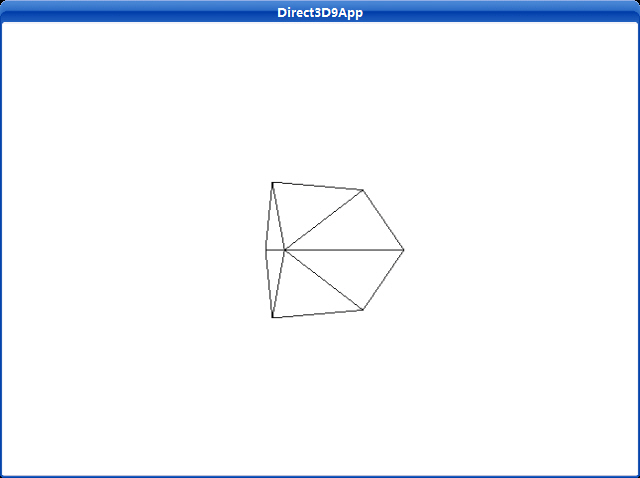
立方体——只比三角形稍微复杂一点,这个程序渲染一个线框立方体。
这个简单的绘制和渲染立方体的程序的运行结果如下图所示:
源程序:
/**************************************************************************************
Renders a spinning cube in wireframe mode. Demonstrates vertex and index buffers,
world and view transformations, render states and drawing commands.
**************************************************************************************/
#include "d3dUtility.h"
#pragma warning(disable : 4100)
const int WIDTH = 640;
const int HEIGHT = 480;
IDirect3DDevice9* g_d3d_device = NULL;
IDirect3DVertexBuffer9* g_vertex_buffer = NULL;
IDirect3DIndexBuffer9* g_index_buffer = NULL;
class cVertex
{
public:
float m_x, m_y, m_z;
cVertex() {}
cVertex(float x, float y, float z)
{
m_x = x;
m_y = y;
m_z = z;
}
};
const DWORD VERTEX_FVF = D3DFVF_XYZ;
////////////////////////////////////////////////////////////////////////////////////////////////////
bool setup()
{
g_d3d_device->CreateVertexBuffer(8 * sizeof(cVertex), D3DUSAGE_WRITEONLY, VERTEX_FVF,
D3DPOOL_MANAGED, &g_vertex_buffer, NULL);
g_d3d_device->CreateIndexBuffer(36 * sizeof(WORD), D3DUSAGE_WRITEONLY, D3DFMT_INDEX16,
D3DPOOL_MANAGED, &g_index_buffer, NULL);
// fill the buffers with the cube data
cVertex* vertices;
g_vertex_buffer->Lock(0, 0, (void**)&vertices, 0);
// vertices of a unit cube
vertices[0] = cVertex(-1.0f, -1.0f, -1.0f);
vertices[1] = cVertex(-1.0f, 1.0f, -1.0f);
vertices[2] = cVertex( 1.0f, 1.0f, -1.0f);
vertices[3] = cVertex( 1.0f, -1.0f, -1.0f);
vertices[4] = cVertex(-1.0f, -1.0f, 1.0f);
vertices[5] = cVertex(-1.0f, 1.0f, 1.0f);
vertices[6] = cVertex( 1.0f, 1.0f, 1.0f);
vertices[7] = cVertex( 1.0f, -1.0f, 1.0f);
g_vertex_buffer->Unlock();
// define the triangles of the cube
WORD* indices = NULL;
g_index_buffer->Lock(0, 0, (void**)&indices, 0);
// front side
indices[0] = 0; indices[1] = 1; indices[2] = 2;
indices[3] = 0; indices[4] = 2; indices[5] = 3;
// back side
indices[6] = 4; indices[7] = 6; indices[8] = 5;
indices[9] = 4; indices[10] = 7; indices[11] = 6;
// left side
indices[12] = 4; indices[13] = 5; indices[14] = 1;
indices[15] = 4; indices[16] = 1; indices[17] = 0;
// right side
indices[18] = 3; indices[19] = 2; indices[20] = 6;
indices[21] = 3; indices[22] = 6; indices[23] = 7;
// top
indices[24] = 1; indices[25] = 5; indices[26] = 6;
indices[27] = 1; indices[28] = 6; indices[29] = 2;
// bottom
indices[30] = 4; indices[31] = 0; indices[32] = 3;
indices[33] = 4; indices[34] = 3; indices[35] = 7;
g_index_buffer->Unlock();
// position and aim the camera
D3DXVECTOR3 position(0.0f, 0.0f, -5.0f);
D3DXVECTOR3 target(0.0f, 0.0f, 0.0f);
D3DXVECTOR3 up(0.0f, 1.0f, 0.0f);
D3DXMATRIX view_matrix;
D3DXMatrixLookAtLH(&view_matrix, &position, &target, &up);
g_d3d_device->SetTransform(D3DTS_VIEW, &view_matrix);
// set the projection matrix
D3DXMATRIX proj;
D3DXMatrixPerspectiveFovLH(&proj, D3DX_PI * 0.5f, (float)WIDTH/HEIGHT, 1.0f, 1000.0f);
g_d3d_device->SetTransform(D3DTS_PROJECTION, &proj);
// set wireframe mode render state
g_d3d_device->SetRenderState(D3DRS_FILLMODE, D3DFILL_WIREFRAME);
return true;
}
void cleanup()
{
safe_release<IDirect3DVertexBuffer9*>(g_vertex_buffer);
safe_release<IDirect3DIndexBuffer9*>(g_index_buffer);
}
bool display(float time_delta)
{
// spin the cube
D3DXMATRIX rx, ry;
// rotate 45 degree on x-axis
D3DXMatrixRotationX(&rx, 3.14f/4.0f);
// increment y-rotation angle each frame
static float y = 0.0f;
D3DXMatrixRotationY(&ry, y);
y += time_delta;
// reset angle to zero when angle reaches 2*PI
if(y >= 6.28f)
y = 0.0f;
// combine x and y axis ratation transformations
D3DXMATRIX rxy = rx * ry;
g_d3d_device->SetTransform(D3DTS_WORLD, &rxy);
// draw the scene
g_d3d_device->Clear(0, NULL, D3DCLEAR_TARGET | D3DCLEAR_ZBUFFER, 0xffffffff, 1.0f, 0);
g_d3d_device->BeginScene();
g_d3d_device->SetStreamSource(0, g_vertex_buffer, 0, sizeof(cVertex));
g_d3d_device->SetIndices(g_index_buffer);
g_d3d_device->SetFVF(VERTEX_FVF);
// draw cube
g_d3d_device->DrawIndexedPrimitive(D3DPT_TRIANGLELIST, 0, 0, 8, 0, 12);
g_d3d_device->EndScene();
g_d3d_device->Present(NULL, NULL, NULL, NULL);
return true;
}
LRESULT CALLBACK wnd_proc(HWND hwnd, UINT msg, WPARAM word_param, LPARAM long_param)
{
switch(msg)
{
case WM_DESTROY:
PostQuitMessage(0);
break;
case WM_KEYDOWN:
if(word_param == VK_ESCAPE)
DestroyWindow(hwnd);
break;
}
return DefWindowProc(hwnd, msg, word_param, long_param);
}
int WINAPI WinMain(HINSTANCE inst, HINSTANCE, PSTR cmd_line, int cmd_show)
{
if(! init_d3d(inst, WIDTH, HEIGHT, true, D3DDEVTYPE_HAL, &g_d3d_device))
{
MessageBox(NULL, "init_d3d() - failed.", 0, MB_OK);
return 0;
}
if(! setup())
{
MessageBox(NULL, "Steup() - failed.", 0, MB_OK);
return 0;
}
enter_msg_loop(display);
cleanup();
g_d3d_device->Release();
return 0;
}
setup函数创建顶点和索引缓存,锁定它们,把构成立方体的顶点写入顶点缓存,以及把定义立方体的三角形的索引写入索引缓存。然后把摄象机向后移动几个单位以便我们能够看见在世界坐标系中原点处被渲染的立方体。
display方法有两个任务;它必须更新场景并且紧接着渲染它。既然想旋转立方体,那么我们将对每一帧增加一个角度使立方体能在这一帧旋转。对于这每一帧,立方体将被旋转一个很小的角度,这样我们看起来旋转就会更平滑。接着我们使用IDirect3DDevice9::DrawIndexedPrimitive方法来绘制立方体。
最后,我们释放使用过的所有内存。这意味着释放顶点和索引缓存接口。
这个程序使用D3DXCreateTeapot函数创建并用DrawSubset函数渲染一个纺纱茶壶。
Uses a left-handed coordinate system to create a mesh containing a teapot.
HRESULT D3DXCreateTeapot(
  LPDIRECT3DDEVICE9 pDevice,
  LPD3DXMESH * ppMesh,
  LPD3DXBUFFER * ppAdjacency
);
If the function succeeds, the return value is D3D_OK. If the function fails, the return value can be one of the following: D3DERR_INVALIDCALL, D3DXERR_INVALIDDATA, E_OUTOFMEMORY.
This function creates a mesh with the D3DXMESH_MANAGED creation option and D3DFVF_XYZ | D3DFVF_NORMAL flexible vertex format (FVF).
Draws a subset of a mesh.
HRESULT DrawSubset(
  DWORD AttribId
);
If the method succeeds, the return value is D3D_OK. If the method fails, the return value can be D3DERR_INVALIDCALL.
The subset that is specified by AttribId will be rendered by the IDirect3DDevice9::DrawIndexedPrimitive method, using the D3DPT_TRIANGLELIST primitive type, so an index buffer must be properly initialized.
An attribute table is used to identify areas of the mesh that need to be drawn with different textures, render states, materials, and so on. In addition, the application can use the attribute table to hide portions of a mesh by not drawing a given attribute identifier (AttribId) when drawing the frame.
截图:
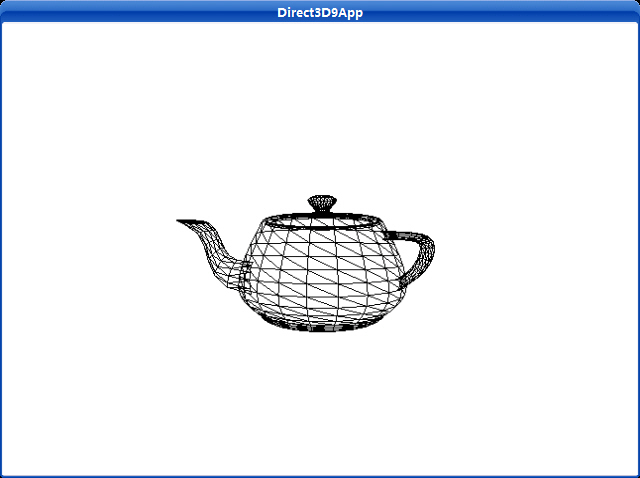
源程序:
/**************************************************************************************
Renders a teapot in wireframe mode. Shows how to create a teapot using the
D3DXCreateTeapot function and how to render the teapot using the ID3DXMesh::DrawSubset
method.
**************************************************************************************/
#include "d3dUtility.h"
#pragma warning(disable : 4100)
const int WIDTH = 640;
const int HEIGHT = 480;
IDirect3DDevice9* g_d3d_device = NULL;
// mesh interface that will store the teapot data and contains method to render the teapot data
ID3DXMesh* g_teapot_mesh = NULL;
////////////////////////////////////////////////////////////////////////////////////////////////////
bool setup()
{
// create the teapot geometry
D3DXCreateTeapot(g_d3d_device, &g_teapot_mesh, NULL);
// position and aim the camera
D3DXVECTOR3 position(0.0f, 0.0f, -3.0f);
D3DXVECTOR3 target(0.0f, 0.0f, 0.0f);
D3DXVECTOR3 up(0.0f, 1.0f, 0.0f);
D3DXMATRIX view_matrix;
D3DXMatrixLookAtLH(&view_matrix, &position, &target, &up);
g_d3d_device->SetTransform(D3DTS_VIEW, &view_matrix);
// set the projection matrix
D3DXMATRIX proj;
D3DXMatrixPerspectiveFovLH(&proj, D3DX_PI * 0.5f, (float)WIDTH/HEIGHT, 1.0f, 1000.0f);
g_d3d_device->SetTransform(D3DTS_PROJECTION, &proj);
// set wireframe mode render state
g_d3d_device->SetRenderState(D3DRS_FILLMODE, D3DFILL_WIREFRAME);
return true;
}
void cleanup()
{
safe_release<ID3DXMesh*>(g_teapot_mesh);
}
bool display(float time_delta)
{
// spin the teapot
D3DXMATRIX ry;
static float y = 0.0f;
D3DXMatrixRotationY(&ry, y);
// increment y-rotation angle each frame
y += time_delta;
// reset angle to zero when angle reaches 2*PI
if(y >= 6.28f)
y = 0.0f;
g_d3d_device->SetTransform(D3DTS_WORLD, &ry);
// draw the scene
g_d3d_device->Clear(0, NULL, D3DCLEAR_TARGET | D3DCLEAR_ZBUFFER, 0xffffffff, 1.0f, 0);
g_d3d_device->BeginScene();
// draw teapot using DrawSubset method with 0 as the argument
g_teapot_mesh->DrawSubset(0);
g_d3d_device->EndScene();
g_d3d_device->Present(NULL, NULL, NULL, NULL);
return true;
}
LRESULT CALLBACK wnd_proc(HWND hwnd, UINT msg, WPARAM word_param, LPARAM long_param)
{
switch(msg)
{
case WM_DESTROY:
PostQuitMessage(0);
break;
case WM_KEYDOWN:
if(word_param == VK_ESCAPE)
DestroyWindow(hwnd);
break;
}
return DefWindowProc(hwnd, msg, word_param, long_param);
}
int WINAPI WinMain(HINSTANCE inst, HINSTANCE, PSTR cmd_line, int cmd_show)
{
if(! init_d3d(inst, WIDTH, HEIGHT, true, D3DDEVTYPE_HAL, &g_d3d_device))
{
MessageBox(NULL, "init_d3d() - failed.", 0, MB_OK);
return 0;
}
if(! setup())
{
MessageBox(NULL, "Steup() - failed.", 0, MB_OK);
return 0;
}
enter_msg_loop(display);
cleanup();
g_d3d_device->Release();
return 0;
}
顶点和索引缓存有相似的接口并且共享相似的方法;因此我们把它们合在一起讲解。一个顶点缓存是一块连续的存储了顶点数据的内存。同样的,一个索引缓存是一块连续的存储了索引数据的内存。我们使用顶点和索引缓存保存我们的数据是因为它们能被放置在显存中。渲染显存中的数据要比渲染系统内存中的数据快的多。
在代码中,一个顶点缓存是通过IDirect3DVertexBuffer9接口来定义的。类似的,一个索引缓存是通过IDirect3DIndexBuffer9接口来定义。
我们能使用下面两个方法创建一个顶点缓存和索引缓存:
HRESULT IDirect3DDevice9::CreateVertexBuffer(
UINT Length,
DWORD Usage,
DWORD FVF,
D3DPOOL Pool
IDirect3DVertexBuffer9** ppVertexBuffer,
HANDLE* pSharedHandle
);
HRESULT IDirect3DDevice9::CreateIndexBuffer(
UINT Length,
DWORD Usage,
D3DFORMAT Format,
D3DPOOL Pool,
IDirect3DIndexBuffer9** ppIndexBuffer,
HANDLE* pSharedHandle
);
这两个方法大部分参数是相同的,因此我们一起介绍它们。
Length —— 分配给缓存的字节大小。假如想得到一个能存储8个顶点的顶点缓存,那么我们就要在顶点结构中设置这个参数为 8 * sizeof ( Vertex ) 。
Usage —— 指定关于怎样使用缓存的额外信息。这个值可以是0,没有标记,或者是下面标记的一个或多个的组合:
D3DUSAGE_DYNAMIC——设置这个参数可以使缓存是动态的。
D3DUSAGE_POINTS——这个参数指定缓存存储原始点。这个参数仅仅用在顶点缓冲中。
D3DUSAGE_SOFTWAREPROCESSING——使用软件顶点处理
D3DUSAGE_WRITEONLY——指定应用程序只能写缓存。它允许驱动程序分配最适合的内存地址作为写缓存。注意如果从创建好的这种缓存中读数据,将会返回错误信息。
FVF —— 存储在缓存中的顶点格式
Pool —— 缓存放置在哪一个内存池中
ppVertexBuffer ——返回创建好的顶点缓存的指针。
pSharedHandle ——没有使用;设置为0。
Format ——指定索引的大小;使用D3DFMT_INDEX16设置16位索引,使用D3DFMT_INDEX32设置32位索引。注意并非所有设备都支持32位索引;请检查设备能力。
ppIndexBuffer ——返回创建好的索引缓存的指针。
注意:不使用D3DUSAGE_DYNAMIC参数创建的缓存被叫做静态缓存。静态缓存通常被放置在显存中,在其中的数据能被很有效的处理。然而,对于静态缓存,从中读取和写入数据是很慢的,因为访问显存是很慢的。因为这个原因我们用静态缓存存储静态数据(不需要被经常改变的数据)。地形和建筑物是很好的候选例子,因为在应用程序中他们通常不需要被改变。静态缓存应该在应用程序初始化的时候就被填充好,而不是在运行时才做。
注意:使用D3DUSAGE_DYNAMIC参数创建的缓存被叫做动态缓存。动态缓存通常被放在AGP内存中,这种内存中的数据能被很快的更新。处理动态缓存中的数据不会比处理静态缓存中的数据快,因为这些数据必须在渲染前被转移到显存中,动态缓存的好处是它们能够被稍微快点地被更新(比CPU写快)。因此,假如你需要经常更新缓存中的数据,那么你就应该使用动态缓存。粒子系统是很好的一个应用,因为它们是动态的,并且他们通常每一帧都会被更新。
注意:在程序中读取显存和AGP内存都是非常慢的。因此,假如你在运行时需要读取你的几何物体,最好的方案是指定一块系统内存,往其中拷贝并且读取数据。
下边是创建一个静态顶点缓存的例子,该缓存能存储8个顶点。
IDirect3DVertexBuffer9* vb;
device->CreateVertexBuffer( 8 * sizeof( Vertex ), 0, D3DFVF_XYZ, D3DPOOL_MANAGED, &vb, 0);
为了访问一个顶点/索引缓存,我们需要得到一个指针。我们通过一个指针获得缓存数据必须使用Lock方法。当我们访问完缓存后必须对它解锁。一旦有一个指向内存的指针,我们就能对它进行读写。
HRESULT IDirect3DVertexBuffer9::Lock(
UINT OffsetToLock,
UINT SizeToLock,
BYTE** ppbData,
DWORD Flags
);
HRESULT IDirect3DIndexBuffer9::Lock(
UINT OffsetToLock,
UINT SizeToLock,
BYTE** ppbData,
DWORD Flags
);
这两个方法的参数都是完全相同的。
OffsetToLock —— 偏移量,以字节为单位,从缓存开始位置到锁定开始位置的距离。如图3.1。
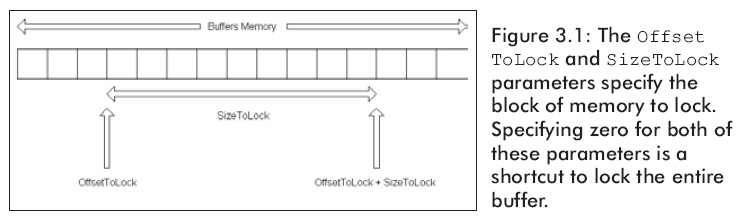
SizeToLock —— 锁定的字节数。
ppbData —— 一个指向锁定内存开始位置的指针。
Flags —— 标记描述怎样锁定内存。它可能是0或者是下面参数中的1个或多个的组合:
D3DLOCK_DISCARD——这个参数仅仅会在动态缓存时被使用。它指示硬件丢弃缓存并返回一个指向新分配的缓存的指针。这是很有用,因为当我们存取一个新分配的缓存时它允许硬件继续从丢弃的缓存渲染。这防止了硬件延迟。
D3DLOCK_NOOVERWRITE——这个参数仅仅会在动态缓存时被使用。它声明你将向缓存中添加数据。即你不能向已经渲染的内存中写数据。这是有好处的因为他允许你在添加新数据到缓存的同时让硬件继续渲染。
D3DLOCK_READONLY——这个参数声明你锁定的缓存只能从中读取数据而不能写数据。这允许一些内在的优化。
用参数D3DLOCK_DISCARD和D3DLOCK_NOOVERWRITE表明缓存的一部分被锁定之后能继续被使用。假如硬件配置允许这些标记被使用,则在对缓存进行锁定时,其他的显示操作就不会中断。
下边的例子展示了通常怎样使用Lock方法。注意当我们使用完以后要调用Unlock方法。
Vertex* vertices;
_vb->Lock(0, 0, (void**)&vertices, 0); // 锁定整个缓存
vertices[0] = Vertex(-1.0f, 0.0f, 2.0f); // 向缓存里写顶点
vertices[1] = Vertex( 0.0f, 1.0f, 2.0f);
vertices[2] = Vertex( 1.0f, 0.0f, 2.0f);
_vb->Unlock(); // 当你访问完缓存时,解锁缓存
有时我们需要得到顶点/索引缓存信息。下面的例子示范了用于获得这些信息的方法:
D3DVERTEXBUFFER_DESC vbDescription;
_vertexBuffer->GetDesc(&vbDescription); // 取得顶点缓存信息
D3DINDEXBUFFER_DESC ibDescription;
_indexBuffer->GetDesc(&ibDescription); //取得索引缓存信息
D3DVERTEXBUFFER_DESC和D3DINDEXBUFFER_DESC结构的定义如下:
Describes a vertex buffer.
typedef struct D3DVERTEXBUFFER_DESC {
    D3DFORMAT Format;
    D3DRESOURCETYPE Type;
    DWORD Usage;
    D3DPOOL Pool;
    UINT Size;
    DWORD FVF;
} D3DVERTEXBUFFER_DESC, *LPD3DVERTEXBUFFER_DESC;Defines resource types.
typedef enum D3DRESOURCETYPE
{
    D3DRTYPE_SURFACE = 1,
    D3DRTYPE_VOLUME = 2,
    D3DRTYPE_TEXTURE = 3,
    D3DRTYPE_VOLUMETEXTURE = 4,
    D3DRTYPE_CubeTexture = 5,
    D3DRTYPE_VERTEXBUFFER = 6,
    D3DRTYPE_INDEXBUFFER = 7,
    D3DRTYPE_FORCE_DWORD = 0x7fffffff,
} D3DRESOURCETYPE, *LPD3DRESOURCETYPE;
Describes an index buffer.
typedef struct D3DINDEXBUFFER_DESC {
    D3DFORMAT Format;
    D3DRESOURCETYPE Type;
    DWORD Usage;
    D3DPOOL Pool;
    UINT Size;
} D3DINDEXBUFFER_DESC, *LPD3DINDEXBUFFER_DESC;For more information about using dynamic index buffers, see Using Dynamic Vertex and Index Buffers.
Note that D3DUSAGE_DYNAMIC cannot be specified on managed index buffers. For more information, see Managing Resources (Direct3D 9).
点光源示例,截图:
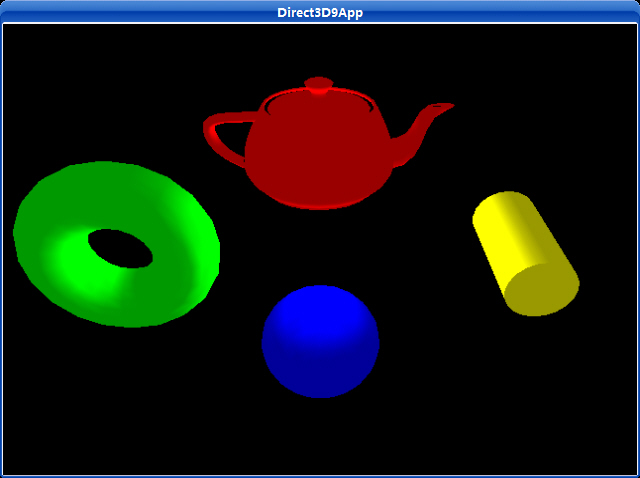
源代码:
/**************************************************************************************
Demonstrates using a point light with D3DX objects.
You can orbit the scene using the left and right arrow keys.
In addition you can elevate the camera with the up and down arrow keys.
**************************************************************************************/
#include "d3dUtility.h"
#pragma warning(disable : 4100)
#define MESH_TEAPOT 0
#define MESH_SPHERE 1
#define MESH_TORUS 2
#define MESH_CYLINDER 3
#define NUM_MESH 4
const int WIDTH = 640;
const int HEIGHT = 480;
IDirect3DDevice9* g_d3d_device = NULL;
ID3DXMesh* g_object_meshes[NUM_MESH];
D3DXMATRIX g_world_matrices[NUM_MESH];
D3DMATERIAL9 g_materials[NUM_MESH];
////////////////////////////////////////////////////////////////////////////////////////////////////
bool setup()
{
// create objects
D3DXCreateTeapot(g_d3d_device, &g_object_meshes[MESH_TEAPOT], NULL);
D3DXCreateSphere(g_d3d_device, 1.0f, 20, 20, &g_object_meshes[MESH_SPHERE], NULL);
D3DXCreateTorus(g_d3d_device, 0.5f, 1.0f, 20, 20, &g_object_meshes[MESH_TORUS], NULL);
D3DXCreateCylinder(g_d3d_device, 0.5f, 1.0f, 2.0f, 20, 20, &g_object_meshes[MESH_CYLINDER], NULL);
// build world matrices - position the objects in world space
D3DXMatrixTranslation(&g_world_matrices[MESH_TEAPOT], 0.0f, 2.0f, 0.0f);
D3DXMatrixTranslation(&g_world_matrices[MESH_SPHERE], 0.0f, -2.0f, 0.0f);
D3DXMatrixTranslation(&g_world_matrices[MESH_TORUS], -3.0f, 0.0f, 0.0f);
D3DXMatrixTranslation(&g_world_matrices[MESH_CYLINDER], 3.0f, 0.0f, 0.0f);
// setup the object's materials
g_materials[MESH_TEAPOT] = RED_MATERIAL;
g_materials[MESH_SPHERE] = BLUE_MATERIAL;
g_materials[MESH_TORUS] = GREEN_MATERIAL;
g_materials[MESH_CYLINDER] = YELLOW_MATERIAL;
// setup a directional light, note that the point light is positioned at the origin.
D3DXVECTOR3 light_direction(0.0f, 0.0f, 0.0f);
D3DXCOLOR color = WHITE;
D3DLIGHT9 point_light = init_point_light(&light_direction, &color);
// set and enable the light
g_d3d_device->SetLight(0, &point_light);
g_d3d_device->LightEnable(0, TRUE);
// turn off specular lighting and instruct Direct3D to renormalize normals
g_d3d_device->SetRenderState(D3DRS_NORMALIZENORMALS, TRUE);
g_d3d_device->SetRenderState(D3DRS_SPECULARENABLE, FALSE);
// set the projection matrix
D3DXMATRIX proj;
D3DXMatrixPerspectiveFovLH(&proj, D3DX_PI * 0.25f, (float)WIDTH/HEIGHT, 1.0f, 1000.0f);
g_d3d_device->SetTransform(D3DTS_PROJECTION, &proj);
return true;
}
void cleanup()
{
for(int i = 0; i < NUM_MESH; i++)
safe_release<ID3DXMesh*>(g_object_meshes[i]);
}
bool display(float time_delta)
{
// update the scene: update camera position
static float angle = (3.0f * D3DX_PI) / 2.0f;
static float height = 5.0f;
if(GetAsyncKeyState(VK_LEFT) & 0x8000f)
angle -= 0.5f * time_delta;
if(GetAsyncKeyState(VK_RIGHT) & 0x8000f)
angle += 0.5f * time_delta;
if(GetAsyncKeyState(VK_UP) & 0x8000f)
height += 5.0f * time_delta;
if(GetAsyncKeyState(VK_DOWN) & 0x8000f)
height -= 5.0f * time_delta;
D3DXVECTOR3 position(cosf(angle) * 7.0f, height, sinf(angle) * 7.0f);
D3DXVECTOR3 target(0.0f, 0.0f, 0.0f);
D3DXVECTOR3 up(0.0f, 1.0f, 0.0f);
D3DXMATRIX view_matrix;
D3DXMatrixLookAtLH(&view_matrix, &position, &target, &up);
g_d3d_device->SetTransform(D3DTS_VIEW, &view_matrix);
// draw the scene
g_d3d_device->Clear(0, NULL, D3DCLEAR_TARGET | D3DCLEAR_ZBUFFER, 0x00000000, 1.0f, 0);
g_d3d_device->BeginScene();
for(int i = 0; i < NUM_MESH; i++)
{
// set material and world matrix for ith object, then render the ith object.
g_d3d_device->SetMaterial(&g_materials[i]);
g_d3d_device->SetTransform(D3DTS_WORLD, &g_world_matrices[i]);
g_object_meshes[i]->DrawSubset(0);
}
g_d3d_device->EndScene();
g_d3d_device->Present(NULL, NULL, NULL, NULL);
return true;
}
LRESULT CALLBACK wnd_proc(HWND hwnd, UINT msg, WPARAM word_param, LPARAM long_param)
{
switch(msg)
{
case WM_DESTROY:
PostQuitMessage(0);
break;
case WM_KEYDOWN:
if(word_param == VK_ESCAPE)
DestroyWindow(hwnd);
break;
}
return DefWindowProc(hwnd, msg, word_param, long_param);
}
int WINAPI WinMain(HINSTANCE inst, HINSTANCE, PSTR cmd_line, int cmd_show)
{
if(! init_d3d(inst, WIDTH, HEIGHT, true, D3DDEVTYPE_HAL, &g_d3d_device))
{
MessageBox(NULL, "init_d3d() - failed.", 0, MB_OK);
return 0;
}
if(! setup())
{
MessageBox(NULL, "Steup() - failed.", 0, MB_OK);
return 0;
}
enter_msg_loop(display);
cleanup();
g_d3d_device->Release();
return 0;
}