Rise的自留地

记录生活中的点滴,分享编程技术和游戏开发经验。

0%

为了提高场景的真实性,我们可以为其加入灯光。灯光也能帮助表现物体的立体感以及物体的实体形状。当使用灯光时,我们不再自己指定顶点的颜色;Direct3D中每个顶点都通过灯光引擎来计算顶点颜色,该计算是基于定义的灯光资源,材质以及灯光资源关心的表面方向。通过灯光模型计算顶点颜色会得到更真实的场景。

5.1灯光的组成

       在Direct3D灯光模型中,灯光是通过灯光资源的三个成员之一来照射的,即有三种灯光。

环境光(Ambient Light)——这种类型的灯光将被其他所有表面反射且被用在照亮整个场景。例如,物体的各部分都被照亮,对于一个角度,甚至穿过不在光源直接照射的地方他们都能被照亮。环境光的使用是粗略的,便宜的,它模仿反射光。

漫反射(Diffuse Reflection)——这种灯光按照特殊方向传播。当它照射到一个表面,它将在所有方向上均匀的反射。因为漫射光在所有方向上都均匀的反射,被反射的光线将到达眼睛而与观察点无关,因此我们不必为观察者考虑。因而,漫射光仅仅需要考虑灯光方向和表面的朝向。这种灯光将成为你的资源中照射的普通灯光。

镜面反射(Specular Reflection)——这种灯光按照特殊方向传播。当它照射到一个表面时,它严格地按照一个方向反射。这将产生一个明亮的光泽,它能在某角度被看见。因为这种灯光在一个方向反射。明显的观察点,必须考虑灯光的方向和表面朝向,且必须按照镜面灯光等式来考虑。镜面灯光被用在物体上产生高光的地方,这种光泽只有在灯光照射在磨光的表面上才会产生。

镜面光比其他灯光类型要求更多的计算;因此,Direct3D提供了一个开关选择。实际上,它默认是被关闭的;要使用镜面光你必须设置D3DRS_SPECULARENABLE渲染状态。

Device->SetRenderState(D3DRS_SPECULARENABLE, true);

每一种灯光都是通过D3DCOLORVALUE结构或者描述灯光颜色的D3DXCOLOR来描绘的。这里有几个灯光颜色的例子:

D3DXCOLOR redAmbient(1.0f, 0.0f, 0.0f, 1.0f);

D3DXCOLOR blueDiffuse(0.0f, 0.0f, 1.0f, 1.0f);

D3DXCOLOR whiteSpecular(1.0f, 1.0f, 1.0f, 1.0f);

注意:在D3DXCOLOR类中的alpha值用在描述灯光颜色时是被忽略的。

5.2材质

在现实世界中我们看到的物体颜色将由物体反射回来的灯光颜色来决定。比如,一个红色的球是红色的,因为它吸收所有的灯光颜色除了红色光。红色光是被球反射回来进入我们眼睛的,因此我们看到的球是红色的。Direct3D通过我们定义的物体材质来模拟这些所有的现象。材质允许我们定义表面反射灯光的百分比。在代码中通过D3DMATERIAL9结构描述一个材质。

typedef struct _D3DMATERIAL9 {

       D3DCOLORVALUE Diffuse, Ambient, Specular, Emissive;

       float Power;

} D3DMATERIAL9;

Diffuse——指定此表面反射的漫射光数量。

Ambient——指定此表面反射的环境光数量。

Specular——指定此表面反射的镜面光数量

Emissive——这个是被用来给表面添加颜色,它使得物体看起来就象是它自己发出的光一样。

Power——指定锐利的镜面高光;它的值是高光的锐利值。

举例,想得到一个红色的球。我们将定义球的材质来只反射红光吸收其他颜色的所有光:

D3DMATERIAL9 red;

::ZeroMemory(&red, sizeof(red));

red.Diffuse = D3DXCOLOR(1.0f, 0.0f, 0.0f, 1.0f); // red

red.Ambient = D3DXCOLOR(1.0f, 0.0f, 0.0f, 1.0f); // red

red.Specular = D3DXCOLOR(1.0f, 0.0f, 0.0f, 1.0f); // red

red.Emissive = D3DXCOLOR(0.0f, 0.0f, 0.0f, 1.0f); // no emission

red.Power = 5.0f;

这里我们设置绿色和蓝色的值为0,这表明材质反射0%此颜色的光。我们设置红色为1,表示材质反射100%的红光。注意,我们能够控制每种灯光反射的颜色(环境、漫射和镜面光)。

同样假如我们定义一个只发出蓝色光的光源,对球的光照将失败因为蓝色光将被全部吸收而没有红光被反射。当物体吸收了所有光以后,物体看起来就为黑色。同样的,当物体反射100%的红、绿和蓝光,物体就将呈现为白色。

因为手工填充一个材质结构将是乏味的工作,我们添加下列有用的函数和全局材质常数到d3dUtility.h/cpp文件中:

// lights
D3DLIGHT9 init_directional_light(D3DXVECTOR3* direction, D3DXCOLOR* color);
D3DLIGHT9 init_point_light(D3DXVECTOR3* position, D3DXCOLOR* color);
D3DLIGHT9 init_spot_light(D3DXVECTOR3* position, D3DXVECTOR3* direction, D3DXCOLOR* color);
// materials
D3DMATERIAL9 init_material(D3DXCOLOR ambient, D3DXCOLOR diffuse, D3DXCOLOR specular,
                           D3DXCOLOR emissive, float power);
const D3DMATERIAL9 WHITE_MATERIAL  = init_material(WHITE,  WHITE,  WHITE,  BLACK, 2.0f);
const D3DMATERIAL9 RED_MATERIAL       = init_material(RED,       RED,       RED,    BLACK, 2.0f);
const D3DMATERIAL9 GREEN_MATERIAL  = init_material(GREEN,  GREEN,  GREEN,  BLACK, 2.0f);
const D3DMATERIAL9 BLUE_MATERIAL   = init_material(BLUE,   BLUE,   BLUE,   BLACK, 2.0f);
const D3DMATERIAL9 YELLOW_MATERIAL = init_material(YELLOW, YELLOW, YELLOW, BLACK, 2.0f);
D3DLIGHT9 init_directional_light(D3DXVECTOR3* direction, D3DXCOLOR* color)
{
    D3DLIGHT9 light;
    ZeroMemory(&light, sizeof(light));
    light.Type        = D3DLIGHT_DIRECTIONAL;
    light.Ambient    = *color * 0.6f;
    light.Diffuse    = *color;
    light.Specular    = *color * 0.6f;
    light.Direction = *direction;
return light;
}
D3DLIGHT9 init_point_light(D3DXVECTOR3* position, D3DXCOLOR* color)
{
    D3DLIGHT9 light;
    ZeroMemory(&light, sizeof(light));
    light.Type            = D3DLIGHT_POINT;
    light.Ambient        = *color * 0.6f;
    light.Diffuse        = *color;
    light.Specular        = *color * 0.6f;
    light.Position        = *position;
    light.Range            = 1000.0f;
    light.Falloff        = 1.0f;
    light.Attenuation0    = 1.0f;
    light.Attenuation1    = 0.0f;
    light.Attenuation2    = 0.0f;
return light;
}
D3DLIGHT9 init_spot_light(D3DXVECTOR3* position, D3DXVECTOR3* direction, D3DXCOLOR* color)
{
    D3DLIGHT9 light;
    ZeroMemory(&light, sizeof(light));
    light.Type            = D3DLIGHT_SPOT;
    light.Ambient        = *color * 0.6f;
    light.Diffuse        = *color;
    light.Specular        = *color * 0.6f;
    light.Position        = *position;
    light.Direction        = *direction;
    light.Range            = 1000.0f;
    light.Falloff        = 1.0f;
    light.Attenuation0    = 1.0f;
    light.Attenuation1    = 0.0f;
    light.Attenuation2    = 0.0f;
    light.Theta            = 0.4f;
    light.Phi            = 0.9f;
return light;
}
D3DMATERIAL9 init_material(D3DXCOLOR ambient, D3DXCOLOR diffuse, D3DXCOLOR specular,
                           D3DXCOLOR emissive, float power)
{
    D3DMATERIAL9 material;
    material.Ambient  = ambient;
    material.Diffuse  = diffuse;
    material.Specular = specular;
    material.Emissive = emissive;
    material.Power      = power;
return material;
}

顶点结构没有材质属性;一个通用的材质必须被设置。设置它我们使用IDirect3DDevice9::SetMaterial(CONST D3DMATERIAL9*pMaterial)方法。

假设我们想渲染几个不同材质的物体;我们将按照如下的写法去做:

D3DMATERIAL9 blueMaterial, redMaterial;

// set up material structures

Device->SetMaterial(&blueMaterial);

drawSphere(); // blue sphere

Device->SetMaterial(&redMaterial);

drawSphere(); // red sphere

5.3顶点法线

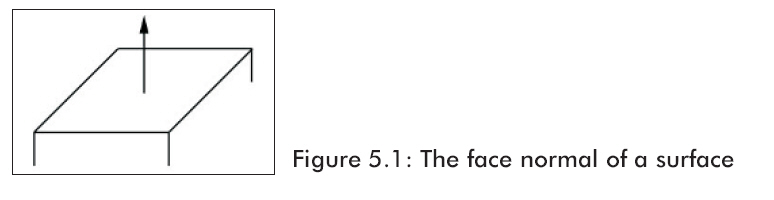
       面法线(face normal)是描述多边形表面方向的一个向量(如图5.1)。

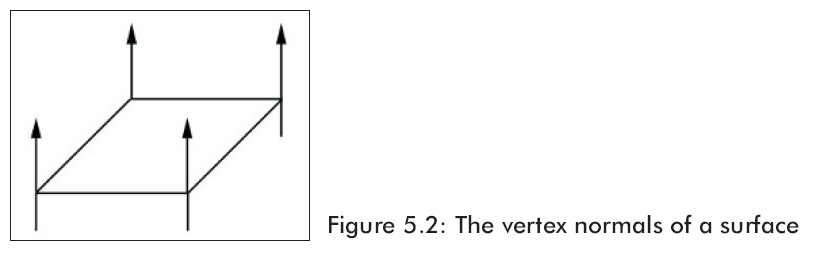
顶点法线(Vertex normals)也是基于同样的概念,但是我们与其指定每个多边形的法线,还不如为每个顶点指定(如图5.2)。

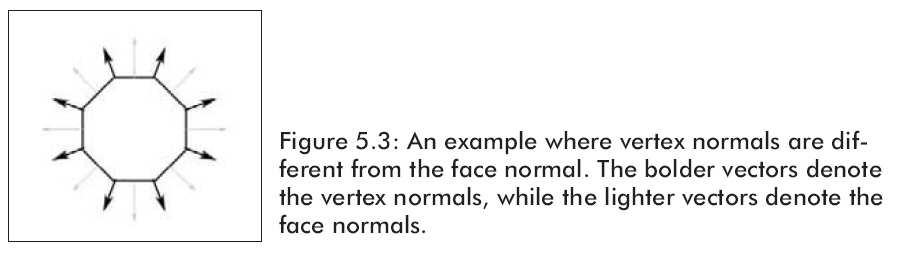
Direct3D需要知道顶点法线以便它能够确定灯光照射到物体表面的角度,并且一旦计算了每个顶点的灯光,Direct3D需要知道每个顶点的表面方向。注意顶点法线不一定和面法线相同。球体/环形物就是很好的实物例子,它们的顶点法线和三角形法线是不相同的(如图5.3)。

为了描述顶点的顶点法线,我们必须更新原来的顶点结构::

class cLightVertex
{
public:
float m_x, m_y, m_z;
float m_nx, m_ny, m_nz;
    cLightVertex() {}
    cLightVertex(float x, float y, float z, float nx, float ny, float nz)
    {
        m_x  = x;    m_y  = y;    m_z  = z;
        m_nx = nx;    m_ny = ny;    m_nz = nz;
    }
};
const DWORD LIGHT_VERTEX_FVF = D3DFVF_XYZ | D3DFVF_NORMAL;

作为一个简单的物体比如立方体和球体,我们能够通过观察看见顶点法线。对于更多复杂的网格,我们需要一个更多的机械方法。假设一个由p0,p1,p2构成的三角形,我们需要计算每个顶点的法线n0,n1,n2。

简单的步骤,我们列举它是为了找到由三个点构成的三角形的面法线,同时使用面法线作为顶点法线。首先计算三角形上的两个向量:

  • p1p0 = u

5.4光源

Direct3D支持三种类型的光源。

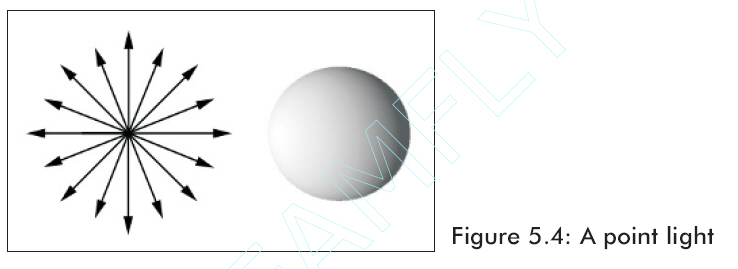
点光源——这种光源在世界坐标中有一个位置且向所有方向上都照射光线。

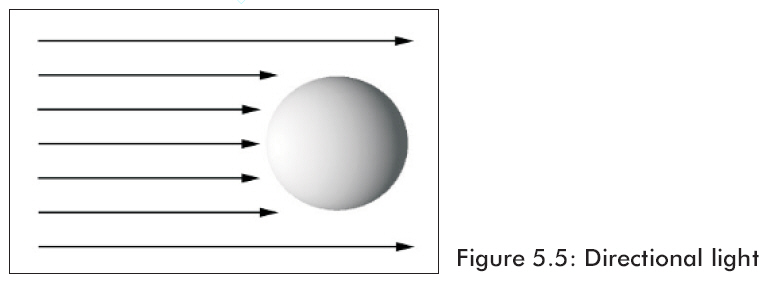
方向光源——这种光源没有位置但是向指定方向发出平行光线。

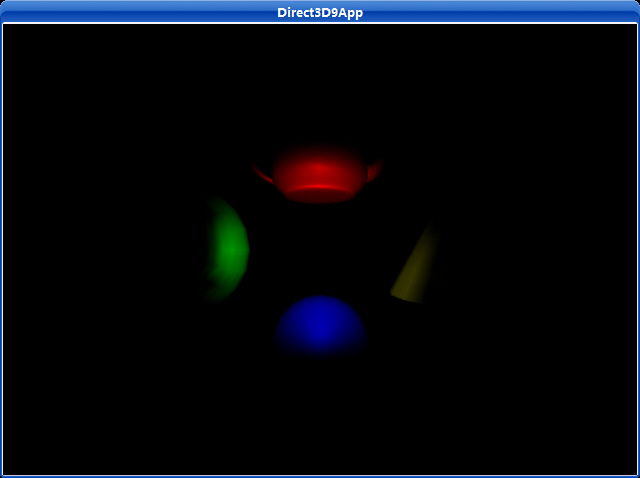
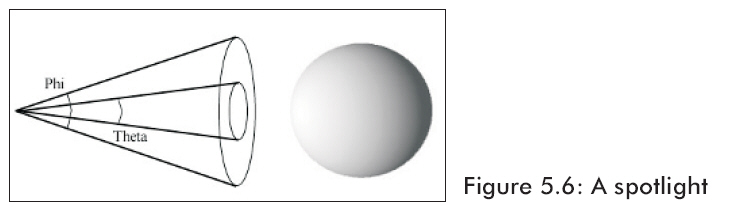
聚光灯——这种类型的光源和手电筒的光类似;它有位置并且发出的光在指定方向上按照圆锥形照射。这个圆锥形有两个角度,θ和φ。角度θ描述内圆锥,φ描述外圆锥。

在代码中一个灯光资源是通过D3DLIGHT9结构来表现的。

typedef struct _D3DLIGHT9 {
       D3DLIGHTTYPE Type;
       D3DCOLORVALUE Diffuse;
       D3DCOLORVALUE Specular;
       D3DCOLORVALUE Ambient;
       D3DVECTOR Position;
       D3DVECTOR Direction;
float Range;
float Falloff;
float Attenuation0;
float Attenuation1;
float Attenuation2;
float Theta;
float Phi;
} D3DLIGHT9;

Type——定义灯光类型,我们能够使用下面三种类型之一:D3DLIGHT_POINT, D3DLIGHT_SPOT, D3DLIGHT_DIRECTIONAL

Diffuse——此光源发出的漫射光颜色。

Specular——此光源发出的镜面光颜色。

Ambient——此光源发出的环境光颜色。

Position——用一个向量来描述的光源世界坐标位置。这个值对于灯光的方向是无意义的。

Direction——用一个向量来描述的光源世界坐标照射方向。这个值不能用在点光源上。

Range——灯光能够传播的最大范围。这个值不能比大。且不能用于方向光源。

Attenuation0, Attenuation1, Attenuation2——这些衰减变量被用来定义灯光强度的传播距离衰减。它们只被用于点光源和聚光灯上。Attenuation0定义恒定衰减,Attenuation1定义线性衰减,Attenuation2定义二次衰减。适当的使用这个公式,D是代表到光源的距离,A0,A1,A2与Attenuation0,1,2相匹配。

                                         attenuation = 1/(A0 + A1D + A2D2)

Theta——只用于聚光灯;指定内圆锥的角度,单位是弧度。

Phi——只用于聚光灯;指定外圆锥的角度,单位是弧度。

现在只是演示怎样使用InitDirectionalLight。其他的也很类似:

创建一个方向光源,它沿着x轴正方向照射白色灯光。我们按照下面的方法来做:

D3DXVECTOR3 dir(1.0f, 0.0f, 0.0f);

D3DXCOLOR c = d3d::WHITE;

D3DLIGHT9 dirLight = d3d::InitDirectionalLight(&dir, &c);

在把D3DLIGHT9初始化好以后,我们需要用Direct3D内在支持的灯光来注册。就象这样做:

Device->SetLight(

       0, // element in the light list to set, range is 0-maxlights

       &light);// address of the D3DLIGHT9 structure to set

一旦灯光注册了,我们就能使用下面的列举的例子来开或关灯光了:

Device->LightEnable(

       0, // the element in the light list to enable/disable

       true); // true = enable, false = disable

5.5实例程序:灯光

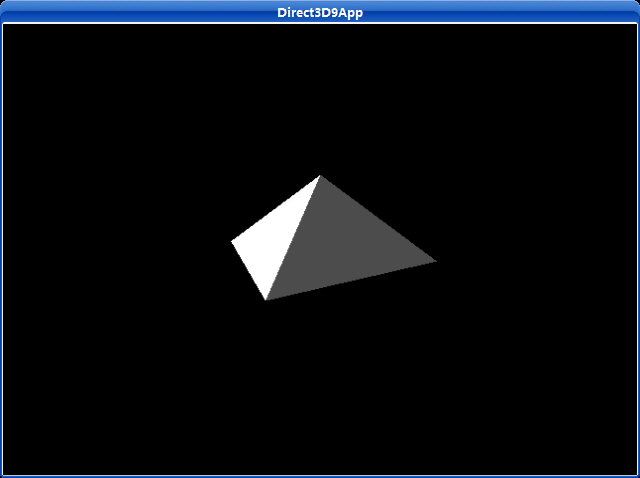
       这一章的例子是创建如图5.7所显示的场景。它示范了怎样指定顶点法线,怎样创建材质,以及怎样创建和使用一个方向灯光。注意在这个示例程序中我们不会使用在文件d3dUtility.h/cpp中的材质和灯光函数。因为我们想展示怎样手动来做这些设置。

图5.7

给场景增加灯光的步骤是:

1、允许使用灯光。

2、为每个物体创建材质并且在渲染相应物体前应将材质附予物体。

3、创建一个或多个光源,设置它们,把它们设为可用。

4、将其他附加光源设为可用,比如镜面高光。

/**************************************************************************************
  Renders a light pyramid.  Demonstrates how to specify the vertex normals, how to create
  and set a material, and how to create and set a directional light.
**************************************************************************************/
#include "d3dUtility.h"
#pragma warning(disable : 4100)
class cLightVertex
{
public:
float m_x, m_y, m_z;
float m_nx, m_ny, m_nz;
    cLightVertex() {}
    cLightVertex(float x, float y, float z, float nx, float ny, float nz)
    {
        m_x  = x;    m_y  = y;    m_z  = z;
        m_nx = nx;    m_ny = ny;    m_nz = nz;
    }
};
const DWORD LIGHT_VERTEX_FVF = D3DFVF_XYZ | D3DFVF_NORMAL;
////////////////////////////////////////////////////////////////////////////////////////////////////
const int WIDTH  = 640;
const int HEIGHT = 480;
IDirect3DDevice9*        g_d3d_device  = NULL;
IDirect3DVertexBuffer9*    g_pyramid_vb = NULL;
////////////////////////////////////////////////////////////////////////////////////////////////////
bool setup()
{   
// turn on lighting
    g_d3d_device->SetRenderState(D3DRS_LIGHTING, TRUE);
    g_d3d_device->CreateVertexBuffer(12 * sizeof(cLightVertex), D3DUSAGE_WRITEONLY, LIGHT_VERTEX_FVF,
                                     D3DPOOL_MANAGED, &g_pyramid_vb, NULL);
// fill the buffers with the triangle data
    cLightVertex* vertices;
    g_pyramid_vb->Lock(0, 0, (void**)&vertices, 0);
// front face
    vertices[0] = cLightVertex(-1.0f, 0.0f, -1.0f, 0.0f, 0.707f, -0.707f);
    vertices[1] = cLightVertex( 0.0f, 1.0f,  0.0f, 0.0f, 0.707f, -0.707f);
    vertices[2] = cLightVertex( 1.0f, 0.0f, -1.0f, 0.0f, 0.707f, -0.707f);
// left face
    vertices[3] = cLightVertex(-1.0f, 0.0f,  1.0f, -0.707f, 0.707f, 0.0f);
    vertices[4] = cLightVertex( 0.0f, 1.0f,  0.0f, -0.707f, 0.707f, 0.0f);
    vertices[5] = cLightVertex(-1.0f, 0.0f, -1.0f, -0.707f, 0.707f, 0.0f);
// right face
    vertices[6] = cLightVertex( 1.0f, 0.0f, -1.0f, 0.707f, 0.707f, 0.0f);
    vertices[7] = cLightVertex( 0.0f, 1.0f,  0.0f, 0.707f, 0.707f, 0.0f);
    vertices[8] = cLightVertex( 1.0f, 0.0f,  1.0f, 0.707f, 0.707f, 0.0f);
// back face
    vertices[9]  = cLightVertex( 1.0f, 0.0f,  1.0f, 0.0f, 0.707f, 0.707f);
    vertices[10] = cLightVertex( 0.0f, 1.0f,  0.0f, 0.0f, 0.707f, 0.707f);
    vertices[11] = cLightVertex(-1.0f, 0.0f,  1.0f, 0.0f, 0.707f, 0.707f);
    g_pyramid_vb->Unlock();
// create and set the material
    D3DMATERIAL9 material;
    material.Ambient  = WHITE;
    material.Diffuse  = WHITE;
    material.Specular = WHITE;
    material.Emissive = BLACK;
    material.Power      = 5.0f;
    g_d3d_device->SetMaterial(&material);
// setup a directional light
    D3DLIGHT9 dir_light;
    ZeroMemory(&dir_light, sizeof(dir_light));
    dir_light.Type        = D3DLIGHT_DIRECTIONAL;
    dir_light.Diffuse    = WHITE;
    dir_light.Specular  = WHITE * 0.3f;
    dir_light.Ambient   = WHITE * 0.3f;
    dir_light.Direction = D3DXVECTOR3(1.0f, 0.0f, 0.0f);
// set and enable the light
    g_d3d_device->SetLight(0, &dir_light);
    g_d3d_device->LightEnable(0, TRUE);
// turn on specular lighting and instruct Direct3D to renormalize normals
    g_d3d_device->SetRenderState(D3DRS_NORMALIZENORMALS, TRUE);
    g_d3d_device->SetRenderState(D3DRS_SPECULARENABLE, TRUE);
// position and aim the camera
    D3DXMATRIX view_matrix;
    D3DXVECTOR3 pos(0.0f, 1.0f, -3.0f);
    D3DXVECTOR3 target(0.0f, 0.0f, 0.0f);
    D3DXVECTOR3 up(0.0f, 1.0f, 0.0f);
    D3DXMatrixLookAtLH(&view_matrix, &pos, &target, &up);
    g_d3d_device->SetTransform(D3DTS_VIEW, &view_matrix);
// set the projection matrix
    D3DXMATRIX proj;
    D3DXMatrixPerspectiveFovLH(&proj, D3DX_PI * 0.5f, (float)WIDTH/HEIGHT, 1.0f, 1000.0f);
    g_d3d_device->SetTransform(D3DTS_PROJECTION, &proj);
return true;
}
void cleanup()
{
    safe_release<IDirect3DVertexBuffer9*>(g_pyramid_vb);
}
bool display(float time_delta)
{
// update the scene: rotate the pyramid
    D3DXMATRIX y_rot;
static float y = 0.0f;
    D3DXMatrixRotationY(&y_rot, y);
    y += time_delta;
if(y >= 6.28f)
        y = 0.0f;
    g_d3d_device->SetTransform(D3DTS_WORLD, &y_rot);
// draw the scene
    g_d3d_device->Clear(0, NULL, D3DCLEAR_TARGET | D3DCLEAR_ZBUFFER, 0x00000000, 1.0f, 0);
    g_d3d_device->BeginScene();
    g_d3d_device->SetStreamSource(0, g_pyramid_vb, 0, sizeof(cLightVertex));
    g_d3d_device->SetFVF(LIGHT_VERTEX_FVF);
    g_d3d_device->DrawPrimitive(D3DPT_TRIANGLELIST, 0, 4);
    g_d3d_device->EndScene();
    g_d3d_device->Present(NULL, NULL, NULL, NULL);
return true;
}
LRESULT CALLBACK wnd_proc(HWND hwnd, UINT msg, WPARAM word_param, LPARAM long_param)
{
switch(msg)
    {
case WM_DESTROY:
        PostQuitMessage(0);
break;
case WM_KEYDOWN:
if(word_param == VK_ESCAPE)
            DestroyWindow(hwnd);
break;
    }
return DefWindowProc(hwnd, msg, word_param, long_param);
}
int WINAPI WinMain(HINSTANCE inst, HINSTANCE, PSTR cmd_line, int cmd_show)
{
if(! init_d3d(inst, WIDTH, HEIGHT, true, D3DDEVTYPE_HAL, &g_d3d_device))
    {
        MessageBox(NULL, "init_d3d() - failed.", 0, MB_OK);
return 0;
    }
if(! setup())
    {
        MessageBox(NULL, "Steup() - failed.", 0, MB_OK);
return 0;
    }
    enter_msg_loop(display);
    cleanup();
    g_d3d_device->Release();
return 0;
}
Setup函数给场景加入灯光。首先允许使用灯光,当然这不是必须的因为默认设置就是允许使用灯光的。

下一步,我们创建顶点缓存,锁定,并且把“金字塔”的三角形顶点放入其中。顶点法线是利用5.3节中的运算法则预先计算好的。注意三角形共享顶点,但它们的法线不能共享;因此对这个物体使用索引列表并不是最有利的。例如,所有三角形都共享顶点(0,1,0);然而,对每个三角形,它们的顶点法线是不相同的。

为物体产生了顶点数据以后,我们描述利用灯光表现各自材质的物体间是怎样相互影响的。在这个例子中,“金字塔”反射出白光,自身不发光,且会产生一些高光。

接着,我们创建一个方向光并将其设为可用。方向光是沿着x轴的正方向照射的。灯光照射最强的白色漫射光(dir.Diffuse = WHITE),较弱的白色镜面光(dir.Specular = WHITE * 0.3f)以及一个中等强度的白色环境光(dir.Ambient = WHITE *0.6f)。

最后,我们设置状态使法线重新单位化且把镜面高光设置为可用。

下载源程序

平行光示例:

The GetAsyncKeyState function determines whether a key is up or down at the time the function is called, and whether the key was pressed after a previous call to GetAsyncKeyState.

Syntax

SHORT GetAsyncKeyState(      
    int vKey
);

Parameters

vKey
[in] Specifies one of 256 possible virtual-key codes. For more information, see Virtual-Key Codes.

Return Value

If the function succeeds, the return value specifies whether the key was pressed since the last call to GetAsyncKeyState, and whether the key is currently up or down. If the most significant bit is set, the key is down, and if the least significant bit is set, the key was pressed after the previous call to GetAsyncKeyState. However, you should not rely on this last behavior; for more information, see the Remarks.

6.4 Mipmaps

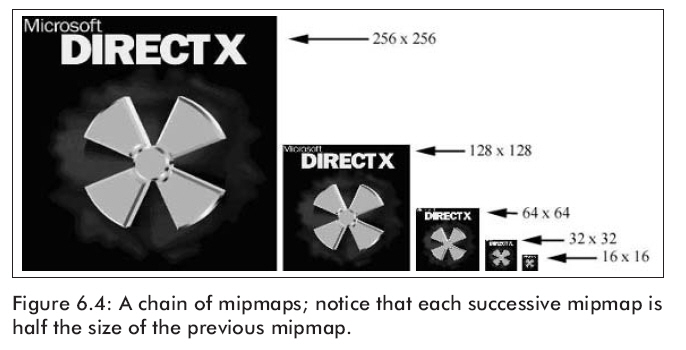
就象6.3节所说的,在屏幕上的三角形和纹理三角形通常是不一样大的。为了使这个大小差异变小,我们为纹理创建mipmaps链。也就是说将一个纹理创建成连续的变小的纹理,但是对它们等级进行定制过滤,因此对我们来说保存细节是很重要的(如图6.4)。

6.4.1 Mipmaps过滤器

       mipmap过滤器是被用来控制Direct3D使用mipmaps的。设置mipmap过滤器,你可以这样写:

Device->SetSamplerState(0, D3DSAMP_MIPFILTER, Filter);

在Filter处你能用下面三个选项中的一个:

D3DTEXF_NONE——不使用mipmap。

D3DTEXF_POINT——通过使用这个过滤器,Direct3D将选择与屏幕三角形大小最接近的mipmap等级。一旦等级选定了,Direct3D就将按照指定的过滤器进行缩小和放大过滤。

D3DTEXF_LINEAR­­——通过使用这个过滤器,Direct3D将选择两个最接近的mipmap等级,缩小和放大过滤每个等级,然后线性联合计算它们两个等级来得到最终的颜色值。

6.5 寻址模式

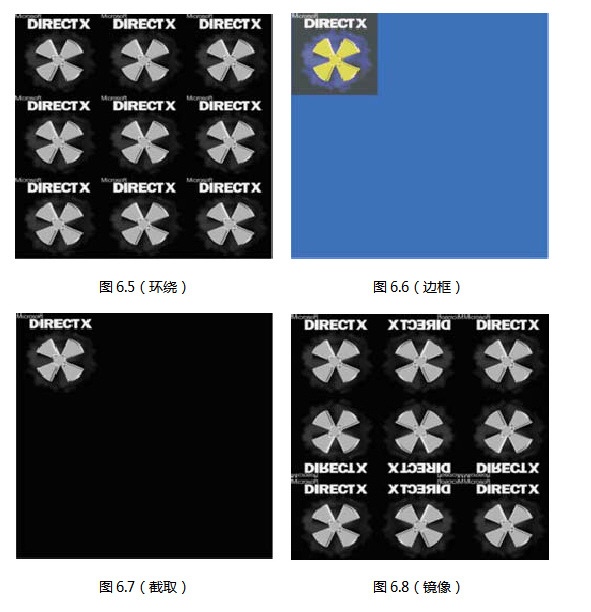
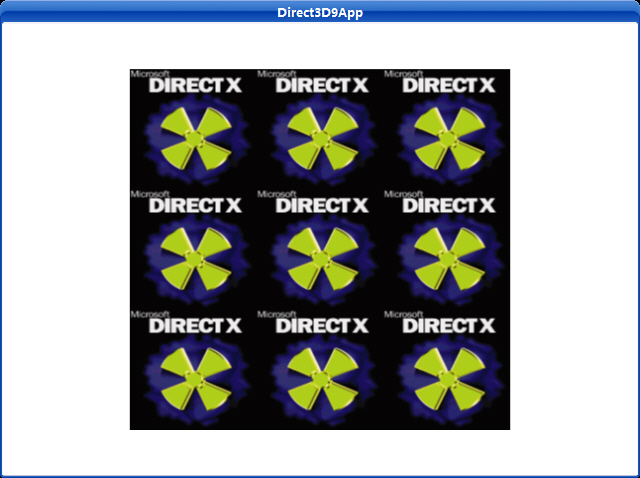
       以前,我们规定纹理坐标必须指定在[0,1]之间。从技术上来说这是不正确的;他们能够超出这个范围。纹理坐标也可以在[0,1]的范围之外,它通过Direct3D的寻址模式来定义。这里有四种寻址模式:环绕纹理寻址模式、边框颜色纹理寻址模式、截取纹理寻址模式、镜像纹理寻址模式,这里分别给出了它们的示意图6.5,6.6,6.7,6.8。

在这些图片中,纹理坐标通过(0,0)(0,3)(3,0)(3,3)顶点来定义。在u轴和v轴上方块又被分成子块放进3×3的矩阵中。假如,你想让纹理按5×5的方格来平铺,你就应该指定环绕纹理寻址模式并且纹理坐标应该设置为(0,0)(0,5)(5,0)(5,5)。

Sampler states define texture sampling operations such as texture addressing and texture filtering. Some sampler states set-up vertex processing, and some set-up pixel processing. Sampler states can be saved and restored using stateblocks (see State Blocks Save and Restore State (Direct3D 9)).

typedef enum D3DSAMPLERSTATETYPE
{
D3DSAMP_ADDRESSU = 1,
D3DSAMP_ADDRESSV = 2,
D3DSAMP_ADDRESSW = 3,
D3DSAMP_BORDERCOLOR = 4,
D3DSAMP_MAGFILTER = 5,
D3DSAMP_MINFILTER = 6,
D3DSAMP_MIPFILTER = 7,
D3DSAMP_MIPMAPLODBIAS = 8,
D3DSAMP_MAXMIPLEVEL = 9,
D3DSAMP_MAXANISOTROPY = 10,
D3DSAMP_SRGBTEXTURE = 11,
D3DSAMP_ELEMENTINDEX = 12,
D3DSAMP_DMAPOFFSET = 13,
D3DSAMP_FORCE_DWORD = 0x7fffffff,
} D3DSAMPLERSTATETYPE, *LPD3DSAMPLERSTATETYPE;
Constants
D3DSAMP_ADDRESSU
Texture-address mode for the u coordinate. The default is D3DTADDRESS_WRAP. For more information, see D3DTEXTUREADDRESS.
D3DSAMP_ADDRESSV
Texture-address mode for the v coordinate. The default is D3DTADDRESS_WRAP. For more information, see D3DTEXTUREADDRESS.
D3DSAMP_ADDRESSW
Texture-address mode for the w coordinate. The default is D3DTADDRESS_WRAP. For more information, see D3DTEXTUREADDRESS.
D3DSAMP_BORDERCOLOR
Border color or type D3DCOLOR. The default color is 0x00000000.
D3DSAMP_MAGFILTER
Magnification filter of type D3DTEXTUREFILTERTYPE. The default value is D3DTEXF_POINT.
D3DSAMP_MINFILTER
Minification filter of type D3DTEXTUREFILTERTYPE. The default value is D3DTEXF_POINT.
D3DSAMP_MIPFILTER
Mipmap filter to use during minification. See D3DTEXTUREFILTERTYPE. The default value is D3DTEXF_NONE.
D3DSAMP_MIPMAPLODBIAS
Mipmap level-of-detail bias. The default value is zero.
D3DSAMP_MAXMIPLEVEL
level-of-detail index of largest map to use. Values range from 0 to (n - 1) where 0 is the largest. The default value is zero.
D3DSAMP_MAXANISOTROPY
DWORD maximum anisotropy. The default value is 1.
D3DSAMP_SRGBTEXTURE
Gamma correction value. The default value is 0, which means gamma is 1.0 and no correction is required. Otherwise, this value means that the sampler should assume gamma of 2.2 on the content and convert it to linear (gamma 1.0) before presenting it to the pixel shader.
D3DSAMP_ELEMENTINDEX
When a multielement texture is assigned to the sampler, this indicates which element index to use. The default value is 0.
D3DSAMP_DMAPOFFSET
Vertex offset in the presampled displacement map. This is a constant used by the tessellator, its default value is 0.
D3DSAMP_FORCE_DWORD
Forces this enumeration to compile to 32 bits in size. Without this value, some compilers would allow this enumeration to compile to a size other than 32 bits. This value is not used.

       下面的代码片段列举的是怎样设置这四种寻址模式:

// set wrap address mode
if( ::GetAsyncKeyState('W') & 0x8000f )
{
       Device->SetSamplerState(0, D3DSAMP_ADDRESSU, D3DTADDRESS_WRAP);
       Device->SetSamplerState(0, D3DSAMP_ADDRESSV, D3DTADDRESS_WRAP);
}
// set border color address mode
if( ::GetAsyncKeyState('B') & 0x8000f )
{
       Device->SetSamplerState(0, D3DSAMP_ADDRESSU, D3DTADDRESS_BORDER);
       Device->SetSamplerState(0, D3DSAMP_ADDRESSV, D3DTADDRESS_BORDER);
       Device->SetSamplerState(0, D3DSAMP_BORDERCOLOR, 0x000000ff);
}
// set clamp address mode
if( ::GetAsyncKeyState('C') & 0x8000f )
{
       Device->SetSamplerState(0, D3DSAMP_ADDRESSU, D3DTADDRESS_CLAMP);
       Device->SetSamplerState(0, D3DSAMP_ADDRESSV, D3DTADDRESS_CLAMP);
}
// set mirror address mode
if( ::GetAsyncKeyState('M') & 0x8000f )
{
       Device->SetSamplerState(0, D3DSAMP_ADDRESSU, D3DTADDRESS_MIRROR);
       Device->SetSamplerState(0, D3DSAMP_ADDRESSV, D3DTADDRESS_MIRROR);
}

6.6实例程序:有纹理的方块

       这个例子演示怎样为方块加上纹理以及设置一个纹理过滤器(如图6.9)。假如你的显卡支持,通过D3DXCreateTextureFromFile函数一个mipmap链将被自动创建。

   图6.9

为一个场景增加纹理的必要步骤是:

1. 构造物体的顶点并指定纹理坐标。

2. 用D3DXCreateTextureFromFile函数读取一个纹理到IDirect3DTexture9接口中。

3. 设置缩小倍数,放大倍数以及mipmap过滤器。

4. 在你绘制一个物体前,用IDirect3DDevice9::SetTexture设置与物体关联的纹理。

源程序:

/**************************************************************************************
  Renders a textured quad.  Demonstrates creating a texture, setting texture filters,
  enabling a texture, and texture coordinates.  
**************************************************************************************/
#include "d3dUtility.h"
#pragma warning(disable : 4100)
const int WIDTH  = 640;
const int HEIGHT = 480;
IDirect3DDevice9*        g_d3d_device;
IDirect3DVertexBuffer9* g_quad_vb;
IDirect3DTexture9*        g_d3d_texture;
class cTextureVertex
{
public:
float m_x,  m_y,  m_z;
float m_nx, m_ny, m_nz;
float m_u, m_v; // texture coordinates   
    cTextureVertex() { }
    cTextureVertex(float x,  float y,  float z,
float nx, float ny, float nz,
float u,  float v)
    {
        m_x  = x;  m_y  = y;  m_z  = z;
        m_nx = nx; m_ny = ny; m_nz = nz;
        m_u  = u;  m_v  = v;
    }   
};
const DWORD TEXTURE_VERTEX_FVF = D3DFVF_XYZ | D3DFVF_NORMAL | D3DFVF_TEX1;
////////////////////////////////////////////////////////////////////////////////////////////////////
bool setup()
{   
// create the quad vertex buffer and fill it with the quad geometry
    g_d3d_device->CreateVertexBuffer(6 * sizeof(cTextureVertex), D3DUSAGE_WRITEONLY, TEXTURE_VERTEX_FVF,
                                     D3DPOOL_MANAGED, &g_quad_vb, NULL);
    cTextureVertex* vertices;
    g_quad_vb->Lock(0, 0, (void**)&vertices, 0);
// quad built from two triangles, note texture coordinate.
    vertices[0] = cTextureVertex(-1.0f, -1.0f, 1.25f, 0.0f, 0.0f, -1.0f, 0.0f, 1.0f);
    vertices[1] = cTextureVertex(-1.0f,  1.0f, 1.25f, 0.0f, 0.0f, -1.0f, 0.0f, 0.0f);
    vertices[2] = cTextureVertex( 1.0f,  1.0f, 1.25f, 0.0f, 0.0f, -1.0f, 1.0f, 0.0f);
    vertices[3] = cTextureVertex(-1.0f, -1.0f, 1.25f, 0.0f, 0.0f, -1.0f, 0.0f, 1.0f);
    vertices[4] = cTextureVertex( 1.0f,  1.0f, 1.25f, 0.0f, 0.0f, -1.0f, 1.0f, 0.0f);
    vertices[5] = cTextureVertex( 1.0f, -1.0f, 1.25f, 0.0f, 0.0f, -1.0f, 1.0f, 1.0f);
    g_quad_vb->Unlock();
// create the texture and set filters
    D3DXCreateTextureFromFile(g_d3d_device, "dx5_logo.bmp", &g_d3d_texture);
    g_d3d_device->SetTexture(0, g_d3d_texture);
    g_d3d_device->SetSamplerState(0, D3DSAMP_MAGFILTER, D3DTEXF_LINEAR);
    g_d3d_device->SetSamplerState(0, D3DSAMP_MINFILTER, D3DTEXF_LINEAR);
    g_d3d_device->SetSamplerState(0, D3DSAMP_MIPFILTER, D3DTEXF_POINT);
// don't use lighting for this sample
    g_d3d_device->SetRenderState(D3DRS_LIGHTING, FALSE);
// set the projection matrix
    D3DXMATRIX proj;
    D3DXMatrixPerspectiveFovLH(&proj, D3DX_PI * 0.5f, (float)WIDTH/HEIGHT, 1.0f, 1000.0f);
    g_d3d_device->SetTransform(D3DTS_PROJECTION, &proj);
return true;
}
void cleanup()
{   
    safe_release<IDirect3DVertexBuffer9*>(g_quad_vb);
    safe_release<IDirect3DTexture9*>(g_d3d_texture);
}
bool display(float time_delta)
{
    g_d3d_device->Clear(0, NULL, D3DCLEAR_TARGET | D3DCLEAR_ZBUFFER, 0xffffffff, 1.0f, 0);
    g_d3d_device->BeginScene();
    g_d3d_device->SetStreamSource(0, g_quad_vb, 0, sizeof(cTextureVertex));
    g_d3d_device->SetFVF(TEXTURE_VERTEX_FVF);
    g_d3d_device->DrawPrimitive(D3DPT_TRIANGLELIST, 0, 2);
    g_d3d_device->EndScene();
    g_d3d_device->Present(NULL, NULL, NULL, NULL);
return true;
}
LRESULT CALLBACK wnd_proc(HWND hwnd, UINT msg, WPARAM word_param, LPARAM long_param)
{
switch(msg)
    {
case WM_DESTROY:
        PostQuitMessage(0);
break;
case WM_KEYDOWN:
if(word_param == VK_ESCAPE)
            DestroyWindow(hwnd);
break;
    }
return DefWindowProc(hwnd, msg, word_param, long_param);
}
int WINAPI WinMain(HINSTANCE inst, HINSTANCE, PSTR cmd_line, int cmd_show)
{
if(! init_d3d(inst, WIDTH, HEIGHT, true, D3DDEVTYPE_HAL, &g_d3d_device))
    {
        MessageBox(NULL, "init_d3d() - failed.", 0, MB_OK);
return 0;
    }
if(! setup())
    {
        MessageBox(NULL, "Steup() - failed.", 0, MB_OK);
return 0;
    }
    enter_msg_loop(display);
    cleanup();
    g_d3d_device->Release();
return 0;
}
setup程序是很容易读懂的;我们用已经定义了纹理坐标的两个三角形创建一个方块。然后把文件dx5_logo.bmp读进IDirect3DTexture9接口中。接着使用SetTexture方法赋予纹理,最后设置缩小和放大过滤器进行线性过滤,我们也可以设置mipmap过滤器来进行D3DTEXF_POINT。

下载源程序

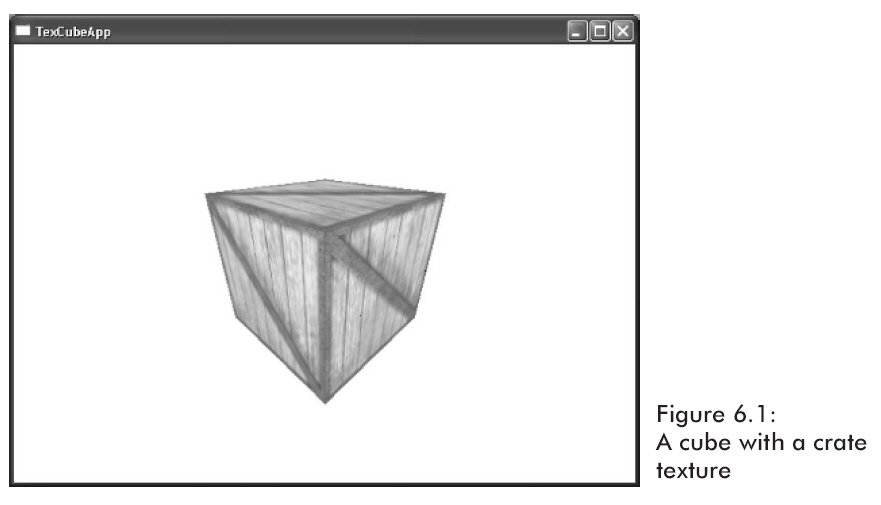
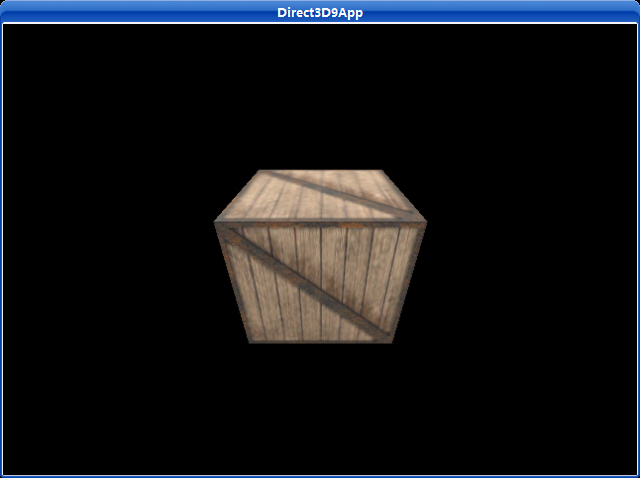
纹理映射是一种允许我们为三角形赋予图象数据的技术;这让我们能够更细腻更真实地表现我们的场景。例如,我们能够创建一个立方体并且通过对它的每个面创建一个纹理来把它变成一个木箱(如图6.1)。

在Direct3D中一个纹理是通过IDirect3DTexture9接口来表现的。一个纹理是一个类似像素矩阵的表面它能够被映射到三角形上。

6.1 纹理坐标

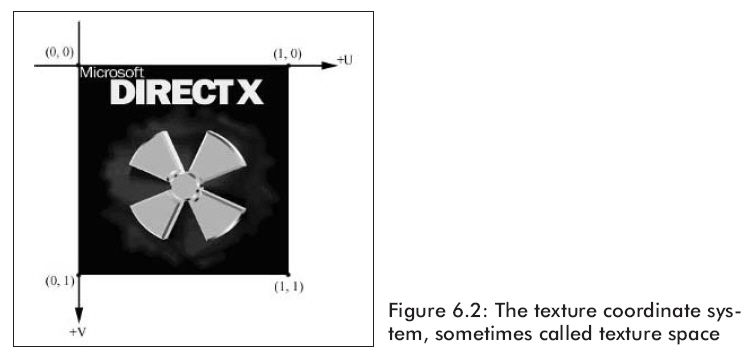
Direct3D使用一个纹理坐标系统,它是由用水平方向的u轴和竖直方向v轴构成。由u,v坐标决定纹理上的元素,它被叫做texel。注意v轴是向下的(如图6.2)。

同样,注意规格化的坐标间隔,[0,1],它被使用是因为它给Direct3D一个固定的范围用于在不同尺寸的纹理上工作。

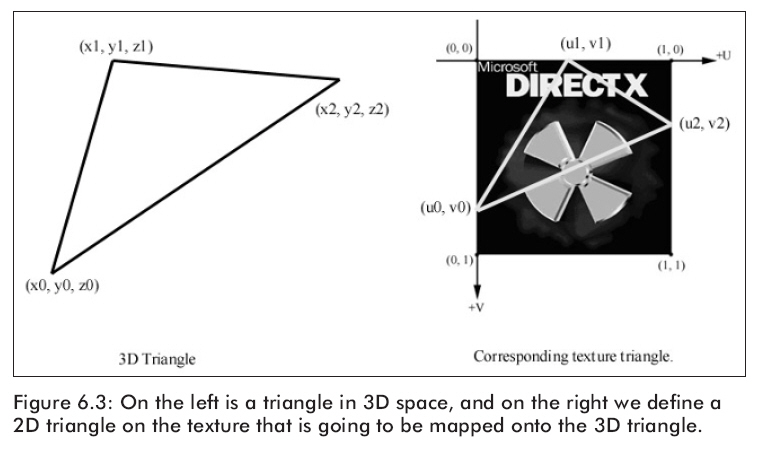
对每一个3D三角形,我们都希望在给它贴图的纹理上定义一个用相应的三角形。(如图6.3)。

我们再一次修改原来的顶点结构,添加一个用于在纹理上定位的纹理坐标。

struct Vertex

{

       float _x, _y, _z;

       float _nx, _ny, _nz;

       float _u, _v; // texture coordinates

       static const DWORD FVF;

};

const DWORD Vertex::FVF = D3DFVF_XYZ | D3DFVF_NORMAL | D3DFVF_TEX1;

我们在顶点格式中添加了一个D3DFVF_TEX1,它是说我们的顶点结构中包含了一个纹理坐标。

现在每个三角形都通过顶点的三个对象来建立,同时也通过纹理坐标定义了一个相应的纹理三角形。

6.2创建并赋予材质

纹理数据通常是从存储在磁盘中的图片文件中读取的,且被读进IDirect3DTexture9对象中。我们能够使用下面的D3DX函数完成这项工作:

Creates a texture from a file.

HRESULT D3DXCreateTextureFromFile(
LPDIRECT3DDEVICE9 pDevice,
LPCTSTR pSrcFile,
LPDIRECT3DTEXTURE9 * ppTexture
);
Parameters
pDevice
[in] Pointer to an IDirect3DDevice9 interface, representing the device to be associated with the texture.
pSrcFile
[in] Pointer to a string that specifies the filename. If the compiler settings require Unicode, the data type LPCTSTR resolves to LPCWSTR. Otherwise, the string data type resolves to LPCSTR. See Remarks.
ppTexture
[out] Address of a pointer to an IDirect3DTexture9 interface, representing the created texture object.
Return Values

If the function succeeds, the return value is D3D_OK. If the function fails, the return value can be one of the following:

D3DERR_NOTAVAILABLED3DERR_OUTOFVIDEOMEMORYD3DERR_INVALIDCALLD3DXERR_INVALIDDATAE_OUTOFMEMORY

Remarks

The compiler setting also determines the function version. If Unicode is defined, the function call resolves to D3DXCreateTextureFromFileW. Otherwise, the function call resolves to D3DXCreateTextureFromFileA because ANSI strings are being used.

This function supports the following file formats: .bmp, .dds, .dib, .hdr, .jpg, .pfm, .png, .ppm, and .tga. See D3DXIMAGE_FILEFORMAT.

The function is equivalent to D3DXCreateTextureFromFileEx(pDevice, pSrcFile, D3DX_DEFAULT, D3DX_DEFAULT, D3DX_DEFAULT, 0, D3DFMT_UNKNOWN, D3DPOOL_MANAGED, D3DX_DEFAULT, D3DX_DEFAULT, 0, NULL, NULL, ppTexture).

Mipmapped textures automatically have each level filled with the loaded texture.

When loading images into mipmapped textures, some devices are unable to go to a 1x1 image and this function will fail. If this happens, the images need to be loaded manually.

Note that a resource created with this function will be placed in the memory class denoted by D3DPOOL_MANAGED.

Filtering is automatically applied to a texture created using this method. The filtering is equivalent to D3DX_FILTER_TRIANGLE | D3DX_FILTER_DITHER in D3DX_FILTER.

For the best performance when using D3DXCreateTextureFromFile:

  1. Doing image scaling and format conversion at load time can be slow. Store images in the format and resolution they will be used. If the target hardware requires power of two dimensions, create and store images using power of two dimensions.
  2. Consider using DirectDraw surface (DDS) files. Because DDS files can be used to represent any Direct3D 9 texture format, they are very easy for D3DX to read. Also, they can store mipmaps, so any mipmap-generation algorithms can be used to author the images.

这个函数能够读取下面图片格式中的任意一种:BMP,DDS,DIB,JPG,PNG,TGA。

例如,用一个名为stonewall.bmp的图片创建一个纹理,我们将按照下面的例子来写:

IDirect3Dtexture9* _stonewall;

D3DXCreateTextureFromFile(_device, "stonewall.bmp", &_stonewall);

设置当前纹理,我们使用下面的方法:

Assigns a texture to a stage for a device.

HRESULT SetTexture(
DWORD Sampler,
IDirect3DBaseTexture9 * pTexture
);
Parameters
Sampler

Zero based sampler number. Textures are bound to samplers; samplers define sampling state such as the filtering mode and the address wrapping mode. Textures are referenced differently by the programmable and the fixed function pipeline:

  • Programmable shaders reference textures using the sampler number. The number of samplers available to a programmable shader is dependent on the shader version. .
  • The fixed function pipeline on the other hand, references textures by texture stage number. The maximum number of samplers is determined from two caps: MaxSimultaneousTextures and MaxTextureBlendStages of the D3DCAPS9 structure.
[in] There are two other special cases for stage/sampler numbers.
  • A special number called D3DDMAPSAMPLER is used for Displacement Mapping (Direct3D 9).
  • A programmable vertex shader uses a special number defined by a D3DVERTEXTEXTURESAMPLER when accessing Vertex Textures in vs_3_0 (Direct3D 9).

该例程演示了如何设置纹理寻址模式。

截图:

源程序:

/**************************************************************************************
  Allows the user to switch between the different texture address modes to see what they do.
  Use the following keys:
           'W' - Switches to Wrap mode
           'B' - Switches to Border mode
           'C' - Switches to Clamp mode
           'M' - Switches to Mirror mode 
**************************************************************************************/
#include "d3dUtility.h"
#pragma warning(disable : 4100)
const int WIDTH  = 640;
const int HEIGHT = 480;
IDirect3DDevice9*        g_d3d_device;
IDirect3DVertexBuffer9* g_quad_vb;
IDirect3DTexture9*        g_d3d_texture;
class cTextureVertex
{
public:
float m_x,  m_y,  m_z;
float m_nx, m_ny, m_nz;
float m_u, m_v; // texture coordinates   
    cTextureVertex() { }
    cTextureVertex(float x,  float y,  float z,
float nx, float ny, float nz,
float u,  float v)
    {
        m_x  = x;  m_y  = y;  m_z  = z;
        m_nx = nx; m_ny = ny; m_nz = nz;
        m_u  = u;  m_v  = v;
    }   
};
const DWORD TEXTURE_VERTEX_FVF = D3DFVF_XYZ | D3DFVF_NORMAL | D3DFVF_TEX1;
////////////////////////////////////////////////////////////////////////////////////////////////////
bool setup()
{   
// create the quad vertex buffer and fill it with the quad geometry
    g_d3d_device->CreateVertexBuffer(6 * sizeof(cTextureVertex), D3DUSAGE_WRITEONLY, TEXTURE_VERTEX_FVF,
                                     D3DPOOL_MANAGED, &g_quad_vb, NULL);
    cTextureVertex* vertices;
    g_quad_vb->Lock(0, 0, (void**)&vertices, 0);
// quad built from two triangles, note texture coordinate.
    vertices[0] = cTextureVertex(-1.0f, -1.0f, 1.25f, 0.0f, 0.0f, -1.0f, 0.0f, 3.0f);
    vertices[1] = cTextureVertex(-1.0f,  1.0f, 1.25f, 0.0f, 0.0f, -1.0f, 0.0f, 0.0f);
    vertices[2] = cTextureVertex( 1.0f,  1.0f, 1.25f, 0.0f, 0.0f, -1.0f, 3.0f, 0.0f);
    vertices[3] = cTextureVertex(-1.0f, -1.0f, 1.25f, 0.0f, 0.0f, -1.0f, 0.0f, 3.0f);
    vertices[4] = cTextureVertex( 1.0f,  1.0f, 1.25f, 0.0f, 0.0f, -1.0f, 3.0f, 0.0f);
    vertices[5] = cTextureVertex( 1.0f, -1.0f, 1.25f, 0.0f, 0.0f, -1.0f, 3.0f, 3.0f);
    g_quad_vb->Unlock();
// create the texture and set filters
    D3DXCreateTextureFromFile(g_d3d_device, "dx5_logo.bmp", &g_d3d_texture);
    g_d3d_device->SetTexture(0, g_d3d_texture);
    g_d3d_device->SetSamplerState(0, D3DSAMP_MAGFILTER, D3DTEXF_LINEAR);
    g_d3d_device->SetSamplerState(0, D3DSAMP_MINFILTER, D3DTEXF_LINEAR);
    g_d3d_device->SetSamplerState(0, D3DSAMP_MIPFILTER, D3DTEXF_POINT);
// don't use lighting for this sample
    g_d3d_device->SetRenderState(D3DRS_LIGHTING, FALSE);
// set the projection matrix
    D3DXMATRIX proj;
    D3DXMatrixPerspectiveFovLH(&proj, D3DX_PI * 0.5f, (float)WIDTH/HEIGHT, 1.0f, 1000.0f);
    g_d3d_device->SetTransform(D3DTS_PROJECTION, &proj);
return true;
}
void cleanup()
{   
    safe_release<IDirect3DVertexBuffer9*>(g_quad_vb);
    safe_release<IDirect3DTexture9*>(g_d3d_texture);
}
bool display(float time_delta)
{
// set wrap address mode
if(GetAsyncKeyState('W') & 0x8000f)
    {
        g_d3d_device->SetSamplerState(0, D3DSAMP_ADDRESSU, D3DTADDRESS_WRAP);
        g_d3d_device->SetSamplerState(0, D3DSAMP_ADDRESSV, D3DTADDRESS_WRAP);
    }
// set border color address mode
if(GetAsyncKeyState('B') & 0x8000f)
    {
        g_d3d_device->SetSamplerState(0, D3DSAMP_ADDRESSU, D3DTADDRESS_BORDER);
        g_d3d_device->SetSamplerState(0, D3DSAMP_ADDRESSV, D3DTADDRESS_BORDER);
        g_d3d_device->SetSamplerState(0,  D3DSAMP_BORDERCOLOR, 0x000000ff);
    }
// set clamp address mode
if(GetAsyncKeyState('C') & 0x8000f)
    {
        g_d3d_device->SetSamplerState(0, D3DSAMP_ADDRESSU, D3DTADDRESS_CLAMP);
        g_d3d_device->SetSamplerState(0, D3DSAMP_ADDRESSV, D3DTADDRESS_CLAMP);
    }
// set mirror address mode
if(GetAsyncKeyState('M') & 0x8000f)
    {
        g_d3d_device->SetSamplerState(0, D3DSAMP_ADDRESSU, D3DTADDRESS_MIRROR);
        g_d3d_device->SetSamplerState(0, D3DSAMP_ADDRESSV, D3DTADDRESS_MIRROR);
    }   
// draw the scene
    g_d3d_device->Clear(0, NULL, D3DCLEAR_TARGET | D3DCLEAR_ZBUFFER, 0xffffffff, 1.0f, 0);
    g_d3d_device->BeginScene();
    g_d3d_device->SetStreamSource(0, g_quad_vb, 0, sizeof(cTextureVertex));
    g_d3d_device->SetFVF(TEXTURE_VERTEX_FVF);
    g_d3d_device->DrawPrimitive(D3DPT_TRIANGLELIST, 0, 2);
    g_d3d_device->EndScene();
    g_d3d_device->Present(NULL, NULL, NULL, NULL);
return true;
}
LRESULT CALLBACK wnd_proc(HWND hwnd, UINT msg, WPARAM word_param, LPARAM long_param)
{
switch(msg)
    {
case WM_DESTROY:
        PostQuitMessage(0);
break;
case WM_KEYDOWN:
if(word_param == VK_ESCAPE)
            DestroyWindow(hwnd);
break;
    }
return DefWindowProc(hwnd, msg, word_param, long_param);
}
int WINAPI WinMain(HINSTANCE inst, HINSTANCE, PSTR cmd_line, int cmd_show)
{
if(! init_d3d(inst, WIDTH, HEIGHT, true, D3DDEVTYPE_HAL, &g_d3d_device))
    {
        MessageBox(NULL, "init_d3d() - failed.", 0, MB_OK);
return 0;
    }
if(! setup())
    {
        MessageBox(NULL, "Steup() - failed.", 0, MB_OK);
return 0;
    }
    enter_msg_loop(display);
    cleanup();
    g_d3d_device->Release();
return 0;
}
下载源程序

使用DirectX纹理工具创建Alpha通道

       绝大多数普通图象文件格式没有存储alpha信息,在这一部分我们给你演示怎样使用DirectX纹理工具来创建一个带alpha通道的DDS文件。DDS文件是一个为DirectX应用程序和纹理设置的图象格式。DDS文件能够利用D3DXCreateTextureFromFile函数读进纹理中,就象bmp和jpg文件一样。DirectX纹理工具被放在你的DXSDK目录下的\Bin\DXUtils文件夹下,文件名是DxTex.exe。

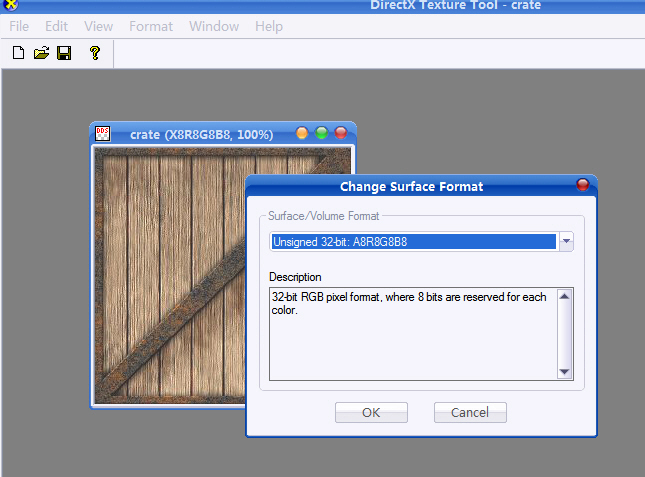
       打开DirectX纹理工具,并且把crate.jpg文件用工具打开。木箱被自动的按照24位RGB纹理被读取。它包含8位红色,8位绿色,以及8位蓝色。我们需要将该纹理增加为32位ARGB纹理,增加的是额外的8位alpha通道。从菜单中选择Format,选择Change Surface Format。一个象图7.5的对话框将被弹出。选择A8R8G8B8格式点击OK。

图7.5   改变纹理的格式

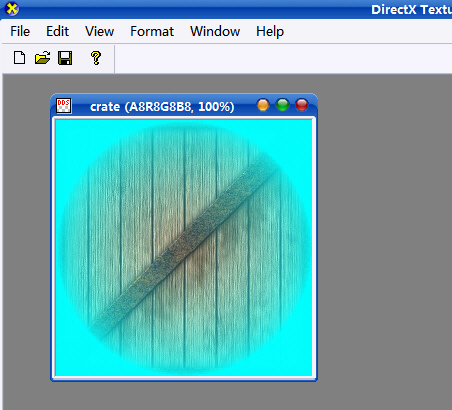
它创建了一个32位颜色深度的图象,它的每个象素都有8位alpha通道,8位红色,8位绿色,8位蓝色。我们下一步是向alpha通道中写入数据。我们将图7.3中的8位灰色图片信息写进alpha通道中。选择菜单中的File,选择Open Onto Alpha Channel Of This Texture。一个对话框将弹出让你选择包含你想要写入alpha通道中数据信息的图片。选择alphachannel.bmp文件。图7.6显示的是程序已经插入了alpha通道数据。

图7.6  在Alpha通道作用下的纹理图

现在用你选择的文件名存储纹理;我们使用cratewalpha.dds文件名。

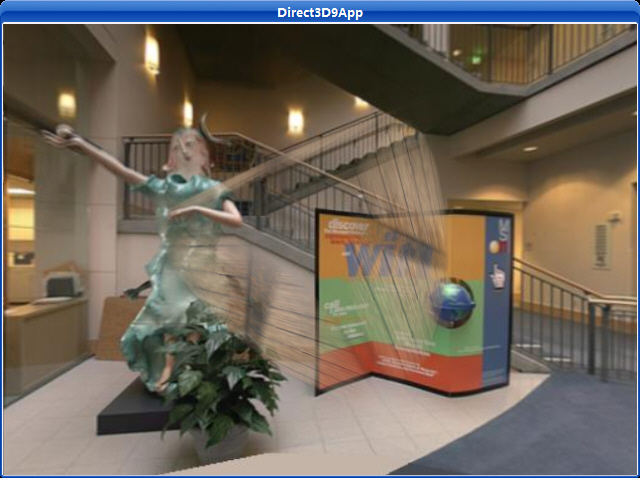
示例程序:

/**************************************************************************************
  Renders a semi transparent cube using alpha blending.
  In this sample, the alpha is taken from the textures alpha channel.   
**************************************************************************************/
#include "d3dUtility.h"
#include "vertex.h"
#include "cube.h"
#pragma warning(disable : 4100)
const int WIDTH  = 640;
const int HEIGHT = 480;
IDirect3DDevice9*        g_d3d_device;
IDirect3DTexture9*        g_crate_texture;
cCube*                    g_cube;
D3DXMATRIX                g_cube_world_matrix;
IDirect3DVertexBuffer9* g_back_vb;
IDirect3DTexture9*        g_back_texture;
////////////////////////////////////////////////////////////////////////////////////////////////////
bool setup()
{   
// create the background quad
    g_d3d_device->CreateVertexBuffer(6 * sizeof(cTextureVertex), D3DUSAGE_WRITEONLY, TEXTURE_VERTEX_FVF,
                                     D3DPOOL_MANAGED, &g_back_vb, NULL);
    cTextureVertex* vertices;
    g_back_vb->Lock(0, 0, (void**)&vertices, 0);
// quad built from two triangles, note texture coordinate.
    vertices[0] = cTextureVertex(-10.0f, -10.0f, 5.0f, 0.0f, 0.0f, -1.0f, 0.0f, 1.0f);
    vertices[1] = cTextureVertex(-10.0f,  10.0f, 5.0f, 0.0f, 0.0f, -1.0f, 0.0f, 0.0f);
    vertices[2] = cTextureVertex( 10.0f,  10.0f, 5.0f, 0.0f, 0.0f, -1.0f, 1.0f, 0.0f);
    vertices[3] = cTextureVertex(-10.0f, -10.0f, 5.0f, 0.0f, 0.0f, -1.0f, 0.0f, 1.0f);
    vertices[4] = cTextureVertex( 10.0f,  10.0f, 5.0f, 0.0f, 0.0f, -1.0f, 1.0f, 0.0f);
    vertices[5] = cTextureVertex( 10.0f, -10.0f, 5.0f, 0.0f, 0.0f, -1.0f, 1.0f, 1.0f);
    g_back_vb->Unlock();
// create the cube
    g_cube = new cCube(g_d3d_device);
// create the texture and set filters
    D3DXCreateTextureFromFile(g_d3d_device, "cratewAlpha.dds",    &g_crate_texture);   
    D3DXCreateTextureFromFile(g_d3d_device, "lobbyxpos.jpg",    &g_back_texture);   
    g_d3d_device->SetSamplerState(0, D3DSAMP_MAGFILTER, D3DTEXF_LINEAR);
    g_d3d_device->SetSamplerState(0, D3DSAMP_MINFILTER, D3DTEXF_LINEAR);
    g_d3d_device->SetSamplerState(0, D3DSAMP_MIPFILTER, D3DTEXF_POINT);
// set alpha blending states
// use alhpa in material's diffuse component for alpha
    g_d3d_device->SetTextureStageState(0, D3DTSS_ALPHAARG1, D3DTA_TEXTURE);
    g_d3d_device->SetTextureStageState(0, D3DTSS_ALPHAOP,    D3DTOP_SELECTARG1);
// set blending factors so that alpha component determines transparency
    g_d3d_device->SetRenderState(D3DRS_SRCBLEND,  D3DBLEND_SRCALPHA);
    g_d3d_device->SetRenderState(D3DRS_DESTBLEND, D3DBLEND_INVSRCALPHA);
// disable lighting
    g_d3d_device->SetRenderState(D3DRS_LIGHTING, FALSE);
// set camera
    D3DXVECTOR3 pos(0.0f, 0.0f, -2.5f);
    D3DXVECTOR3 target(0.0f, 0.0f, 0.0f);
    D3DXVECTOR3 up(0.0f, 1.0f, 0.0f);
    D3DXMATRIX view_matrix;
    D3DXMatrixLookAtLH(&view_matrix, &pos, &target, &up);
    g_d3d_device->SetTransform(D3DTS_VIEW, &view_matrix);
// set the projection matrix
    D3DXMATRIX proj;
    D3DXMatrixPerspectiveFovLH(&proj, D3DX_PI * 0.5f, (float)WIDTH/HEIGHT, 1.0f, 1000.0f);
    g_d3d_device->SetTransform(D3DTS_PROJECTION, &proj);
return true;
}
void cleanup()
{   
    safe_release<IDirect3DTexture9*>(g_crate_texture);   
    safe_release<IDirect3DVertexBuffer9*>(g_back_vb);
    safe_release<IDirect3DTexture9*>(g_back_texture);
    safe_delete<cCube*>(g_cube);   
}
bool display(float time_delta)
{
// update: rotate the cube.
    D3DXMATRIX x_rot;
    D3DXMatrixRotationX(&x_rot, D3DX_PI * 0.2f);
static float y = 0.0f;
    D3DXMATRIX y_rot;
    D3DXMatrixRotationY(&y_rot, y);
    y += time_delta;
if(y >= 6.28f)
        y = 0.0f;
    g_cube_world_matrix = x_rot * y_rot;
// render now
    g_d3d_device->Clear(0, NULL, D3DCLEAR_TARGET | D3DCLEAR_ZBUFFER, 0x00000000, 1.0f, 0);
    g_d3d_device->BeginScene();
// draw the background
    D3DXMATRIX world_matrix;
    D3DXMatrixIdentity(&world_matrix);
    g_d3d_device->SetTransform(D3DTS_WORLD, &world_matrix);
    g_d3d_device->SetFVF(TEXTURE_VERTEX_FVF);
    g_d3d_device->SetStreamSource(0, g_back_vb, 0, sizeof(cTextureVertex));   
    g_d3d_device->SetTexture(0, g_back_texture);
    g_d3d_device->DrawPrimitive(D3DPT_TRIANGLELIST, 0, 2);
// draw the cube
    g_d3d_device->SetRenderState(D3DRS_ALPHABLENDENABLE, TRUE);   
    g_cube->draw(&g_cube_world_matrix, NULL, g_crate_texture);
    g_d3d_device->SetRenderState(D3DRS_ALPHABLENDENABLE, FALSE);
    g_d3d_device->EndScene();
    g_d3d_device->Present(NULL, NULL, NULL, NULL);
return true;
}
LRESULT CALLBACK wnd_proc(HWND hwnd, UINT msg, WPARAM word_param, LPARAM long_param)
{
switch(msg)
    {
case WM_DESTROY:
        PostQuitMessage(0);
break;
case WM_KEYDOWN:
if(word_param == VK_ESCAPE)
            DestroyWindow(hwnd);
break;
    }
return DefWindowProc(hwnd, msg, word_param, long_param);
}
int WINAPI WinMain(HINSTANCE inst, HINSTANCE, PSTR cmd_line, int cmd_show)
{
if(! init_d3d(inst, WIDTH, HEIGHT, true, D3DDEVTYPE_HAL, &g_d3d_device))
    {
        MessageBox(NULL, "init_d3d() - failed.", 0, MB_OK);
return 0;
    }
if(! setup())
    {
        MessageBox(NULL, "Steup() - failed.", 0, MB_OK);
return 0;
    }
    enter_msg_loop(display);
    cleanup();
    g_d3d_device->Release();
return 0;
}
截图:

下载源程序

该例程演示了怎样对一个立方体映射板条纹理。

截图:

vertex.h:

#ifndef __VERTEX_H__
#define __VERTEX_H__
class cTextureVertex
{
public:
float m_x, m_y, m_z;
float m_nx, m_ny, m_nz;
float m_u, m_v; // texture coordinates
    cTextureVertex() { }
    cTextureVertex(float x, float y, float z,
float nx, float ny, float nz,
float u, float v)
    {
        m_x  = x;  m_y  = y;  m_z  = z;
        m_nx = nx; m_ny = ny; m_nz = nz;
        m_u  = u;  m_v  = v;
    }   
};
#define TEXTURE_VERTEX_FVF (D3DFVF_XYZ | D3DFVF_NORMAL | D3DFVF_TEX1)
#endif

cube.h:

#ifndef __CUBE_H__
#define __CUBE_H__
#include <d3dx9.h>
class cCube
{
public:
    cCube(IDirect3DDevice9* d3d_device);
~cCube();
void draw(const D3DMATRIX* world, const D3DMATERIAL9* material, IDirect3DTexture9* texture);
private:
    IDirect3DDevice9*        m_d3d_device;
    IDirect3DVertexBuffer9*    m_vertex_buffer;
    IDirect3DIndexBuffer9*    m_index_buffer;
};
#endif

cube.cpp:

/****************************************************************************
  Provides an interface to create and render a cube.
****************************************************************************/
#include "cube.h"
#include "vertex.h"
cCube::cCube(IDirect3DDevice9* d3d_device)
{
    m_d3d_device = d3d_device;
    m_d3d_device->CreateVertexBuffer(24 * sizeof(cTextureVertex), D3DUSAGE_WRITEONLY, TEXTURE_VERTEX_FVF,
        D3DPOOL_MANAGED, &m_vertex_buffer, NULL);
    cTextureVertex* v;
    m_vertex_buffer->Lock(0, 0, (void**)&v, 0);
// build box
// fill in the front face vertex data
    v[0] = cTextureVertex(-1.0f, -1.0f, -1.0f, 0.0f, 0.0f, -1.0f, 0.0f, 0.0f);
    v[1] = cTextureVertex(-1.0f,  1.0f, -1.0f, 0.0f, 0.0f, -1.0f, 0.0f, 1.0f);
    v[2] = cTextureVertex( 1.0f,  1.0f, -1.0f, 0.0f, 0.0f, -1.0f, 1.0f, 1.0f);
    v[3] = cTextureVertex( 1.0f, -1.0f, -1.0f, 0.0f, 0.0f, -1.0f, 1.0f, 0.0f);
// fill in the back face vertex data
    v[4] = cTextureVertex(-1.0f, -1.0f, 1.0f, 0.0f, 0.0f, 1.0f, 0.0f, 0.0f);
    v[5] = cTextureVertex( 1.0f, -1.0f, 1.0f, 0.0f, 0.0f, 1.0f, 0.0f, 1.0f);
    v[6] = cTextureVertex( 1.0f,  1.0f, 1.0f, 0.0f, 0.0f, 1.0f, 1.0f, 1.0f);
    v[7] = cTextureVertex(-1.0f,  1.0f, 1.0f, 0.0f, 0.0f, 1.0f, 1.0f, 0.0f);
// fill in the top face vertex data
    v[8]  = cTextureVertex(-1.0f, 1.0f, -1.0f, 0.0f, 1.0f, 0.0f, 0.0f, 0.0f);
    v[9]  = cTextureVertex(-1.0f, 1.0f,  1.0f, 0.0f, 1.0f, 0.0f, 0.0f, 1.0f);
    v[10] = cTextureVertex( 1.0f, 1.0f,  1.0f, 0.0f, 1.0f, 0.0f, 1.0f, 1.0f);
    v[11] = cTextureVertex( 1.0f, 1.0f, -1.0f, 0.0f, 1.0f, 0.0f, 1.0f, 0.0f);
// fill in the bottom face vertex data
    v[12] = cTextureVertex(-1.0f, -1.0f, -1.0f, 0.0f, -1.0f, 0.0f, 0.0f, 0.0f);
    v[13] = cTextureVertex( 1.0f, -1.0f, -1.0f, 0.0f, -1.0f, 0.0f, 0.0f, 1.0f);
    v[14] = cTextureVertex( 1.0f, -1.0f,  1.0f, 0.0f, -1.0f, 0.0f, 1.0f, 1.0f);
    v[15] = cTextureVertex(-1.0f, -1.0f,  1.0f, 0.0f, -1.0f, 0.0f, 1.0f, 0.0f);
// fill in the left face vertex data
    v[16] = cTextureVertex(-1.0f, -1.0f,  1.0f, -1.0f, 0.0f, 0.0f, 0.0f, 0.0f);
    v[17] = cTextureVertex(-1.0f,  1.0f,  1.0f, -1.0f, 0.0f, 0.0f, 0.0f, 1.0f);
    v[18] = cTextureVertex(-1.0f,  1.0f, -1.0f, -1.0f, 0.0f, 0.0f, 1.0f, 1.0f);
    v[19] = cTextureVertex(-1.0f, -1.0f, -1.0f, -1.0f, 0.0f, 0.0f, 1.0f, 0.0f);
// fill in the right face vertex data
    v[20] = cTextureVertex( 1.0f, -1.0f, -1.0f, 1.0f, 0.0f, 0.0f, 0.0f, 0.0f);
    v[21] = cTextureVertex( 1.0f,  1.0f, -1.0f, 1.0f, 0.0f, 0.0f, 0.0f, 1.0f);
    v[22] = cTextureVertex( 1.0f,  1.0f,  1.0f, 1.0f, 0.0f, 0.0f, 1.0f, 1.0f);
    v[23] = cTextureVertex( 1.0f, -1.0f,  1.0f, 1.0f, 0.0f, 0.0f, 1.0f, 0.0f);
    m_vertex_buffer->Unlock();
    m_d3d_device->CreateIndexBuffer(36 * sizeof(WORD), D3DUSAGE_WRITEONLY, D3DFMT_INDEX16, D3DPOOL_MANAGED,
&m_index_buffer, NULL);
    WORD* index_ptr = NULL;
    m_index_buffer->Lock(0, 0, (void**)&index_ptr, 0);
// fill in the front face index data
    index_ptr[0] = 0; index_ptr[1] = 1; index_ptr[2] = 2;
    index_ptr[3] = 0; index_ptr[4] = 2; index_ptr[5] = 3;
// fill in the back face index data
    index_ptr[6] = 4; index_ptr[7]  = 5; index_ptr[8]  = 6;
    index_ptr[9] = 4; index_ptr[10] = 6; index_ptr[11] = 7;
// fill in the top face index data
    index_ptr[12] = 8; index_ptr[13] = 9; index_ptr[14] = 10;
    index_ptr[15] = 8; index_ptr[16] = 10; index_ptr[17] = 11;
// fill in the bottom face index data
    index_ptr[18] = 12; index_ptr[19] = 13; index_ptr[20] = 14;
    index_ptr[21] = 12; index_ptr[22] = 14; index_ptr[23] = 15;
// fill in the left face index data
    index_ptr[24] = 16; index_ptr[25] = 17; index_ptr[26] = 18;
    index_ptr[27] = 16; index_ptr[28] = 18; index_ptr[29] = 19;
// fill in the right face index data
    index_ptr[30] = 20; index_ptr[31] = 21; index_ptr[32] = 22;
    index_ptr[33] = 20; index_ptr[34] = 22; index_ptr[35] = 23;
    m_index_buffer->Unlock();
}
cCube::~cCube()
{
if(m_vertex_buffer)
    {
        m_vertex_buffer->Release();
        m_vertex_buffer = NULL;
    }
if(m_index_buffer)
    {
        m_index_buffer->Release();
        m_index_buffer = NULL;
    }
}
void cCube::draw(const D3DMATRIX* world, const D3DMATERIAL9* material, IDirect3DTexture9* texture)
{
if(world)
        m_d3d_device->SetTransform(D3DTS_WORLD, world);
if(material)
        m_d3d_device->SetMaterial(material);
if(texture)
        m_d3d_device->SetTexture(0, texture);
    m_d3d_device->SetStreamSource(0, m_vertex_buffer, 0, sizeof(cTextureVertex));
    m_d3d_device->SetIndices(m_index_buffer);
    m_d3d_device->SetFVF(TEXTURE_VERTEX_FVF);
    m_d3d_device->DrawIndexedPrimitive(D3DPT_TRIANGLELIST, 0, 0, 24, 0, 12);
}

TexCube.cpp:

/**************************************************************************************
  Renders a textured cube.  Demonstrates creating a texture, setting texture filters,
  enabling a texture, and texture coordinates.  Use the arrow keys to orbit the scene.
**************************************************************************************/
#include "d3dUtility.h"
#include "cube.h"
#include "vertex.h"
#pragma warning(disable : 4100)
const int WIDTH  = 640;
const int HEIGHT = 480;
IDirect3DDevice9*        g_d3d_device;
cCube*                    g_cube;
IDirect3DTexture9*        g_d3d_texture;
////////////////////////////////////////////////////////////////////////////////////////////////////
bool setup()
{   
    g_cube = new cCube(g_d3d_device);
// set a directional light
    D3DLIGHT9 light;
    ZeroMemory(&light, sizeof(light));
    light.Type        = D3DLIGHT_DIRECTIONAL;
    light.Ambient   = D3DXCOLOR(0.8f, 0.8f, 0.8f, 1.0f);
    light.Diffuse   = D3DXCOLOR(1.0f, 1.0f, 1.0f, 1.0f);
    light.Specular  = D3DXCOLOR(0.2f, 0.2f, 0.2f, 1.0f);
    light.Direction    = D3DXVECTOR3(1.0f, -1.0f, 0.0f);
// set and enable the light
    g_d3d_device->SetLight(0, &light);
    g_d3d_device->LightEnable(0, TRUE);
// turn off specular lighting and instruct Direct3D to renormalize normals
    g_d3d_device->SetRenderState(D3DRS_NORMALIZENORMALS, TRUE);
    g_d3d_device->SetRenderState(D3DRS_SPECULARENABLE, TRUE);
    D3DXCreateTextureFromFile(g_d3d_device, "crate.jpg", &g_d3d_texture);
// set texture filter states
    g_d3d_device->SetSamplerState(0, D3DSAMP_MAGFILTER, D3DTEXF_LINEAR);
    g_d3d_device->SetSamplerState(0, D3DSAMP_MINFILTER, D3DTEXF_LINEAR);
    g_d3d_device->SetSamplerState(0, D3DSAMP_MIPFILTER, D3DTEXF_LINEAR);
// set the projection matrix
    D3DXMATRIX proj;
    D3DXMatrixPerspectiveFovLH(&proj, D3DX_PI * 0.5f, (float)WIDTH/HEIGHT, 1.0f, 1000.0f);
    g_d3d_device->SetTransform(D3DTS_PROJECTION, &proj);
return true;
}
void cleanup()
{
    safe_delete<cCube*>(g_cube);
    safe_release<IDirect3DTexture9*>(g_d3d_texture);
}
bool display(float time_delta)
{
// update the scene: update camera position
static float angle = (3.0f * D3DX_PI) / 2.0f;
static float height = 2.0f;
if(GetAsyncKeyState(VK_LEFT) & 0x8000f)
        angle -= 0.5f * time_delta;
if(GetAsyncKeyState(VK_RIGHT) & 0x8000f)
        angle += 0.5f * time_delta;
if(GetAsyncKeyState(VK_UP) & 0x8000f)
        height += 5.0f * time_delta;
if(GetAsyncKeyState(VK_DOWN) & 0x8000f)
        height -= 5.0f * time_delta;
    D3DXVECTOR3 position(cosf(angle) * 3.0f, height, sinf(angle) * 3.0f);
    D3DXVECTOR3 target(0.0f, 0.0f, 0.0f);
    D3DXVECTOR3 up(0.0f, 1.0f, 0.0f);
    D3DXMATRIX view_matrix;
    D3DXMatrixLookAtLH(&view_matrix, &position, &target, &up);
    g_d3d_device->SetTransform(D3DTS_VIEW, &view_matrix);
// draw the scene
    g_d3d_device->Clear(0, NULL, D3DCLEAR_TARGET | D3DCLEAR_ZBUFFER, 0x00000000, 1.0f, 0);
    g_d3d_device->BeginScene();
    g_cube->draw(NULL, &WHITE_MATERIAL, g_d3d_texture);       
    g_d3d_device->EndScene();
    g_d3d_device->Present(NULL, NULL, NULL, NULL);
return true;
}
LRESULT CALLBACK wnd_proc(HWND hwnd, UINT msg, WPARAM word_param, LPARAM long_param)
{
switch(msg)
    {
case WM_DESTROY:
        PostQuitMessage(0);
break;
case WM_KEYDOWN:
if(word_param == VK_ESCAPE)
            DestroyWindow(hwnd);
break;
    }
return DefWindowProc(hwnd, msg, word_param, long_param);
}
int WINAPI WinMain(HINSTANCE inst, HINSTANCE, PSTR cmd_line, int cmd_show)
{
if(! init_d3d(inst, WIDTH, HEIGHT, true, D3DDEVTYPE_HAL, &g_d3d_device))
    {
        MessageBox(NULL, "init_d3d() - failed.", 0, MB_OK);
return 0;
    }
if(! setup())
    {
        MessageBox(NULL, "Steup() - failed.", 0, MB_OK);
return 0;
    }
    enter_msg_loop(display);
    cleanup();
    g_d3d_device->Release();
return 0;
}
下载源程序

我们介绍一种叫做混合(blending)的技术,它允许我们混合像素,我们通常用已经光栅化的像素光栅化同一位置的像素。换句话说就是我们在图元上混合图元,这种技术允许我们完成多种特效。

7.1混合因素

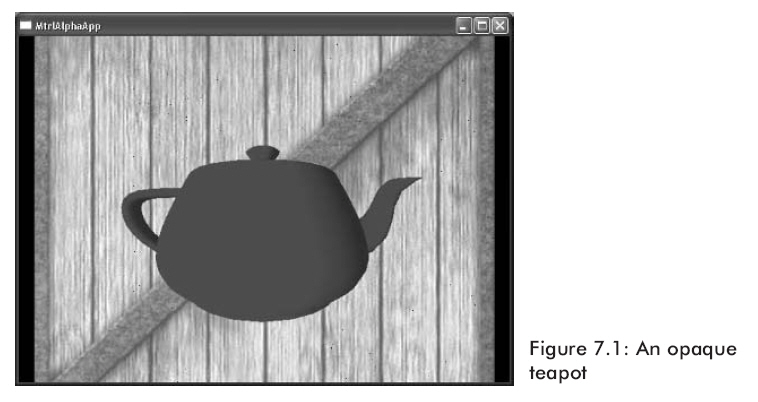
观察图7.1,我们将一个红色的茶壶绘制在一个木质背景上。

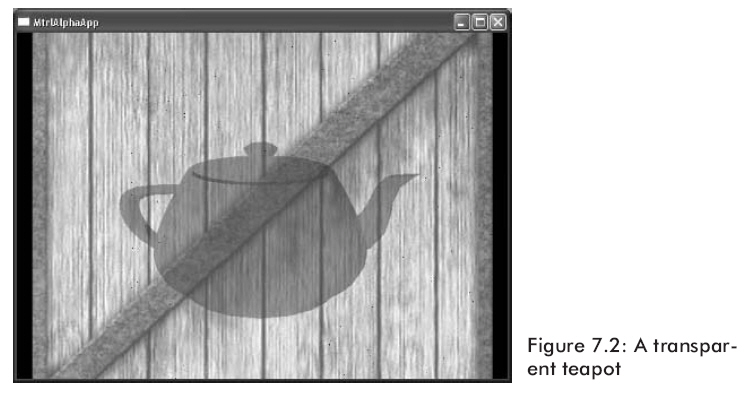
假设想让茶壶有一个透明度,以便我们能够透过茶壶看见背景(如图7.2)。

我们怎样才能实现这个效果呢?我们只需要在木箱子上光栅化茶壶三角形,我们需要结合像素颜色,就象通过茶壶显示木箱那样来计算茶壶的像素颜色。结合像素值的意思就是用以前写过的目标像素值去估算源像素值这被叫做混合。注意混合的效果不仅仅象是玻璃透明一样。我们有很多选项来指定颜色是怎样被混合的,就象7.2部分中看到的一样。

这是很重要的,认识三角形普遍利用以前写入后缓存中的像素来与之混合来光栅化。在示例图片中,木箱图片首先被画出来且它的像素在后缓存中。我们然后绘制茶壶,以便用木箱的像素来混合茶壶的像素。因此,当使用混合时,下面的规则将被遵循:

规则:首先不使用混合绘制物体。然后根据物体离摄象机的距离使用混合对物体拣选;这是非常有效的处理,假如物体是在视图坐标中,那么你能够利用z分量简单地拣选。最后使用从后到前的顺序混合绘制物体。

下面的公式是用来混合两个像素值的:

上面的所有变量都是一个4D颜色向量(r,g,b,a),并且叉号表示分量相乘。

OutputPixel——混合后的像素结果。

SourcePixel——通常被计算的像素,它是利用在后缓存中的像素来被混合的。

SourceBlendFactor——在[0,1]范围内的一个值。它指定源像素在混合中的百分比。

DestPixel——在后缓存中的像素。

DestBlendFactor——在[0,1]范围内的一个值。它指定目的像素在混合中的百分比。

源和目的混合要素使我们能够按照多种途径改变原始源和目的像素,允许实现不同的效果。7.2节列举了能够被使用的预先确定的值。

混合默认是被关闭的;你能够通过设置D3DRS_ALPHABLENDENABLE渲染状态为true来开启它:

Device->SetRenderState(D3DRS_ALPHABLENDENABLE, true);

7.2混合要素

通过设置不同的源和目的要素,我们能够创造很多不同的混合效果。通过实验,使用不同的组合看看它们到底能实现什么效果。你能够通过设置D3DRS_SRCBLEND和D3DRS_DESTBLEND渲染状态来分别设置源混合要素和目的混合要素。

Sets a single device render-state parameter.

HRESULT SetRenderState(
D3DRENDERSTATETYPE State,
DWORD Value
);
Parameters
State
[in] Device state variable that is being modified. This parameter can be any member of the D3DRENDERSTATETYPE enumerated type.
Value
[in] New value for the device render state to be set. The meaning of this parameter is dependent on the value specified for State. For example, if State were D3DRS_SHADEMODE, the second parameter would be one member of the D3DSHADEMODE enumerated type.
Return Values

If the method succeeds, the return value is D3D_OK. D3DERR_INVALIDCALL is returned if one of the arguments is invalid.

例如我们可以这样写:

Device->SetRenderState(D3DRS_SRCBLEND, Source);

Device->SetRenderState(D3DRS_DESTBLEND, Destination);

这里Source和Destination能够使用下面混合要素中的一个:

  • D3DBLEND_ZERO—blendFactor=(0, 0, 0, 0)

tinyxml是个高效精简的xml解析开源代码.

针对tinyxml直接使用对于对xml不是很熟悉的入门新手来说,有些概念难以理解,因此我将其封装后,供大家使用.

头文件:

#include<string>

#include "tinyxml.h"

using namespace std;

class CXML

{

public:

    CXML(void)

    {

    }

    ~CXML(void)

    {

    }

private:

    TiXmlDocument m_xml;

    TiXmlElement* pElement;

private:

    TiXmlElement* getFirstElement(string ElementMark,TiXmlElement* pcrElement);

public:

    //解析xml字符串

    int ParseXmlStr(string xmlstr);

    //解析xml文件

    int ParseXmlFile(string xmlFile);

    //根据标签取值

    int getFirstElementValue(string ElementMark,string& value);

    //针对同一标签的记录取值,如果返回值是0表明再无此标签内容值可取

    int getNextElementValue(string ElementMark,string& value);

    //取得属性值

    int getElementAttributeValue(string AttributeName,string& value);

    //获取根结点

    TiXmlElement* getRootElement();

    //返回当前的xml字符串

    string getXmlStr();

    //清空解析的内容

    void Clear();

    //添加子节点

    TiXmlElement* addXmlRootElement(string ElementMark);//添加一个根节点

    //添加子节点

    TiXmlElement* addXmlChildElement(TiXmlElement* pElement,string ElementMark);

    //给节点添加值

    void addElementValue(TiXmlElement* pElement,string value);

    //添加属性及属性值

    void addXmlAttribute(TiXmlElement* pElement,string AttributeMark,string value);

    //添加声明

    void addXmlDeclaration(string vesion,string encoding,string standalone);

    //添加注释

    void addXmlComment(TiXmlElement* pElement,string Comment);

    //将xml内容保存到文件

    void saveFile(string FileName);

};

///////////////////实现文件

#include "XML.h"

int CXML::ParseXmlFile(string xmlFile)

{

    int result=0;

    try

    {

        if(m_xml.LoadFile(xmlFile.c_str()))

            result=1;

        else

            result=0;

    }

    catch(...)

    {

    }

    return result;

}

int CXML::ParseXmlStr(std::string xmlStr)

{

    int result=0;

    if(xmlStr=="")

        return 0;

    try

    {

        if(m_xml.Parse(xmlStr.c_str()))

            result=1;

        else

            result=0;

    }

    catch(...)

    {

    }

    return result;

}

TiXmlElement* CXML::getFirstElement(string ElementMark,TiXmlElement* pcrElement)

{

    TiXmlElement* pElementtmp=NULL;

    pElementtmp=pcrElement;

    while(pElementtmp)

    {

        if(strcmp(pElementtmp->Value(),ElementMark.c_str())==0)

        {

            //printf("%s\r\n",pElementtmp->Value());

            return pElementtmp;

        }

        else

        {

            TiXmlElement* nextElement=pElementtmp->FirstChildElement();

            while(nextElement)

            {

                //printf("%s\r\n",nextElement->Value());

                if(strcmp(nextElement->Value(),ElementMark.c_str())==0)

                {

                    return nextElement;

                }

                else

                {

                    TiXmlElement* reElement=NULL;

                    reElement=getFirstElement(ElementMark,nextElement);

                    if(reElement)

                    {

                        return reElement;

                    }

                }

                nextElement=nextElement->NextSiblingElement();

            }

        }

        pElementtmp=pElementtmp->NextSiblingElement();

    }

    return NULL;

}

//根据标签取值

int CXML::getFirstElementValue(string ElementMark,string& value)

{

    int result=0;

    if(ElementMark=="")

        return 0;

    try

    {

        TiXmlElement* pcrElement=NULL;

        pcrElement=m_xml.RootElement();

        pcrElement=this->getFirstElement(ElementMark,pcrElement);

        if(pcrElement)

        {

            this->pElement=pcrElement;

            value=this->pElement->GetText();

            result=1;

        }

    }

    catch(...)

    {

    }

    return result;

}

int CXML::getNextElementValue(string ElementMark,string& value)

{

    value="";

    this->pElement=this->pElement->NextSiblingElement(ElementMark.c_str());

    if(this->pElement)

    {

        value=this->pElement->GetText();

        return 1;

    }

    return 0;

}

string CXML::getXmlStr()

{

    string result="";

    try

    {

        TiXmlPrinter printer;

        m_xml.Accept(&printer);

        result=printer.CStr();

    }

    catch(...)

    {

    }

    return result;

}

void CXML::Clear()

{

    m_xml.Clear();

}

//添加子节点

TiXmlElement* CXML::addXmlRootElement(string ElementMark)

{

    TiXmlElement* RootElement=new TiXmlElement(ElementMark.c_str());

    m_xml.LinkEndChild(RootElement);

    return RootElement;

}

TiXmlElement* CXML::addXmlChildElement(TiXmlElement* pElement,string ElementMark)

{

    if(pElement)

    {

        TiXmlElement* tempElement=new TiXmlElement(ElementMark.c_str());

        pElement->LinkEndChild(tempElement);

        return tempElement;

    }

    return 0;

}

void CXML::addElementValue(TiXmlElement *pElement, std::string value)

{

    if(pElement)

    {

        TiXmlText *pContent=new TiXmlText(value.c_str());

        pElement->LinkEndChild(pContent);

    }

}

//添加属性及属性值

void CXML::addXmlAttribute(TiXmlElement* pElement,string AttributeMark,string value)

{

    if(pElement)

    {

        pElement->SetAttribute(AttributeMark.c_str(),value.c_str());

    }

}

//添加声明

void CXML::addXmlDeclaration(string vesion,string encoding,string standalone)

{

    TiXmlDeclaration *pDeclaration=new TiXmlDeclaration(vesion.c_str(),encoding.c_str(),standalone.c_str());

    m_xml.LinkEndChild(pDeclaration);

}

//添加注释

void CXML::addXmlComment(TiXmlElement* pElement,string Comment)

{

    if(pElement)

    {

        TiXmlComment *pComment=new TiXmlComment(Comment.c_str());

        pElement->LinkEndChild(pComment);

    }

}

TiXmlElement* CXML::getRootElement()

{

    return m_xml.RootElement();

}

//取得属性值

int CXML::getElementAttributeValue(string AttributeName,string& value)

{

    if(this->pElement->Attribute(AttributeName.c_str()))

    {

        value=this->pElement->Attribute(AttributeName.c_str());

        return 1;

    }

    return 0;

}

void CXML::saveFile(string FileName)

{

    this->m_xml.SaveFile(FileName.c_str());

}

//////////////////////////////////////////

注意:

xml字符串如果不是从文件中读出,那么必须以"\r\n"结束,否则解析失败