Rise的自留地

记录生活中的点滴,分享编程技术和游戏开发经验。

0%

Download the Debugging Tools for Windows 32-bit Version

Current Release version 6.8.4.0 - October 18, 2007
Install 32-bit version 6.8.4.0 [16.7 MB]

Previous Release version 6.7.5.1 - July 3, 2007
Install 32-bit Beta version 6.7.5.1 [15.8 MB]

Previous Release version 6.6.7.5 - July 18, 2006
Install 32-bit version 6.6.7.5 [15.2 MB]

Previous Release version 6.6.3.5 - January 24, 2006
Install 32-bit Beta version 6.6.3.5 [13.8 MB]

Previous Release version 6.5.3.8 - August 10, 2005
Install 32-bit version 6.5.3.8 [13.0 MB]


Download Debugging Tools for Windows 64-bit Version- Native Itanium

Current Release version 6.8.4.0 - October 18, 2007
Install 64-bit Itanium version 6.8.4.0 [21.2 MB]

Previous Release version 6.7.5.1 - July 3, 2007
Install 64-bit Itanium Beta version 6.7.5.1 [20.2 MB]

Previous Release version 6.6.7.5 - July 18, 2006
Install 64-bit Itanium version 6.6.7.5 [19.9 MB]

Previous Release version 6.6.3.5 - January 24, 2006
Install 64-bit Itanium Beta version 6.6.3.5 [17.9 MB]

Previous Release version 6.5.3.8 - August 10, 2005
Install 64-bit Itanium version 6.5.3.8 [16.8 MB]

Download Debugging Tools for Windows - Native x64

Current Release version 6.8.4.0 - October 18, 2007
Install 64-bit Native x64 version 6.8.4.0 [13.9 MB]

Previous Release version 6.7.5.1 - July 3, 2007
Install 64-bit Native x64 Beta version 6.7.5.1 [13.1 MB]

Previous Release version 6.6.7.5 - July 18, 2006
Install 64-bit Native x64 version 6.6.7.5 [12.6 MB]

Previous Release version 6.6.3.5 - January 24, 2006
Install 64-bit Native x64 Beta version 6.6.3.5 [11.4 MB]

Previous Release version 6.5.3.8 - August 10, 2005
Install 64-bit Native x64 version 6.5.3.8 [11.0 MB]


Windows Server 2008

Windows Server 2008 RTM symbols

These packages contain the full set of symbols required to debug Windows Server 2008 RTM.
Note: These packages also contain the full set of symbols required to debug Windows Vista SP1 RTM.

Windows Server 2008 RC1 symbols

These packages contain the full set of symbols required to debug Windows Server 2008 RC1.

Windows Server 2008 Beta 3 symbols

These packages contain the full set of symbols required to debug Windows Server 2008 Beta 3.


Windows Vista

Windows Vista SP1 RTM symbols

These packages contain the full set of symbols required to debug Windows Vista SP1 RTM.
Note: These packages also contain the full set of symbols required to debug Windows Server 2008 RTM.

Windows Vista SP1 RC1 symbols

These packages contain the full set of symbols required to debug Windows Vista SP1 RC1.

Windows Vista RTM symbols

These packages contain the full set of symbols required to debug Windows Vista.


Windows Server 2003 and Windows XP x64 Edition

Windows Server 2003 with Service Pack 2 symbols

These packages contain the full set of symbols required to debug Windows Server 2003 with Service Pack 2. The symbols for Windows Server 2003 have been modified to match the updated files that are in the Windows Server 2003 Service Pack 2.

Note: The Windows Server 2003 SP2 x64-based symbols packages also apply to Windows XP x64 Edition.

Reduced download size: Windows Server 2003 Service Pack 2

These packages are a smaller download size than the full set of Windows Server 2003 with Service Pack 2 symbols. They contain only the symbols for the files that ship with the Windows Server 2003 Service Pack 2. If you already have the Windows Server 2003 symbols installed, you can install these to the same location and you will have a full set of Windows Server 2003 with Service Pack 2 symbols.

Windows Server 2003 with Service Pack 1 symbols

These packages contain the full set of symbols required to debug Windows Server 2003 with Service Pack 1. The symbols for Windows Server 2003 have been modified to match the updated files that are in the Windows Server 2003 Service Pack 1.

Note: The Windows Server 2003 SP1 x64-based symbols packages also apply to Windows XP x64 Edition.

Reduced download size: Windows Server 2003 Service Pack 1

These packages are a smaller download size than the full set of Windows Server 2003 with Service Pack 1 symbols. They contain only the symbols for the files that ship with the Windows Server 2003 Service Pack 1. If you already have the Windows Server 2003 symbols installed, you can install these to the same location and you will have a full set of Windows Server 2003 with Service Pack 1 symbols.

Windows Server 2003 symbols with no Service Pack


Windows XP

Windows XP with Service Pack 2 symbols

These packages contain the full set of symbols required to debug Windows XP with Service Pack 2. The symbols for Windows XP have been modified to match the updated files that are in the Windows XP Service Pack 2.

Reduced download size: Windows XP Service Pack 2

These packages are a smaller download size than the full set of Windows XP with Service Pack 2 symbols. They contain only the symbols for the files that ship with the Windows XP Service Pack 2. If you already have the Windows XP symbols installed, you can install these to the same location and you will have a full set of Windows XP with Service Pack 2 symbols.

Windows XP with Service Pack 1 and Service Pack 1a symbols

These packages contain the full set of symbols required to debug Windows XP with Service Pack 1 or Service Pack 1a applied. The symbols for Windows XP have been modified to match the updated files that are in the Windows XP Service Pack 1 and Service Pack 1a.

Reduced download size: Windows XP Service Pack 1 and Service Pack 1a symbols

These packages are a smaller download size than the full set of Windows XP with Service Pack 1 and Service Pack 1a symbols. They contain only the symbols for the files that ship with the Windows XP Service Pack 1 and Service Pack 1a. If you already have the Windows XP symbols installed, you can install these to the same location and you will have a full set of Windows XP with Service Pack 1 and Service Pack 1a symbols.

Windows XP symbols with no Service Pack


Windows 2000

The links below will either download the symbols package, or take you to sites that have information about downloading Windows 2000 symbols.

Update Rollup 1 for Windows 2000 SP4. To install additional symbols introduced with the Update Rollup 1 for Windows 2000 SP4, select the language that you want to download in the drop down box below and then click on the link that says "Click here to download". To obtain a complete set of symbols, you need to first install the Windows 2000 symbols, and then install the Service Pack 4 symbols, and then install the Update Rollup 1 for Windows 2000 SP4 symbols.

Select language:

Arabic Chinese (Simplified) Chinese (Traditional) Czech Danish Dutch English Finnish French German Greek Hebrew Hungarian Italian Japanese Japanese NEC98 Korean Norwegian Polish Portugese Portugese (Brazilian) Russian Spanish Swedish Turkish

Click here to download (EN)(Download size: 22 MB)

Click here to download (DE)(Download size: 22 MB)

Click here to download (FRA)(Download size: 22 MB)

Click here to download (ESN)(Download size: 22 MB)

Click here to download (JP)(Download size: 22 MB)

Click here to download (JP NEC98)(Download size: 22 MB)

Click here to download (ITA)(Download size: 22 MB)

Click here to download (PTB)(Download size: 22 MB)

Click here to download (CHS)(Download size: 22 MB)

Click here to download (CHT)(Download size: 22 MB)

Click here to download (KOR)(Download size: 22 MB)

Click here to download (SVE)(Download size: 22 MB)

Click here to download (NLD)(Download size: 22 MB)

Click here to download (ARA)(Download size: 22 MB)

Click here to download (HEB)(Download size: 22 MB)

Click here to download (DAN)(Download size: 22 MB)

Click here to download (FIN)(Download size: 22 MB)

Click here to download (NOR)(Download size: 22 MB)

Click here to download (CSY)(Download size: 22 MB)

Click here to download (PLK)(Download size: 22 MB)

Click here to download (HUN)(Download size: 22 MB)

Click here to download (RUS)(Download size: 22 MB)

Click here to download (PTG)(Download size: 22 MB)

Click here to download (TRK)(Download size: 22 MB)

Click here to download (ELL)(Download size: 22 MB)

Windows 2000 Service Pack 4. To install additional symbols introduced with Service Pack 4, select the language that you want to download in the drop down box below and then click on the link that says "Click here to download". To obtain a complete set of symbols, you need to first install the Windows 2000 symbols, and then install the Service Pack 4 symbols.

Select language:

Arabic Chinese (Simplified) Chinese (Traditional) Chinese (Hong Kong SAR) Czech Danish Dutch English Finnish French German Greek Hebrew Hungarian Italian Japanese Japanese NEC98 Korean Norwegian Polish Portugese Portugese (Brazilian) Russian Spanish Swedish Turkish

Click here to download (EN)(Download size: 72 MB)

Click here to download (DE)(Download size: 72 MB)

Click here to download (FR)(Download size: 74 MB)

Click here to download (ES)(Download size: 74 MB)

Click here to download (JA)(Download size: 74 MB)

Click here to download (JP NEC98)(Download size: 74 MB)

Click here to download (IT)(Download size: 74 MB)

Click here to download (BR)(Download size: 74 MB)

Click here to download (CN)(Download size: 74 MB)

Click here to download (TW)(Download size: 74 MB)

Click here to download (KO)(Download size: 74 MB)

Click here to download (SV)(Download size: 74 MB)

Click here to download (NL)(Download size: 74 MB)

Click here to download (HK)(Download size: 74 MB)

Click here to download (AR)(Download size: 74 MB)

Click here to download (HE)(Download size: 74 MB)

Click here to download (DA)(Download size: 74 MB)

Click here to download (FI)(Download size: 74 MB)

Click here to download (NO)(Download size: 74 MB)

Click here to download (CS)(Download size: 74 MB)

Click here to download (PL)(Download size: 74 MB)

Click here to download (HU)(Download size: 74 MB)

Click here to download (RU)(Download size: 74 MB)

Click here to download (PT)(Download size: 74 MB)

Click here to download (TR)(Download size: 74 MB)

Click here to download (EL)(Download size: 74 MB)

If you have a special version of Service Pack 4 with extra debugging information, then you should download the symbols for the checked version. To download the English checked version of Service Pack 4, click here (Download size: 66 MB).

Windows 2000 Service Pack 3. To install additional symbols introduced with Service Pack 3, select the language that you want to download in the drop down box below and then click on the link that says "Click here to download". To obtain a complete set of symbols, you need to first install the Windows 2000 symbols, and then install the Service Pack 3 symbols.

Select language:

English French German Italian Japanese Japanese NEC98 Portugese (Brazilian) Spanish

Click here to download (BR)(Download size: 67 MB)

Click here to download (DE)(Download size: 67 MB)

Click here to download (EN)(Download size: 67 MB)

Click here to download (ES)(Download size: 67 MB)

Click here to download (FR)(Download size: 67 MB)

Click here to download (IT)(Download size: 67 MB)

Click here to download (JP)(Download size: 67 MB)

Click here to download (JP NEC98)(Download size: 67 MB)

If you have a special version of Service Pack 3 with extra debugging information, then you should download the symbols for the checked version. To download the English checked version of Service Pack 3, click here.

Windows 2000 Service Pack 2 Security Rollup Package 1. To install additional symbols introduced with the Service Pack 2 Security Rollup Package 1, select the language that you want to download in the drop down box below and then click on the link that says "Click here to download". To obtain a complete set of symbols, you need to first install the Windows 2000 symbols, and then install the Service Pack 2 symbols, and then install the Security Rollup Package 1 symbols.

Select language:

English Arabic Chinese (Simplified) Chinese (Traditional) Czech Danish Dutch Finnish French German Greek Hebrew Hungarian Italian Japanese Japanese NEC98 Korean Norwegian Polish Portugese Portugese (Brazilian) Russian Spanish Swedish Turkish

Click here to download (AR)(Download size: 19 MB)

Click here to download (BR)(Download size: 19 MB)

Click here to download (CN)(Download size: 19 MB)

Click here to download (CS)(Download size: 19 MB)

Click here to download (DA)(Download size: 19 MB)

Click here to download (DE)(Download size: 19 MB)

Click here to download (EL)(Download size: 19 MB)

Click here to download (EN)(Download size: 19 MB)

Click here to download (ES)(Download size: 19 MB)

Click here to download (FI)(Download size: 19 MB)

Click here to download (FR)(Download size: 19 MB)

Click here to download (HE)(Download size: 19 MB)

Click here to download (HU)(Download size: 19 MB)

Click here to download (IT)(Download size: 19 MB)

Click here to download (JP)(Download size: 19 MB)

Click here to download (JP NEC98)(Download size: 19 MB)

Click here to download (KO)(Download size: 19 MB)

Click here to download (NL)(Download size: 19 MB)

Click here to download (NO)(Download size: 19 MB)

Click here to download (PL)(Download size: 19 MB)

Click here to download (PT)(Download size: 19 MB)

Click here to download (RU)(Download size: 19 MB)

Click here to download (SV)(Download size: 19 MB)

Click here to download (TR)(Download size: 19 MB)

Click here to download (TW)(Download size: 19 MB)

Windows 2000 Service Pack 2 Symbols - additional symbols introduced with SP2. To obtain a complete set of symbols for Windows 2000 with Service Pack 2, you need to first install the Windows 2000 symbols and then install the Service Pack 2 symbols.

Windows 2000 Service Pack 1 Symbols - additional symbols introduced with SP1. To obtain a complete set of symbols for Windows 2000 with Service Pack 1, you need to first install the Windows 2000 symbols and then install the Service Pack 1 symbols.

Windows 2000 Symbols (Download size: 98 MB) - Files required for debugging Windows 2000.
1.5初始化Direct3D实例

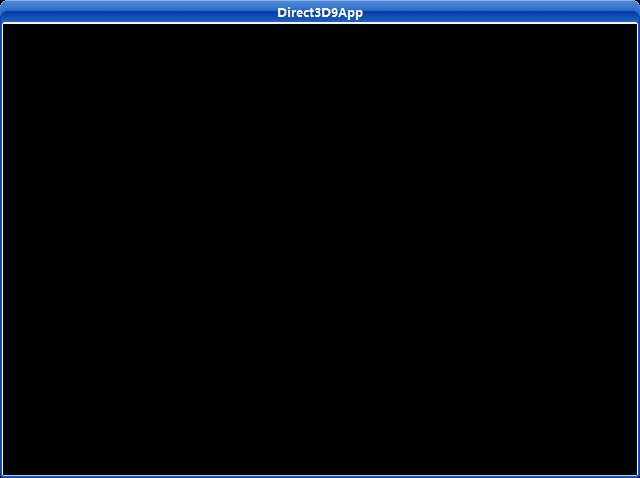
在本例程中,初始化了一个Direct3D应用程序并用黑色填充显示窗口(如图1.7)。

图1.7

所有的应用程序都包含了d3dUtility.h和d3dUtility.cpp这两个文件,它们所包含的函数实现了所有Direct3D应用程序都要去做的一些常见的功能。例如:创建一个窗口、初始化Direct3D、进入程序的消息循环等。

1.5.1d3dUtility.h/cpp

让我们先熟悉一下d3dUtility.h/cpp所提供的函数。d3dUtility.h如下:

#include <d3dx9.h>
    template<typename T>
void safe_release(T obj)
    {
if(obj == NULL)
return;
        obj->Release();
        obj = NULL;
    }
    template<typename T>
void safe_delete(T obj)
    {
if(obj == NULL)
return;
        delete obj;
        obj = NULL;
    }
///////////////////////////////////////////////////////////////////////////////////
    typedef bool (*DISPLAY_FUNC_PTR)(float timeDelta);
bool init_d3d(HINSTANCE instance,            // application instance
int width, int height,        // backbuffer dimensions
bool is_window,                // true - windowed mode, false - full screen mode.
              D3DDEVTYPE device_type,        // HAL or REF
                  IDirect3DDevice9** device);    // the create device
int enter_msg_loop(DISPLAY_FUNC_PTR display);
    LRESULT CALLBACK wnd_proc(HWND hwnd, UINT msg, WPARAM wParam, LPARAM lParam);

init_d3d——初始化一个应用程序主窗口并进行Direct3D的初始化。如果成功,则输出IDirect3DDevice9接口指针。从它的参数我们可以发现,我们能够设置窗口的大小和以窗口模式运行还是全屏模式运行。要知道它实现的细节,请看示例代码。

//-----------------------------------------------------------------------
    // Initialize windows and direct 3D.
    //-----------------------------------------------------------------------
bool init_d3d(HINSTANCE instance,            // application instance
int width, int height,        // backbuffer dimensions
bool is_window,                // true - windowed mode, false - full screen mode.
              D3DDEVTYPE device_type,        // HAL or REF
                  IDirect3DDevice9** device)    // the create device
{
const char* classname = "Direct3D9App";
        WNDCLASS wc;
        wc.style         = CS_HREDRAW | CS_VREDRAW;
        wc.lpfnWndProc   = wnd_proc;
        wc.cbClsExtra    = 0;
        wc.cbWndExtra    = 0;
        wc.hInstance     = instance;
        wc.hIcon         = LoadIcon(NULL, IDI_APPLICATION);
        wc.hCursor         = LoadCursor(NULL, IDC_ARROW);
        wc.hbrBackground = (HBRUSH) GetStockObject(WHITE_BRUSH);
        wc.lpszMenuName  = NULL;
        wc.lpszClassName = classname;
if(! RegisterClass(&wc))
        {
            MessageBox(NULL, "RegisterClass() - failed.", NULL, MB_OK);
return false;
        }
        HWND hwnd = CreateWindow(classname, "Direct3D9App", WS_EX_TOPMOST,
                                 0, 0, width, height, NULL, NULL, instance, NULL);
if(hwnd == NULL)
        {
            MessageBox(NULL, "CreateWindow() - failed.", NULL, MB_OK);
return false;
        }
        ShowWindow(hwnd, SW_SHOW);
        UpdateWindow(hwnd);
// initialize D3D
        // step 1: Create the IDirect3D9 object.
        IDirect3D9* d3d9 = Direct3DCreate9(D3D_SDK_VERSION);
if(d3d9 == NULL)
        {
            MessageBox(NULL, "Direct3DCreate9() - failed.", NULL, MB_OK);
return false;
        }
// step 2: check for hardware vertex presentation.
        D3DCAPS9 caps;   
        d3d9->GetDeviceCaps(D3DADAPTER_DEFAULT, device_type, &caps);
int vp = 0;
if(caps.DevCaps & D3DDEVCAPS_HWTRANSFORMANDLIGHT)
            vp = D3DCREATE_HARDWARE_VERTEXPROCESSING;
else
            vp = D3DCREATE_SOFTWARE_VERTEXPROCESSING;
// step 3: fill out the D3DPRESENT_PARAMETERS structure.
        D3DPRESENT_PARAMETERS d3dpp;
        d3dpp.BackBufferWidth                = width;
        d3dpp.BackBufferHeight                = height;
        d3dpp.BackBufferFormat                = D3DFMT_A8R8G8B8;
        d3dpp.BackBufferCount                = 1;
        d3dpp.MultiSampleType                = D3DMULTISAMPLE_NONE;
        d3dpp.MultiSampleQuality            = 0;
        d3dpp.SwapEffect                    = D3DSWAPEFFECT_DISCARD;
        d3dpp.hDeviceWindow                    = hwnd;
        d3dpp.Windowed                        = is_window;
        d3dpp.EnableAutoDepthStencil        = true;
        d3dpp.AutoDepthStencilFormat        = D3DFMT_D24S8;
        d3dpp.Flags                            = 0;
        d3dpp.FullScreen_RefreshRateInHz    = D3DPRESENT_RATE_DEFAULT;
        d3dpp.PresentationInterval            = D3DPRESENT_INTERVAL_IMMEDIATE;
// step 4: create the device.
if(FAILED(d3d9->CreateDevice(D3DADAPTER_DEFAULT, device_type, hwnd, vp, &d3dpp, device)))
        {
// try again using a 16-bit depth buffer
            d3dpp.AutoDepthStencilFormat = D3DFMT_D16;
if(FAILED(d3d9->CreateDevice(D3DADAPTER_DEFAULT, device_type, hwnd, vp, &d3dpp, device)))
            {
                d3d9->Release();    // done with d3d9 object
            MessageBox(NULL, "CreateDevice() - failed.", NULL, MB_OK);
return false;
            }
        }
        d3d9->Release();        // done with d3d9 object
return true;
    }

enter_msg_loop——这个函数封装了应用程序的消息循环。它需要输入一个显示函数的函数指针,显示函数为程序中绘制图形的代码块,这样做是为了使显示函数能够在空闲的时候被调用并显示场景,它的实现如下:

//-----------------------------------------------------------------------
    // Enter windows message loop and render game frames if there is no message
    // comes from thread message queue.
    //-----------------------------------------------------------------------
int enter_msg_loop(DISPLAY_FUNC_PTR display)
    {
        MSG msg;
        ZeroMemory(&msg, sizeof(MSG));
// The timeGetTime function retrieves the system time, in milliseconds.
        // The system time is the time elapsed since Windows was started.   
static float last_time = (float) timeGetTime();
while(msg.message != WM_QUIT)
        {
// The PeekMessage function dispatches incoming sent messages, checks the thread message queue for a
            // posted message, and retrieves the message (if any exist).
            //
            // If a message is available, the return value is nonzero.
            // If no messages are available, the return value is zero.
if(PeekMessage(&msg, NULL, 0, 0, PM_REMOVE))
            {
                TranslateMessage(&msg);
                DispatchMessage(&msg);
            }
else
            {
float curr_time  = (float) timeGetTime();
float time_delta = (curr_time - last_time) * 0.001f;
                display(time_delta);
                last_time = curr_time;
            }
        }
return (int) msg.wParam;
    }

与“time”有关的代码用于计算每次调用显示函数的时间间隔,即是每帧的时间。

safe_release——这个模版函数能方便的释放COM接口并将它们的值设为NULL

safe_delete——这个模版函数能方便的删除一个对象并将指向其的指针设为NULL

wnd_proc——应用程序主窗口的回调函数

1.5.2 实例框架

通过实例框架,我们形成了一种通用的方法去构造示例程序。每一个例程都含有三个函数的实现,当然这不包括回调函数和WinMain主函数。这三个函数用特定的代码实现特定的功能。这三个函数是:

bool setup()——在这个函数里,我们将准备一切该程序需要用到的东西,包括资源的分配,检查设备能力,设置应用程序的状态

void clearup()——这个函数将释放Setup()中分配的资源,如分配的内存。

bool display(float time_delta)——这个函数包含所有与我们绘图和显示有关的代码。参数timeDelta为每一帧的间隔时间,用来控制每秒的帧数。

这个示例程序将创建并初始化一个Direct3D应用程序,并用黑色填充屏幕。注意,我们使用了通用函数简化了初始化过程。

/*********************************************************************************
    PURPOISE:
        Demonstrates how to initialize Direct3D, how to use framework functions,
        and how to clear the screen to black.    
    *********************************************************************************/
    #include "D3DUtility.h"
    IDirect3DDevice9* g_device = NULL;
bool setup()
    {
// nothing to setup in this sample
return true;
    }
void cleanup()
    {
// nothing to cleanup in this sample
}
bool display(float timeDelta)
    {
// Only use Device methods if we have a valid device.
if(g_device == NULL)
return false;
// Instruct the device to set each pixel on the back buffer black - D3DCLEAR_TARGET: 0x00000000 (black);
        // and to set each pixel on the depth buffer to a value of 1.0 - D3DCLEAR_ZBUFFER: 1.0f.
    g_device->Clear(0, NULL, D3DCLEAR_TARGET | D3DCLEAR_ZBUFFER, 0x00000000, 1.0f, 0);
// swap the back and front buffers
    g_device->Present(NULL, NULL, NULL, NULL);
return true;
    }
    LRESULT CALLBACK wnd_proc(HWND hwnd, UINT msg, WPARAM wParam, LPARAM lParam)
    {
switch(msg)
        {
case WM_DESTROY:
            PostQuitMessage(0);
break;
case WM_KEYDOWN:
if(wParam == VK_ESCAPE)
                DestroyWindow(hwnd);
break;
        }
return DefWindowProc(hwnd, msg, wParam, lParam);
    }
int WINAPI WinMain(HINSTANCE inst, HINSTANCE, PSTR cmd_line, int cmd_show)
    {
if(! init_d3d(inst, 640, 480, true, D3DDEVTYPE_HAL, &g_device))
        {
            MessageBox(NULL, "init_d3d() - failed.", 0, MB_OK);
return 0;
        }
if(! setup())
        {
            MessageBox(NULL, "Steup() - failed.", 0, MB_OK);
return 0;
        }
        enter_msg_loop(display);
        cleanup();
        g_device->Release();
return 0;
    }

Display方法调用了IDirect3DDevice::Clear方法,分别用黑色和1.0填充后备表面和深度/模版缓冲。如果应用程序不停止的话,我们会一直执行这个操作。IDirect3DDevice::Clear声明如下:

HRESULT Clear( DWORD Count, CONST D3DRECT * pRects, DWORD Flags, D3DCOLOR Color, float Z, DWORD Stencil );

Count——pRects 组中的矩形的个数

pRects——将要清除的屏幕矩形的数组,这使我们可以清除屏幕的某一部分

Flags——指定在哪些表面上执行清除表面的操作

         D3DCLEAR_TARGET——目的表面,通常为后备表面

         D3DCLEAR_ZBUFFER——深度缓冲

         D3DCLEAR_STENCIL——模版缓冲

Color——使用什么颜色填充清除的表面

Z——设置深度缓冲的值

Stencil——设置模版缓冲的值

屏幕被填充后,要调用IDirecte3DDevice9::Present方法进行后备表面的交换。

Windows 回调函数为一组事件集,即,我们可按ESC键让程序退出。

最后,WinMain按如下步骤运行:

1. 初始化主显示窗口和Direct3D

2. 调用setup进行程序的准备工作

3. 使用display函数作为参数进入消息循环

4. 清除应用程序最后释放IDirecte3DDevice9对象

注意:不要忘了在你的工程中加入d3d9.lib、d3dx9.lib、winmm.lib这三个库!

下载源码

1.3.2 Multisampling
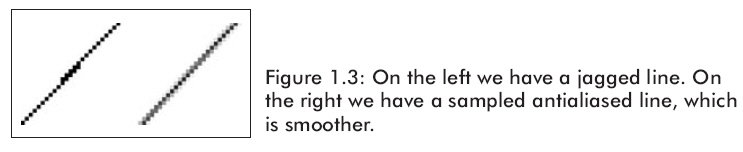
由于使用像素矩阵来表示图像,在显示时会出现锯齿状,Multisampling就是使其变得平滑的技术。它的一种最普通的用法即为——全屏抗锯齿(看图1.3)。

D3DMULTISAMPLE_TYPE枚举类型使我们可以指定全屏抗锯齿的质量等级:

D3DMULTISAMPLE_NONE——不使用全屏抗锯齿。

D3DMULTISAMPLE_1_SAMPLE…D3DMULTISAPLE_16_SAMPLE——设定1~16级的等级。

Defines the levels of full-scene multisampling that the device can apply.

typedef enum D3DMULTISAMPLE_TYPE
{
D3DMULTISAMPLE_NONE = 0,
D3DMULTISAMPLE_NONMASKABLE = 1,
D3DMULTISAMPLE_2_SAMPLES = 2,
D3DMULTISAMPLE_3_SAMPLES = 3,
D3DMULTISAMPLE_4_SAMPLES = 4,
D3DMULTISAMPLE_5_SAMPLES = 5,
D3DMULTISAMPLE_6_SAMPLES = 6,
D3DMULTISAMPLE_7_SAMPLES = 7,
D3DMULTISAMPLE_8_SAMPLES = 8,
D3DMULTISAMPLE_9__SAMPLES = 9,
D3DMULTISAMPLE_10_SAMPLES = 10,
D3DMULTISAMPLE_11_SAMPLES = 11,
D3DMULTISAMPLE_12_SAMPLES = 12,
D3DMULTISAMPLE_13_SAMPLES = 13,
D3DMULTISAMPLE_14_SAMPLES = 14,
D3DMULTISAMPLE_15_SAMPLES = 15,
D3DMULTISAMPLE_16_SAMPLES = 16,
D3DMULTISAMPLE_FORCE_DWORD = 0xffffffff,
} D3DMULTISAMPLE_TYPE, *LPD3DMULTISAMPLE_TYPE;

使用全屏抗锯齿的功能将大大的降低了程序运行速度。如果你实在很想使用它的话,要记住使用IDirect3D9::CheckDeviceMultisampleType来检测你的显卡是否支持。

1.3.3像素格式

当我们创建一个表面或纹理时,经常需要指定这些Direct3D资源的像素格式。它是由D3DFORMAT枚举类型的一个成员来定义的。这里例举一部分:

D3DFMT_R8G8B8——表示一个24位像素,从左开始,8位分配给红色,8位分配给绿色,8位分配给蓝色。

D3DFMT_X8R8G8B8——表示一个32位像素,从左开始,8位不用,8位分配给红色,8位分配给绿色,8位分配给蓝色。

D3DFMT_A8R8G8B8——表示一个32位像素,从左开始,8位为ALPHA通道,8位分配给红色,8位分配给绿色,8位分配给蓝色。

D3DFMT_A16B16G16R16F——表示一个64位浮点像素,从左开始,16位为ALPHA通道,16位分配给蓝色,16位分配给绿色,16位分配给红色。

D3DFMT_A32B32G32R32F——表示一个128位浮点像素,从左开始,32位为ALPHA通道,32位分配给蓝色,32位分配给绿色,32位分配给红色。

想了解全部的像素格式请查看SDK文档中的D3DFORMAT部分。

注意:这前三种格式(D3DFMT_R8G8B8、D3DFMT_X8R8G8B8、D3DFMT_A8R8G8B8)是最常用并为大部分显卡所支持。但浮点像素格式或其它一些类型的支持并不是很广泛,在使用它们前请先检测你的显卡,看是否支持。

1.3.4 内存池

表面和其它一些Direct3D资源被放在多种内存池中。内存池的种类由D3DPOOL枚举类型的一个成员来指定。可用到的内存池有下列几种:

D3DPOOL_DEFAULT——表示Direct3D将根据资源的类型和用途把它们放在最合适的地方。这有可能是显存、AGP内存或者系统内存中。值得注意的是,这种内存池中的资源必须要在IDirect3DDevice9::Reset被调用之前消毁掉,并且再次使用时必须重新初始化。

D3DPOOL_MANAGED——资源将由Direct3D管理并且按设备的需要来指定放在显存还是放在AGP内存中。当应用程序访问和改变资源时它先把这些资源拷贝到系统内存中,当需要时Direct3D会自动把它们拷贝到显存里。

D3DPOOL_SYSTEMMEM——指定资源放在系统内存中。

D3DPOOL_SCRATCH——指定资源放在系统内存中,它与D3DPOOL_SYSTEMMEM不同之处在于使用这些资源不必受图形设备的限制。因此,参数使图形设备不能访问该内存池的资源,但资源可以相互拷贝。

AGP内存

AGP(Accelerate Graphical Port),加速图形接口。随着显示芯片的发展,PCI总线日益无法满足其需求。英特尔于1996年7月正式推出了AGP接口,它是一种显示卡专用的局部总线。严格的说,AGP不能称为总线,它与PCI总线不同,因为它是点对点连接,即连接控制芯片和AGP显示卡,但在习惯上我们依然称其为AGP总线。AGP接口是基于PCI 2.1 版规范并进行扩充修改而成,工作频率为66MHz。

  AGP总线直接与主板的北桥芯片相连,且通过该接口让显示芯片与系统主内存直接相连,避免了窄带宽的PCI总线形成的系统瓶颈,增加3D图形数据传输速度,同时在显存不足的情况下还可以调用系统主内存。所以它拥有很高的传输速率,这是PCI等总线无法与其相比拟的。

由于采用了数据读写的流水线操作减少了内存等待时间,数据传输速度有了很大提高;具有133MHz及更高的数据传输频率;地址信号与数据信号分离可提高随机内存访问的速度;采用并行操作允许在CPU访问系统RAM的同时AGP显示卡访问AGP内存;显示带宽也不与其它设备共享,从而进一步提高了系统性能。

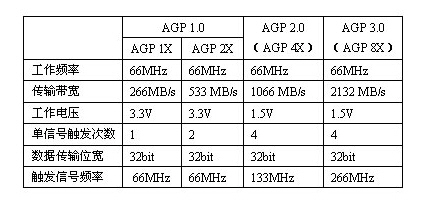
  AGP标准在使用32位总线时,有66MHz和133MHz两种工作频率,最高数据传输率为266Mbps和533Mbps,而PCI总线理论上的最大传输率仅为133Mbps。目前最高规格的AGP 8X模式下,数据传输速度达到了2.1GB/s。

  AGP接口的发展经历了AGP1.0(AGP1X、AGP2X)、AGP2.0(AGP Pro、AGP4X)、AGP3.0(AGP8X)等阶段,其传输速度也从最早的AGP1X的266MB/S的带宽发展到了AGP8X的2.1GB/S。

AGP 1.0(AGP1X、AGP2X)
1996年7月AGP 1.0 图形标准问世,分为1X和2X两种模式,数据传输带宽分别达到了266MB/s和533MB/s。这种图形接口规范是在66MHz PCI2.1规范基础上经过扩充和加强而形成的,其工作频率为66MHz,工作电压为3.3v,在一段时间内基本满足了显示设备与系统交换数据的需要。这种规范中的AGP带宽很小,现在已经被淘汰了,只有在前几年的老主板上还见得到。

AGP2.0(AGP4X)
显示芯片的飞速发展,图形卡单位时间内所能处理的数据呈几何级数成倍增长,AGP 1.0 图形标准越来越难以满足技术的进步了,由此AGP 2.0便应运而生了。1998年5月份,AGP 2.0 规范正式发布,工作频率依然是66MHz,但工作电压降低到了1.5v,并且增加了4x模式,这样它的数据传输带宽达到了1066MB/sec,数据传输能力大大地增强了。

AGP Pro
AGP Pro接口与AGP 2.0同时推出,这是一种为了满足显示设备功耗日益加大的现实而研发的图形接口标准,应用该技术的图形接口主要的特点是比AGP 4x略长一些,其加长部分可容纳更多的电源引脚,使得这种接口可以驱动功耗更大(25-110w)或者处理能力更强大的AGP显卡。这种标准其实是专为高端图形工作站而设计的,完全兼容AGP 4x规范,使得AGP 4x的显卡也可以插在这种插槽中正常使用。AGP Pro在原有AGP插槽的两侧进行延伸,提供额外的电能。它是用来增强,而不是取代现有AGP插槽的功能。根据所能提供能量的不同,可以把AGP Pro细分为AGP Pro110和AGP Pro50。在某些高档台式机主板上也能见到AGP Pro插槽,例如华硕的许多主板。

AGP 3.0(AGP8X)
2000年8月,Intel推出AGP3.0规范,工作电压降到0.8V,并增加了8x模式,这样它的数据传输带宽达到了2133MB/sec,数据传输能力相对于AGP 4X成倍增长,能较好的满足当前显示设备的带宽需求。

AGP接口的模式传输方式
不同AGP接口的模式传输方式不同。1X模式的AGP,工作频率达到了PCI总线的两倍—66MHz,传输带宽理论上可达到266MB/s。AGP 2X工作频率同样为66MHz,但是它使用了正负沿(一个时钟周期的上升沿和下降沿)触发的工作方式,在这种触发方式中在一个时钟周期的上升沿和下降沿各传送一次数据,从而使得一个工作周期先后被触发两次,使传输带宽达到了加倍的目的,而这种触发信号的工作频率为133MHz,这样AGP 2X的传输带宽就达到了266MB/s×2(触发次数)=533MB/s的高度。AGP 4X仍使用了这种信号触发方式,只是利用两个触发信号在每个时钟周期的下降沿分别引起两次触发,从而达到了在一个时钟周期中触发4次的目的,这样在理论上它就可以达到266MB/s×2(单信号触发次数)×2(信号个数)=1066MB/s的带宽了。在AGP 8X规范中,这种触发模式仍然使用,只是触发信号的工作频率变成266MHz,两个信号触发点也变成了每个时钟周期的上升沿,单信号触发次数为4次,这样它在一个时钟周期所能传输的数据就从AGP4X的4倍变成了8倍,理论传输带宽将可达到266MB/s×4(单信号触发次数)×2(信号个数)=2133MB/s的高度了。

目前常用的AGP接口为AGP4X、AGP PRO、AGP通用及AGP8X接口。需要说明的是由于AGP3.0显卡的额定电压为0.8—1.5V,因此不能把AGP8X的显卡插接到AGP1.0规格的插槽中。这就是说AGP8X规格与旧有的AGP1X/2X模式不兼容。而对于AGP4X系统,AGP8X显卡仍旧在其上工作,但仅会以AGP4X模式工作,无法发挥AGP8X的优势。

1.3.5 交换链和页面切换

Direct3D通常创建2~3个表面组成一个集合,即为交换链,通常由IDirect3DSwapChain接口来表示。我们不必去了解它更详细的细节。我们也很少去管理它,通常Direct3D会自己去管理。所以我们只要大概的了解一下它就可以了。

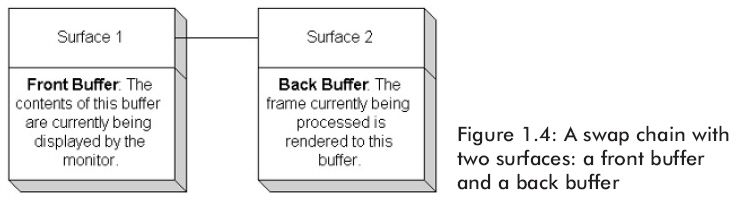
交换链以及页面切换技巧被用在使两帧动画之间过度更平滑。图1.4展示的是一个有两个绘制表面的交换链。

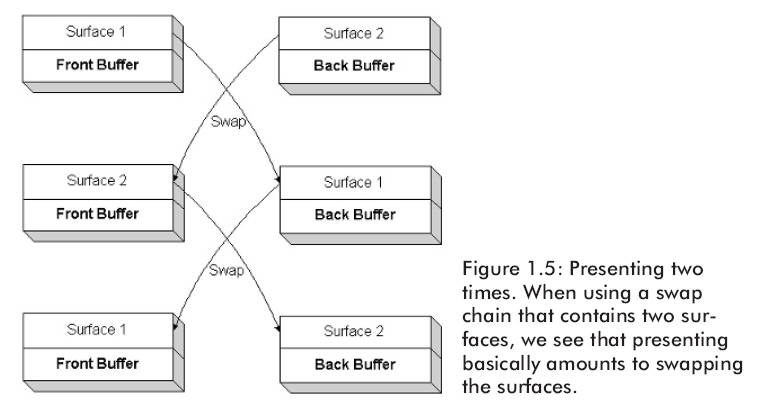
如图1.4,在Front Buffer中的表面将用来在屏幕上显示。显示器不能即时显示Front Buffer中表示的图像;通常情况下,它是每六十分之一秒刷新显示一次,即刷新率为60赫兹。应用程序的帧率经常与监视器的刷新率不同步(比如应用程序的渲染帧速度可能比显示器的刷新速度快)。然而,我们不能在显示器显示完成当前帧之前就更新有下一帧动画的Front Buffer内容,但是我们又不想让程序停止渲染而去等待显示器显示。因此,我们渲染另一个屏幕表面Back Buffer。当监视器将Front Buffer显示出来后,Front Buffer就被放到交换链的末端,即变成图中的Back Buffer,而Back Buffer就会变成交换链中的Front Buffer。这个过程就叫做presenting。图1.5表示了交换的整个过程。

因此,我们绘图代码的结构就会像下面这样:

1. Render to back buffer

2. Present the back buffer

3. Goto (1)

1.3.6 深度缓冲

深度缓冲也是一个表面,但它不是用来存储图像数据的,而是用来记录像素的深度信息。它将确定哪一个像素最后被绘制出来。所以,如果要绘制640*480分辨率的图片,那么就会有640*480个深度值。

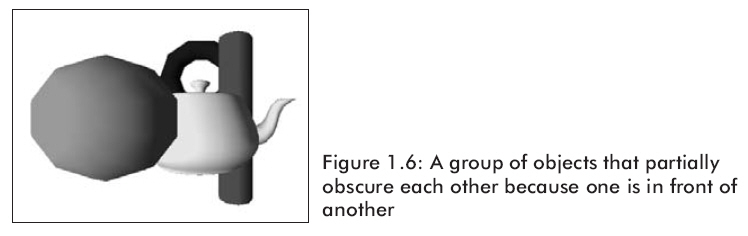
图1.6展示了一个简单的场景,在这个场景里,一个物体把将另一个物体的一部分遮住了。为了使Direct3D能确定物体的前后关系并正确的绘制出来,我们使用一种深度缓冲,又叫做z-buffering的技术。

深度缓冲为每一个像素计算深度值,并进行深度测试。通过深度测试,我们可以比较出哪个像素离照相机更近,并将它画出来。这样就可以只绘制最靠近照相机的像素,被遮住的像素就不会被画出来。

深度缓冲的格式决定着深度测试的精确性。一个24位的深度缓冲比16位的深度缓冲更精确。通常,应用程序在24位深度缓冲下就能工作的很好,但是Direct3D也同时支持32位的深度缓冲。

D3DFMT_D32——表示32位深度缓冲

D3DFMT_D24S8——表示24位深度缓冲并保留8位模版缓冲(stencil buffer)

D3DFMT_D24X8——表示24位深度缓冲

D3DFMT_D24X4S4——表示24位深度缓冲并保留4位模版缓冲

D3DFMT_D16——表示16位深度缓冲

1.3.7 顶点处理

顶点是3D图形学的基础,它能够通过两种不同的方法被处理,一种是软件方式(software vertex processing),一种是硬件方式(hardware vertex processing),前者总是被支持且永远可用,后者必须要显卡硬件支持顶点处理才可用。

使用硬件顶点处理总是首选,因为它比软件方式更快,而且不占用CPU资源,这意味CPU至少可以有更多的空闲时间进行别的计算。

注意:如果一块显卡支持硬件顶点处理的话,也就是说它也支持硬件几何转换和光源计算。

1.3.8 设备能力

Direct3D支持的每一项特性都对应于D3DCAPS9结构的一个数据成员。初始化一个D3DCAPS9实例应该以你的设备实际支持特性为基础。因此,在我们的应用程序里,我们能够通过检测D3DCAPS9结构中相对应的某一成员来检测设备是否支持这一特性。

下面将举例说明,假设我们想要检测显卡是否支持硬件顶点处理(换句话说,就是显卡是否支持硬件几何转换和光源计算)。通过查阅SDK中的D3DCAPS9结构,可以得知数据成员D3DCAPS9::DevCaps中的D3DDEVCAPS_HWTRANSFORMANDLIGHT位表示硬件是否支持硬件顶点处理即硬件几何变换和光源计算。程序如下:

bool supportsHardwareVertexProcessing;
// If the bit is "on" then that implies the hardware device supports it.
if( caps.DevCaps & D3DDEVCAPS HWTRANSFORMANDLIGHT )
{
// Yes, the bit is on, so it is supported.
      supportsHardwareVertexProcessing = true;
}
else
{
// No, the bit is off, so it is not supported.
      hardwareSupportsVertexProcessing = false;
}

注意:DevCaps即为“device capabilities。

1.4 初始化Direct3D

下面几点说明怎样初始化Direct3D。根据下边的步骤你能初始化Direct3D:

1.获得一个IDirect3D9接口指针。这个接口用于获得物理设备的信息和创建一个IDirect3DDevice9接口,它是一个代表我们显示3D图形的物理设备的C++对象。

2.检查设备能力(D3DCAPS9),搞清楚主显卡是否支持硬件顶点处理。我们需要知道假如它能支持,我们就能创建IDirect3DDevice9接口。

3.初始化一个D3DPRESENT_PARAMETERS结构实例,这个结构包含了许多数据成员允许我们指定将要创建的IDirect3DDevice9接口的特性。

4.创建一个基于已经初始化好的D3DPRESENT_PARAMETERS结构的IDirect3DDevice9对象。它是一个代表我们显示3D图形的物理设备的C++对象。

请注意,我们使用主显示设备绘制3D图形,如果你的机子只有一块显卡,那它就是主显示设备。如果你有多个显卡,那么你当前使用的显卡将会成为主显示设备(如:用来显示Windows桌面的显卡)。

1.4.1获得IDirect3D9接口

Direct3D的初始化是从获得一个IDirect3D9接口指针开始的。使用一个专门的Direct3D函数来完成这个工作是非常容易的,代码如下:

IDirect3D9* _d3d9;

_d3d9 = Direct3DCreate9(D3D_SDK_VERSION);

Direct3DCreate9的唯一一个参数总是D3D_SDK_VERSION,这可以保证应用程序通过正确的头文件被生成。如果函数调用失败,那么它将返回一个空指针。

IDirect3D9对象通常有两个用途:设备列举和创建IDirect3DDevice9对象。设备列举即为查明系统中显示设备的技术特性,显示模式、格式,以及其它每一种显卡各自支持的特性。创建代表物理设备的IDirect3DDevice9对象,我们需要利用这个物理设备的显示模式结构和格式来创建它。为了找到一个工作配置,我们必须使用IDirect3D9的列举方法。

然而,设备列举实在太慢了,为了使Direct3D运行得尽可能快,我们通常不使用这个测试,除了下一节所谈到的一项测试。为了安全跳过它,我们可以选择总是被所有显卡都支持的“安全”配置。

1.4.2 检测硬件顶点处理

当我们创建一个IDirect3DDevice9对象来表示主显示设备时,必须要设定其顶点处理的类型。如果可以的话,当然要选用硬件顶点处理,但是由于并非所有显卡都支持硬件顶点处理,因此我们必须首先检查显卡是否支持。

首先我们要根据主显示设备的技术特性来初始化D3DCAPS9实例。可以使用如下方法:

HRESULT IDirect3D9::GetDeviceCaps(

       UINT Adapter,

       D3DDEVTYPE DeviceType,

       D3DCAPS9 *pCaps

);

Adapter——指定要获得哪个显示适配器的特性

DeviceType——指定设备类型(硬件设备(D3DDEVTYPE_HAL),软件设备(D3DDEVTYPE_REF))

PCaps——返回一个已初始化的D3DCAPS9结构

然后,我们就可以象1.3.8部分那样检测显卡的能力了。下面就是代码片段:

// Fill D3DCAPS9 structure with the capabilities of the primary display adapter.
D3DCAPS9 caps;
d3d9->GetDeviceCaps(
      D3DADAPTER_DEFAULT, // Denotes primary display adapter.
      deviceType, // Specifies the device type, usually D3DDEVTYPE HAL.
&caps);     // Return filled D3DCAPS9 structure that contains
// the capabilities of the primary display adapter.
// Can we use hardware vertex processing?
int vp = 0;
if( caps.DevCaps & D3DDEVCAPS_HWTRANSFORMANDLIGHT )
{
// yes, save in 'vp' the fact that hardware vertex processing is supported.
      vp = D3DCREATE HARDWARE VERTEXPROCESSING;
}
else
{
// no, save in 'vp' the fact that we must use software vertex processing.
      vp = D3DCREATE_SOFTWARE_VERTEXPROCESSING;
}

观察代码,我们使用变量vp来存储顶点处理类型。这是因为在稍后创建IDirect3DDevice9对象时要求指定其顶点处理的类型。

注意:标识符D3DCREATE_HARDWARE_VERTEXPROCESSING和D3DCREATE_SOFTWARE_VERTEXPROCESSING是预定义的值,它们分别代表硬件顶点处理和软件顶点处理。

技巧:若我们开发有一些新的,高级特性的程序,在使用前我们总是先检查硬件是否支持这些特性。

注意:如果一个应用程序在你的机子上不能运行,说明它用到的一些特性可能你的显卡并不支持,可以试试把设备类型换成REF。

1.4.3 填充D3DPRESENT_PARAMETERS结构

初始化过程的下一步是填充一个D3DPRESENT_PARAMETERS结构的实例。这个结构用于设定我们将要创建的IDirect3DDevice9对象的一些特性,它的定义如下:

typedef struct _D3DPRESENT_PARAMETERS_ {

       UINT BackBufferWidth;

       UINT BackBufferHeight;

       D3DFORMAT BackBufferFormat;

       UINT BackBufferCount;

       D3DMULTISAMPLE_TYPE MultiSampleType;

       DWORD MultiSampleQuality;

       D3DSWAPEFFECT SwapEffect;

       HWND hDeviceWindow;

       BOOL Windowed;

       BOOL EnableAutoDepthStencil;

       D3DFORMAT AutoDepthStencilFormat;

       DWORD Flags;

       UINT FullScreen_RefreshRateInHz;

       UINT PresentationInterval;

} D3DPRESENT_PARAMETERS;

下面介绍其比较重要的数据成员,至于更详细的信息,请查阅SDK:

BackBufferWidth——后备缓冲表面的宽度(以像素为单位)

BackBufferHeight——后备缓冲表面的高度(以像素为单位)

BackBufferFormat——后备缓冲表面的像素格式(如:32位像素格式为D3DFMT——A8R8G8B8)

BackBufferCount——后备缓冲表面的数量,通常设为“1”,即只有一个后备表面

MultiSampleType——全屏抗锯齿的类型,详情请看SDK

MultiSampleQuality——全屏抗锯齿的质量等级,详情看SDK

SwapEffect——指定表面在交换链中是如何被交换的,取D3DSWAPEFFECT枚举类型中的一个成员。其中D3DSWAPEFFECT_DISCARD是最有效的

hDeviceWindow——与设备相关的窗口句柄,你想在哪个窗口绘制就写那个窗口的句柄

Windowed——BOOL型,设为true则为窗口模式,false则为全屏模式

EnableAutoDepthStencil——设为true,D3D将自动创建深度/模版缓冲

AutoDepthStencilFormat——深度/模版缓冲的格式

Flags——一些附加特性,设为0或D3DPRESENTFLAG类型的一个成员。下列两个最常用的标志

全部的标志请查阅SDK:

D3DPRESENTFLAG_LOCKABLE_BACKBUFFER——设定后备表面能够被锁定,这会降低应用程序的性能

D3DPRESENTFLAG_DISCARD_DEPTHSTENCIL——深度/模版缓冲在调用IDirect3DDevice9::present方法后将被删除,这有利于提升程序性能

FullScreen_RefreshRateInHz——刷新率,设定D3DPRESENT_RATE_DEFAULT使用默认刷新率

PresentationInterval——属于D3DPRESENT成员,又有两个常用标志,其余请查SDK:

         D3DPRESENT_INTERVAL_IMMEDIATE——立即交换

         D3DPRESENT_INTERVAL_DEFAULT——D3D选择交换速度,通常等于刷新率

填充示例如下:

D3DPRESENT_PARAMETERS d3dpp;

d3dpp.BackBufferWidth = 800;

d3dpp.BackBufferHeight = 600;

d3dpp.BackBufferFormat = D3DFMT_A8R8G8B8; //像素格式

d3dpp.BackBufferCount = 1;

d3dpp.MultiSampleType = D3DMULTISAMPLE_NONE;

d3dpp.MultiSampleQuality = 0;

d3dpp.SwapEffect = D3DSWAPEFFECT_DISCARD;

d3dpp.hDeviceWindow = hwnd;

d3dpp.Windowed = false; // fullscreen

d3dpp.EnableAutoDepthStencil = true;

d3dpp.AutoDepthStencilFormat = D3DFMT_D24S8; // depth format

d3dpp.Flags = 0;

d3dpp.FullScreen_RefreshRateInHz = D3DPRESENT_RATE_DEFAULT;

d3dpp.PresentationInterval = D3DPRESENT_INTERVAL_IMMEDIATE;

1.4.4 创建IDirect3DDevice9对象

在填充完了D3DPRESENT_PARAMETERS结构后,我们就可以用下面的方法创建一个IDirect3DDevice9对象了:

HRESULT IDirect3D9::CreateDevice(

       UINT Adapter,

       D3DDEVTYPE DeviceType,

       HWND hFocusWindow,

       DWORD BehaviorFlags,

       D3DPRESENT_PARAMETERS *pPresentationParameters,

       IDirect3DDevice9** ppReturnedDeviceInterface

);

Adapter——指定对象要表示的物理显示设备

DeviceType——设备类型,前面说过

hFocusWindow——同我们在前面d3dpp.hDeviceWindow的相同

BehaviorFlags——设定为D3DCREATE_SOFTWARE_VERTEXPROCESSING或者D3DCREATE_HARDWARE_VERTEXPROCESSING

pPresentationParameters——指定一个已经初始化好的D3DPRESENT_PARAMETERS实例

ppReturnedDeviceInterface——返回创建的设备

例子:

IDirect3DDevice9* device = 0;
hr = d3d9->CreateDevice(
       D3DADAPTER_DEFAULT, // primary adapter
       D3DDEVTYPE_HAL, // device type
       hwnd, // window associated with device
       D3DCREATE_HARDWARE_VERTEXPROCESSING, // vertex processing type
&d3dpp, // present parameters
&device); // returned created device
if( FAILED(hr) )
{
       ::MessageBox(0, "CreateDevice() - FAILED", 0, 0);
return 0;
}

平面

D3DX平面

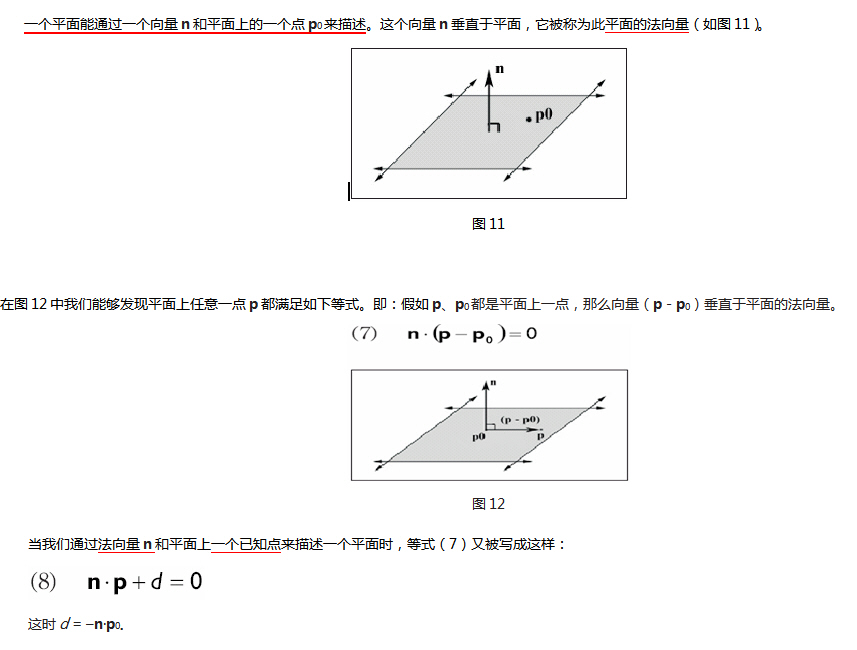
在代码中描述一个平面:仅仅需要一个法向量n和常数d就可以了。因此我们就使用一个4D向量(我们记录成(n, d))来实现它。D3DX库中用如下的结构来定义一个平面:

typedef struct D3DXPLANE
{
#ifdef __cplusplus
public:
D3DXPLANE() {}
D3DXPLANE( CONST FLOAT* );
D3DXPLANE( CONST D3DXFLOAT16* );
D3DXPLANE( FLOAT a, FLOAT b, FLOAT c, FLOAT d );

// casting
operator FLOAT* ();
operator CONST FLOAT* () const;

// unary operators
D3DXPLANE operator + () const;
D3DXPLANE operator - () const;

// binary operators
BOOL operator == ( CONST D3DXPLANE& ) const;
BOOL operator != ( CONST D3DXPLANE& ) const;
#endif //__cplusplus
FLOAT a, b, c, d;
} D3DXPLANE, *LPD3DXPLANE;

对照等式(8)可知:这里a, b和c是平面法向量n的成员,d就是那个常数。

点和平面的空间关系

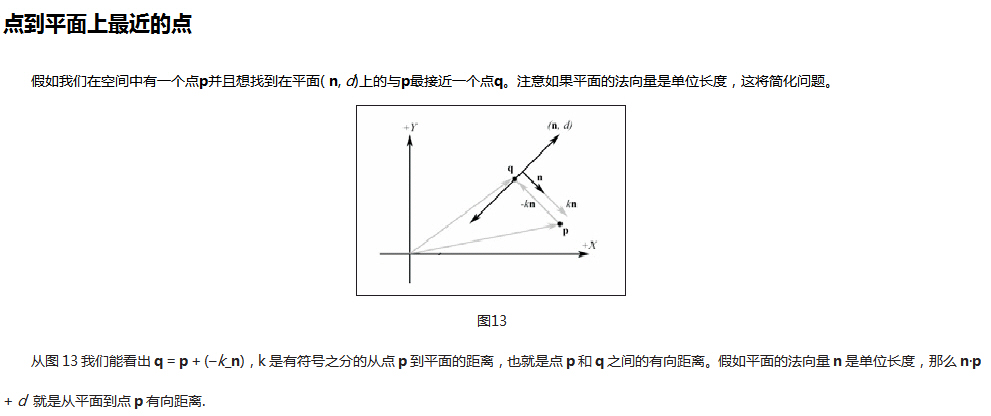
我们判定点和平面的关系主要是利用等式(8)来实现。例如,假设平面(n, d),我们能判定点p和平面的关系

假如n·p + d = 0,那么点p与平面共面。

       假如n·p + d >0,那么点p在平面的前面且在平面的正半空间里。

       假如n·p + d <0,那么点p在平面的背面且在平面的负半空间里。

下边的D3DX函数就是利用n·p + d 来判定点和平面的关系的函数:

FLOAT D3DXPlaneDotCoord(

       CONST D3DXPLANE *pP, // 平面

       CONST D3DXVECTOR3 *pV // 点

);

// 测试点相对于平面的位置

D3DXPLANE p(0.0f, 1.0f, 0.0f, 0.0f);

D3DXVECTOR3 v(3.0f, 5.0f, 2.0f);

float x = D3DXPlaneDotCoord( &p, &v );

if( x approximately equals 0.0f ) // v在平面.上

if( x > 0 ) // v在正半空间

if( x < 0 ) // v在负半空间

创建平面

我们能通过两种方法创建平面。

第一种方法,直接用指定法线和点创建平面。假设法线n和在平面上的已知点p0,我们就能求出d:

n·p0+ d = 0

n·p0 = -d

-n·p0 = d

D3DX库提供如下函数来完成创建平面的任务:

D3DXPLANE *D3DXPlaneFromPointNormal(

       D3DXPLANE* pOut, // Result.

       CONST D3DXVECTOR3* pPoint, // Point on the plane.

       CONST D3DXVECTOR3* pNormal // The normal of the plane.

);

第二种方法我们能通过在平面上的3个点创立一个平面

假如有点p0, p1, p2,那么我们就能得到平面上的两个向量:

u = p1 - p0

v = p2 - p0

因此我们能通过把平面上的两个向量进行叉乘得到平面的法线。回忆左手坐标系。

n = u × v

Then, -(n · p0) = d.

D3DX库提供如下函数来完成通过同一平面上的3个点确定一个平面:

D3DXPLANE *D3DXPlaneFromPoints(

       D3DXPLANE* pOut, // Result.

       CONST D3DXVECTOR3* pV1, // Point 1 on the plane.

       CONST D3DXVECTOR3* pV2, // Point 2 on the plane.

       CONST D3DXVECTOR3* pV3 // Point 3 on the plane.

);

变换平面

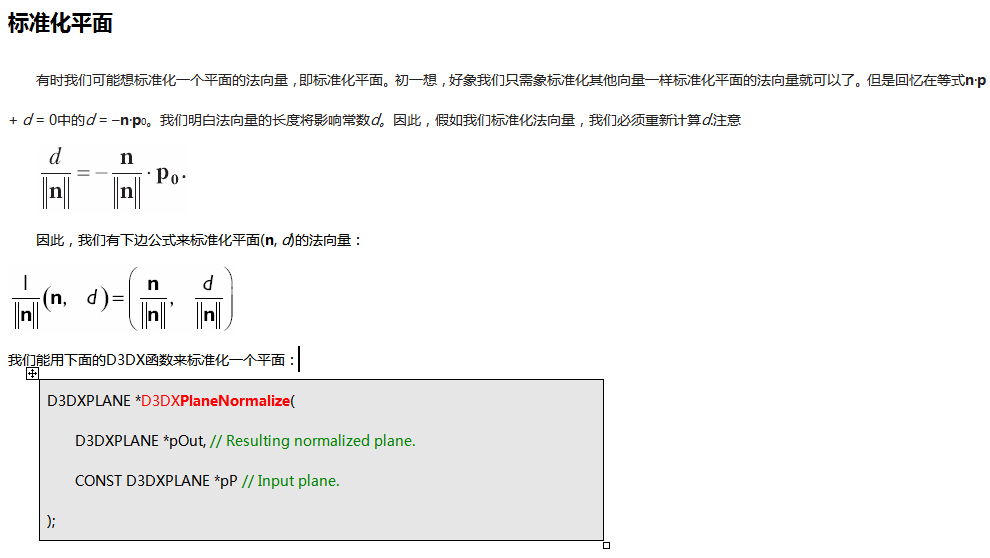
我们能够通过如下处理来变换一个面(n, d),就象一个4D向量通过乘以它所期望的变换矩阵的逆矩阵一样来达到变换目的。注意平面的法向量必须首先被标准化。

我们能用下面的D3DX函数来完成操作:

D3DXPLANE *D3DXPlaneTransform(

       D3DXPLANE *pOut, // Result

       CONST D3DXPLANE *pP, // Input plane.

       CONST D3DXMATRIX *pM // Transformation matrix.

);

示例代码:

D3DXMATRIX T(...); // Init. T to a desired transformation.

D3DXMATRIX inverseOfT;

D3DXMATRIX inverseTransposeOfT;

D3DXMatrixInverse( &inverseOfT, 0, &T );

D3DXMatrixTranspose( &inverseTransposeOfT, &inverseOfT );

D3DXPLANE p(...); // Init. Plane.

D3DXPlaneNormalize( &p, &p ); // make sure normal is normalized.

D3DXPlaneTransform( &p, &p, &inverseTransposeOfT );

射线(可选的)

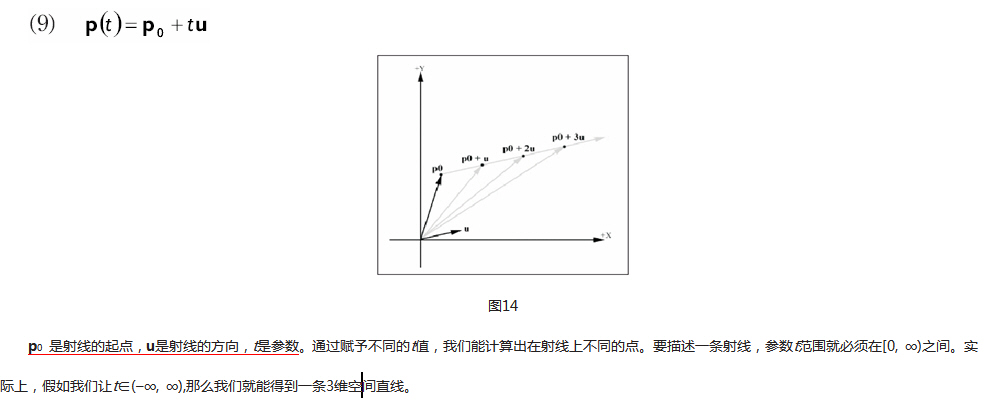
设想在游戏中的一个玩家,正用他的枪射击敌人。我们怎么判断子弹是否从一个位置击中另一个位置的目标?一个方法是用一条射线模拟子弹,用一个球体模型模拟敌人。(球体模型只是一个球体,它紧紧的围绕一个物体,从而粗略地表示它的大小。球体模型将在第11章中做更详细的介绍。)那么通过计算我们就能够判定是否射中球体。在这部分我们学习射线的数学模型。

射线

一条射线能用一个起点和方向来描述。射线的参数方程是:

线/面相交

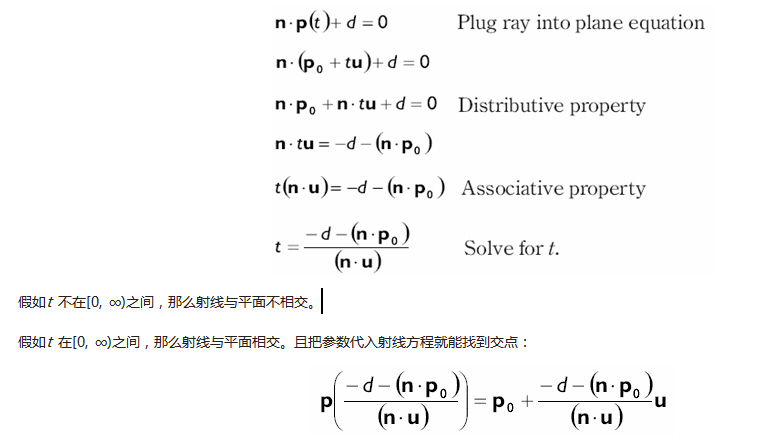
假设一条射线p(t) = p0 + tu 和 一个平面n·p + d = 0,我们想知道射线是否与平面相交,以及相交的交点信息(如果相交的话)。照这样做,我们把射线代入平面方程并且求满足平面方程的参数t,解答出来的参数就是相交的点。

把等式(9)代入平面方程:

Direct3D是一种低层图形API,它能让我们利用3D硬件加速来渲染3D世界。我们可以把Direct3D看作是应用程序和图形设备之间的中介。例如通知图形设备清空屏幕,应用程序将调用Direct3D的IDirect3DDevice9::Clear方法。图1.1显示了应用程序、Direct3D和图形设备之间的关系。

图1.1中Direct3D所表示的是Direct3D中已定义的,供程序员使用的Direct3D接口和函数的集合。这些接口和函数代表了当前版本的Direct3D所支持的全部特性。注意:仅仅因为Direct3D支持某种特性,并不意味着你所使用的图形硬件(显卡)也能支持它。

如图1.1所示,在Direct3D和图形设备之间有一层中介——叫做硬件抽象层(HAL,Hardware Abstraction Layer)。Direct3D不能直接作用于图形设备,因为现在市面上的显卡种类实在是太多了并且每种显卡都有不同的性能和处理事件的方式。例如,两种不同的显卡实现清屏的方式也可能是不同的。因此,Direct3D要求设备制造商实现HAL。HAL是一组指示设备执行某种操作的特殊设备代码的集合。用这种方法,Direct3D避免了必须去了解某个设备的特殊细节,使它能够独立于硬件设备。

设备制造商在HAL中实现他们的产品所支持的所有特性。HAL将不会实现那些Direct3D支持但硬件产品不支持的特性。调用一个HAL中没有实现的Direct3D的函数将会出错,除非它是顶点处理操作,因为这个功能可以由软件模拟来实现。因此当使用某些仅由市面上少数显卡所支持的高级特性时,必须检测一下设备是否支持。

1.1.1 REF设备
你也许想把一些你的设备不支持的Direct3D函数写入程序。为了达到这个目的,Direct3D提供了REF设备,它用软件模拟了所有的Direct3D API。这允许你写并测试那些你的显卡不支持的Direct3D特性的代码。懂得REF设备仅仅用于开发阶段,这是很重要的。它只会和DirectX SDK一起被装载,而不会发布给最终用户。另外,REF设备实在是太慢了,除了测试以外它没有任何利用价值。
1.1.2 D3DDEVTYPE

在代码中,我们用D3DDEVTYPE_HAL来定义HAL设备,它是D3DDEVTYPE枚举类型的一个成员。同样的,REF设备则由D3DDEVTYPE_REF来定义,它也属于D3DDEVTYPE枚举类型。记住这些类型很重要,因为在创建设备的时候我们需要指定我们将要使用的类型。

Defines device types.

typedef enum D3DDEVTYPE
{
D3DDEVTYPE_HAL = 1,
D3DDEVTYPE_NULLREF = 4,
D3DDEVTYPE_REF = 2,
D3DDEVTYPE_SW = 3,
D3DDEVTYPE_FORCE_DWORD = 0xffffffff,
} D3DDEVTYPE, *LPD3DDEVTYPE;
Constants
D3DDEVTYPE_HAL
Hardware rasterization. Shading is done with software, hardware, or mixed transform and lighting.
D3DDEVTYPE_NULLREF
Initialize Direct3D on a computer that has neither hardware nor reference rasterization available, and enable resources for 3D content creation. See Remarks.
D3DDEVTYPE_REF
Direct3D features are implemented in software; however, the reference rasterizer does make use of special CPU instructions whenever it can.
D3DDEVTYPE_SW
A pluggable software device that has been registered with IDirect3D9::RegisterSoftwareDevice.
D3DDEVTYPE_FORCE_DWORD
Forces this enumeration to compile to 32 bits in size. Without this value, some compilers would allow this enumeration to compile to a size other than 32 bits. This value is not used.
Remarks

All methods of the IDirect3D9 interface that take a D3DDEVTYPE device type will fail if D3DDEVTYPE_NULLREF is specified. To use these methods, substitute D3DDEVTYPE_REF in the method call.

A D3DDEVTYPE_REF device should be created in D3DPOOL_SCRATCH memory, unless vertex and index buffers are required. To support vertex and index buffers, create the device in D3DPOOL_SYSTEMMEM memory.

If D3dref9.dll is installed, Direct3D will use the reference rasterizer to create a D3DDEVTYPE_REF device type, even if D3DDEVTYPE_NULLREF is specified. If D3dref9.dll is not available and D3DDEVTYPE_NULLREF is specified, Direct3D will neither render nor present the scene.

1.2 COM

组件对象模型(COM, Component Object Model)是一种能使DirectX独立于编程语言和具有向下兼容性的技术。我们通常把COM对象作为一个接口,你可以把它当作达到某种目的的C++类来使用它。当使用C++写DirectX程序的时候,COM的大部分细节对我们来说是透明。但是有一件事,我们必须知道,那就是我们通过某个特殊的COM接口的函数或指针获得了另一个COM接口指针,而不是通过C++的新关键字来创建它。当我们使用完某个接口后,调用它的Release方法比直接Delete它更好。COM对象具有它们自己的内存管理。

对COM来说还有很多细节可以了解,但是掌握这些细节对于我们有效的使用DirectX不是必须的。

注意:COM接口都具有前缀大写字母“I”,例如表示一个表面的COM接口叫做IDirect3DSurface9。

1.3 一些准备工作

Direct3D的初始化过程要求我们对图形学基础知识和Direct3D类型有一定了解。这里将介绍这些知识和类型,以确保以后能把焦点集中在讨论Direct3D的初始化上。

1.3.1 表面

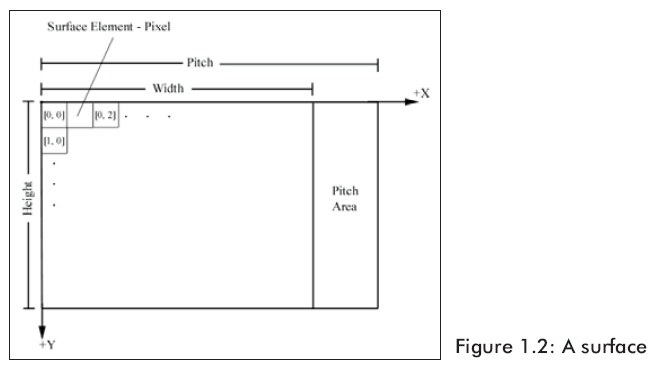
表面是一个像素点阵,在Direct3D中主要用来存储2D图形数据。图1.2指明了表面的一些成分。由图可以看出表面数据就像一个矩阵,像素数据实际上存储在线性数组里面。

表面的Width和Height是按像素计算的。Pitch以字节为单位。而且Pitch有可能比Width大且依赖于低层硬件,所以不能单纯的认为Pitch = Width * sizeof (pixelFormat)。

在代码中,我们可以使用IDirect3DSurface9接口来描述表面。这个接口提供若干方法来直接读写表面数据并且还有一个方法用来返回表面息。IDirect3DSurface9中最重要的方法是:

l         LockRect——使用这个方法,我们将获得一个指向表面内存的指针,然后,通过一系列指针运算,我们可以对表面上任一个像素点进行读、写操作。

Locks a rectangle on a surface.

HRESULT LockRect(
D3DLOCKED_RECT * pLockedRect,
CONST RECT * pRect,
DWORD Flags
);
Parameters
pLockedRect
[out] Pointer to a D3DLOCKED_RECT structure that describes the locked region.
pRect
[in] Pointer to a rectangle to lock. Specified by a pointer to a RECT structure. Specifying NULL for this parameter expands the dirty region to cover the entire surface.
Flags
[in] Combination of zero or more locking flags that describe the type of lock to perform. For this method, the valid flags are:
  • D3DLOCK_DISCARD
  • D3DLOCK_DONOTWAIT
  • D3DLOCK_NO_DIRTY_UPDATE
  • D3DLOCK_NOSYSLOCK
  • D3DLOCK_READONLY
You may not specify a subrect when using D3DLOCK_DISCARD. For a description of the flags, see D3DLOCK.
Return Values

If the method succeeds, the return value is D3D_OK.

If the method fails, the return value can be D3DERR_INVALIDCALL or D3DERR_WASSTILLDRAWING.

Remarks

If the D3DLOCK_DONOTWAIT flag is specified and the driver cannot lock the surface immediately, IDirect3DSurface9::LockRect will return D3DERR_WASSTILLDRAWING so that an application can use the CPU cycles while waiting for the driver to lock the surface.

The only lockable format for a depth-stencil surface is D3DFMT_D16_LOCKABLE. See D3DFORMAT.

For performance reasons, dirty regions are recorded only for level zero of a texture. Dirty regions are automatically recorded when IDirect3DSurface9::LockRect is called without D3DLOCK_NO_DIRTY_UPDATE or D3DLOCK_READONLY. See IDirect3DDevice9::UpdateTexture for more information.

A multisample back buffer cannot be locked.

This method cannot retrieve data from a surface that is is contained by a texture resource created with D3DUSAGE_RENDERTARGET because such a texture must be assigned to D3DPOOL_DEFAULT memory and is therefore not lockable. In this case, use instead IDirect3DDevice9::GetRenderTargetData to copy texture data from device memory to system memory.

l         UnlockRect——当你调用了LockRect和完成了对表面内存的访问后,你必须调用这个方法给表面解锁。

Unlocks a rectangle on a surface.

HRESULT UnlockRect();
Parameters

None.

Return Values

If the method succeeds, the return value is D3D_OK. If the method fails, the return value can be D3DERR_INVALIDCALL.

l         GetDesc——这个方法将通过填充D3DSURFACE_DESC结构来返回表面的描述信息。

D3DSURFACE_DESC

Describes a surface.

typedef struct D3DSURFACE_DESC {
D3DFORMAT Format;
D3DRESOURCETYPE Type;
DWORD Usage;
D3DPOOL Pool;
D3DMULTISAMPLE_TYPE MultiSampleType;
DWORD MultiSampleQuality;
UINT Width;
UINT Height;
} D3DSURFACE_DESC, *LPD3DSURFACE_DESC;
Members
Format
Member of the D3DFORMAT enumerated type, describing the surface format.
Type
Member of the D3DRESOURCETYPE enumerated type, identifying this resource as a surface.
Usage
Either the D3DUSAGE_DEPTHSTENCIL or D3DUSAGE_RENDERTARGET values. For more information, see D3DUSAGE.
Pool
Member of the D3DPOOL enumerated type, specifying the class of memory allocated for this surface.
MultiSampleType
Member of the D3DMULTISAMPLE_TYPE enumerated type, specifying the levels of full-scene multisampling supported by the surface.
MultiSampleQuality
Quality level. The valid range is between zero and one less than the level returned by pQualityLevels used by IDirect3D9::CheckDeviceMultiSampleType. Passing a larger value returns the error, D3DERR_INVALIDCALL. The MultisampleQuality values of paired render targets, depth stencil surfaces and the MultiSample type must all match.
Width
Width of the surface, in pixels.
Height
Height of the surface, in pixels.

Retrieves a description of the surface.

HRESULT GetDesc(
D3DSURFACE_DESC * pDesc
);
Parameters
pDesc
[out] Pointer to a D3DSURFACE_DESC structure, describing the surface.
Return Values

If the method succeeds, the return value is D3D_OK.

D3DERR_INVALIDCALL is returned if the argument is invalid.

最初锁定表面和改写每一像素看来稍微有点迷茫。下面的代码表示锁定表面并将每一像素染成红色:

// Assume _surface is a pointer to an IDirect3DSurface9 interface.
// Assumes a 32-bit pixel format for each pixel.
// Get the surface description.
D3DSURFACE_DESC surfaceDesc;
_surface->GetDesc(&surfaceDesc);
// Get a pointer to the surface pixel data.
D3DLOCKED RECT lockedRect;
_surface->LockRect(
&lockedRect,// pointer to receive locked data
0,          // lock entire surface
0);         // no lock flags specified
// Iterate through each pixel in the surface and set it to red.
DWORD* imageData = (DWORD*)lockedRect.pBits;
for(int i = 0; i < surfaceDesc.Height; i++)
{
for(int j = 0; j < surfaceDesc.Width; j++)
      {
// index into texture, note we use the pitch and divide by
// four since the pitch is given in bytes and there are 4 bytes per DWORD.
int index = i * lockedRect.Pitch / 4 + j;
            imageData[index] = 0xffff0000; // red
      }
}
_surface->UnlockRect();

程序中D3DLOCKED_RECT结构的定义如下:

typedef struct _D3DLOCKED RECT {
    INT Pitch;   // the surface pitch
    void *pBits; // pointer to the start of the surface memory
} D3DLOCKED_RECT;

在这里有一些关于表面锁定代码的一些说明。32-bit像素格式这个设定很重要,我们把bits转换成DWORDs。这让我们能把每一个DWORD视为表示一个像素。

向量相加

我们能够通过分别把两个向量的各个分量相加得到向量之和,注意在相加之前必须保证它们有相同的维数。

u + v = (ux+ vx, uy+ vy, uz+ vz)

图5显示的是几何学上的向量相加。

两个向量相加的代码,我们使用重载的加法操作符:

D3DXVECTOR3 u(2.0f, 0.0f, 1.0f);

D3DXVECTOR3 v(0.0f, -1.0f, 5.0f);

// (2.0 + 0.0,  0.0 + (-1.0),  1.0 + 5.0)

D3DXVECTOR3 sum = u + v; // = (2.0f, -1.0f, 6.0f)

向量相减

和加法类似,通过分别把两个向量的各个分量相减得到向量之差。再次重声两个向量必须是相同维数。

u-v = u + (-v) = (ux - vx, uy - vy, uz - vz)

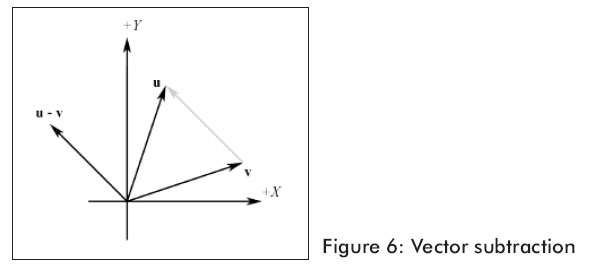
图6显示的是几何学上的向量相减。

两个向量相减的代码,我们使用重载的减法操作符:

D3DXVECTOR3 u(2.0f, 0.0f, 1.0f);

D3DXVECTOR3 v(0.0f, -1.0f, 5.0f);

D3DXVECTOR3 difference = u - v; // = (2.0f, 1.0f, -4.0f)

图6显示,向量减法得到一个从v向量终点到u向量终点的向量。假如我们解释uv的分量,我们能用向量相减找到从一个点到另一个点的向量。这是非常方便的操作,因为我们常常想找到从一个点到另一个点的方向向量。

标量与向量的乘积

我们能用一个标量与向量相乘,就象名字暗示的一样,向量按比例变化。这种运算不会改变向量的方向,除非标量是负数,这种情况向量方向相反。

ku = (kux, kuy, kuz)

D3DXVECTOR3类提供了向量与标量乘法的操作符。

D3DXVECTOR3 u(1.0f, 1.0f, -1.0f);

D3DXVECTOR3 scaledVec = u * 10.0f; // = (10.0f, 10.0f, -10.0f)

点积

数学上定义点积是两个向量的乘积。按下面等式计算:

u.v = uxvx + uyvy + uzvz = s

The above formula does not present an obvious geometric meaning. Using the law of cosines, we can find the relationship u.v = ∥u∥∥v∥ cosθ , which says that the dot product between two vectors is the cosine of the angle between them scaled by the vectors' magnitudes. Thus, if both u and v are unit vectors, then u.v is the cosine of the angle between them.

Some useful properties of the dot product:

  • If u.v = 0, then uv.

矩阵

在这一部分我们关注的焦点是数学中的矩阵。它们在3D图形学中的应用将在下一部分讲解。

一个m×n的矩阵是由m行和n列的数字组成的矩阵列。行和列的数字就是这个矩阵的维数。我们通过写在下方的数字识别矩阵清单,数字中的第一个表示行第二个表示列。例如下边的M是3×3矩阵,B是2×4矩阵, C是3×2矩阵。

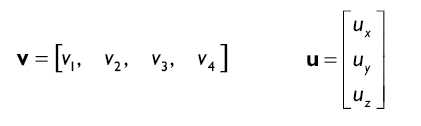
我们使用加粗的大写字母表示矩阵。有时一个矩阵只包含一行或者一列。我们用行矩阵和列矩阵这个特殊的名称来称呼。例如下边就是行和列矩阵:

当使用行或列矩阵时,我们只用一个下标,有时我们还用字母表示。

D3DX 矩阵

当设计Direct3D应用程序时,使用4×4矩阵和1×4行矩阵(向量)是有代表性的。注意使用这两种矩阵意味着可以进行下列定义的矩阵乘法。

n       向量-矩阵乘法。即,假如1×4的单行矩阵V,和4×4的矩阵T,那么积VT可计算并且返回的结果是一个1×4的单行矩阵(向量)。

n       矩阵-矩阵乘法。即,假如4×4的矩阵T,和4×4的矩阵R,那么积TRRT可计算并且两者返回的结果都是一个4×4的矩阵。注意因为矩阵乘法不满足交换律所以TRRT不一定相等。

在D3DX中表示1×4的行矩阵(向量),我们用D3DXVECTOR3和D3DXVECTOR4向量类。当然D3DXVECTOR3只有3个成员,不是4个。然而,第4个成员缺省是1或0(在下一部分有更多信息)。

在D3DX中表示4×4的矩阵,我们用D3DXMATRIX类,定义如下:

typedef struct D3DXMATRIX : public D3DMATRIX
{
public:
D3DXMATRIX() {};
D3DXMATRIX(CONST FLOAT*);
D3DXMATRIX(CONST D3DMATRIX&);
D3DXMATRIX(FLOAT _11, FLOAT _12, FLOAT _13, FLOAT _14,
FLOAT _21, FLOAT _22, FLOAT _23, FLOAT _24,
FLOAT _31, FLOAT _32, FLOAT _33, FLOAT _34,
FLOAT _41, FLOAT _42, FLOAT _43, FLOAT _44);
// access grants
FLOAT& operator () (UINT Row, UINT Col);
FLOAT operator () (UINT Row, UINT Col) const;

// casting operators
operator FLOAT* ();
operator CONST FLOAT* () const;

// assignment operators
D3DXMATRIX& operator *= (CONST D3DXMATRIX&);
D3DXMATRIX& operator += (CONST D3DXMATRIX&);
D3DXMATRIX& operator -= (CONST D3DXMATRIX&);
D3DXMATRIX& operator *= (FLOAT);
D3DXMATRIX& operator /= (FLOAT);

// unary operators
D3DXMATRIX operator + () const;
D3DXMATRIX operator - () const;

// binary operators
D3DXMATRIX operator * (CONST D3DXMATRIX&) const;
D3DXMATRIX operator + (CONST D3DXMATRIX&) const;
D3DXMATRIX operator - (CONST D3DXMATRIX&) const;
D3DXMATRIX operator * (FLOAT) const;
D3DXMATRIX operator / (FLOAT) const;

friend D3DXMATRIX operator * (FLOAT, CONST D3DXMATRIX&);

BOOL operator == (CONST D3DXMATRIX&) const;
BOOL operator != (CONST D3DXMATRIX&) const;

} D3DXMATRIX, *LPD3DXMATRIX;

The D3DXMATRIX class inherits its data entries from the simpler D3DMATRIX structure, which is defined as:

typedef struct _D3DMATRIX {
union {
struct {
float _11, _12, _13, _14;
float _21, _22, _23, _24;
float _31, _32, _33, _34;
float _41, _42, _43, _44;
};
float m[4][4];
};
} D3DMATRIX;

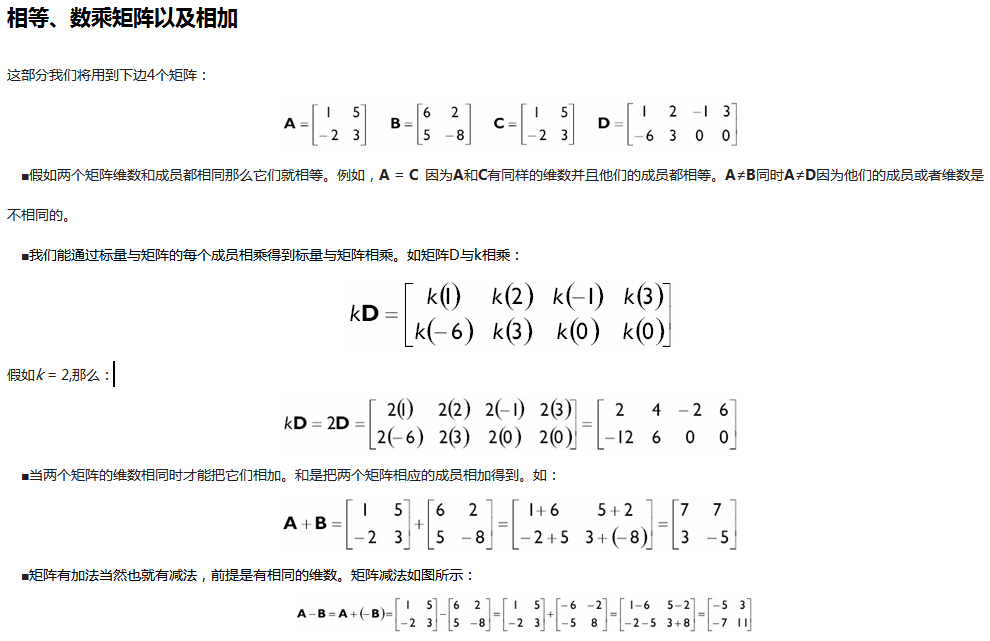
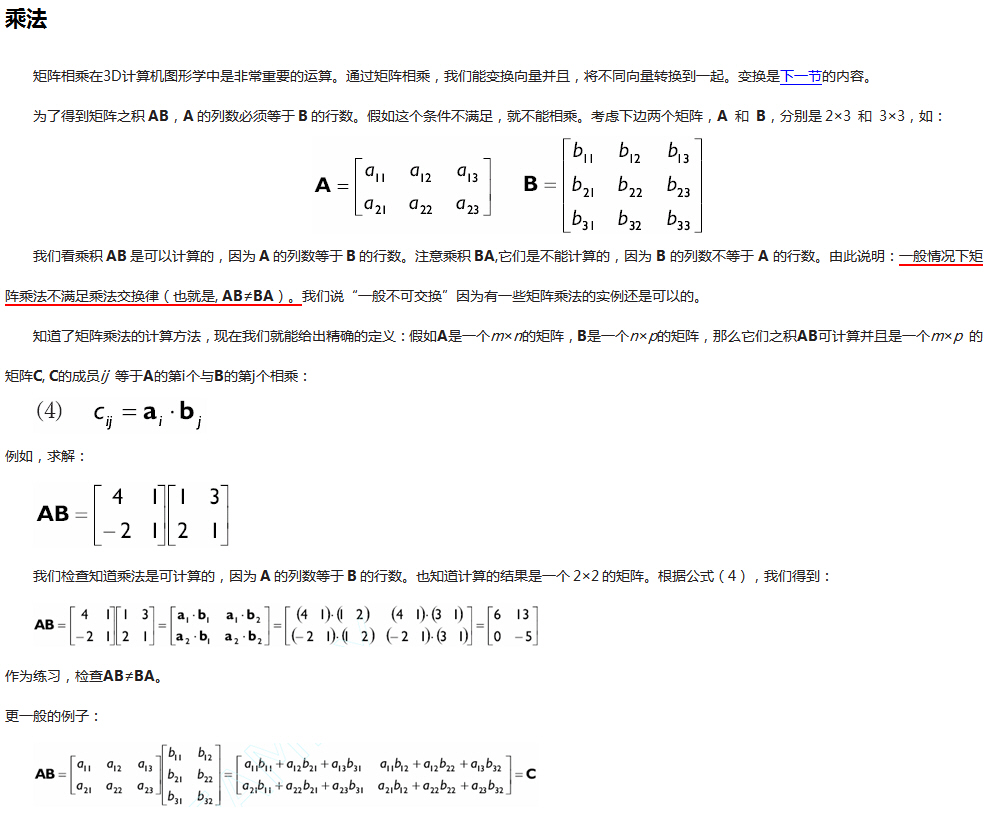
观察D3DXMATRIX类发现有很多有用的运算符,比如对矩阵检测相等,矩阵相加和矩阵相减,标量与矩阵相乘,类型转换(casting),以及非常重要的两个D3DXMATRIXs相乘。因为矩阵相乘是非常重要的,我们给出一段实例代码:

D3DXMATRIX A(…); // initialize A

D3DXMATRIX B(…); // initialize B

D3DXMATRIX C = A * B; // C = AB

D3DXMATRIX类另一个重要的运算符是小括号,它允许我们非常方便的为矩阵成员赋值。注意当使用小括号时我们的下标就象C语言数组下标一样是从0开始的。例如,为一个矩阵的ij = 11 赋值,我们写成:

D3DXMATRIX M;

M(0, 0) = 5.0f; // Set entry ij = 11 to 5.0f.

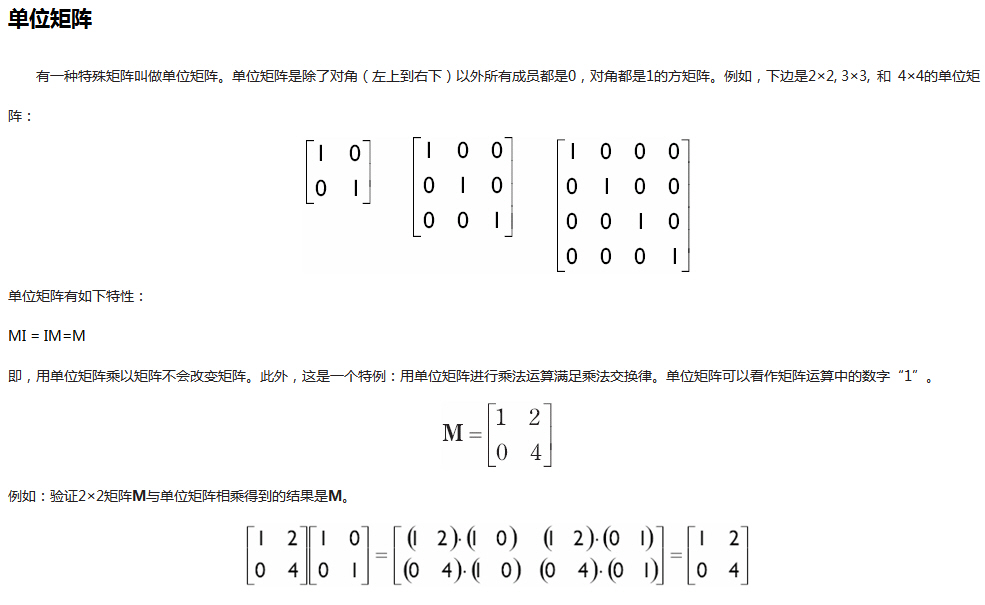
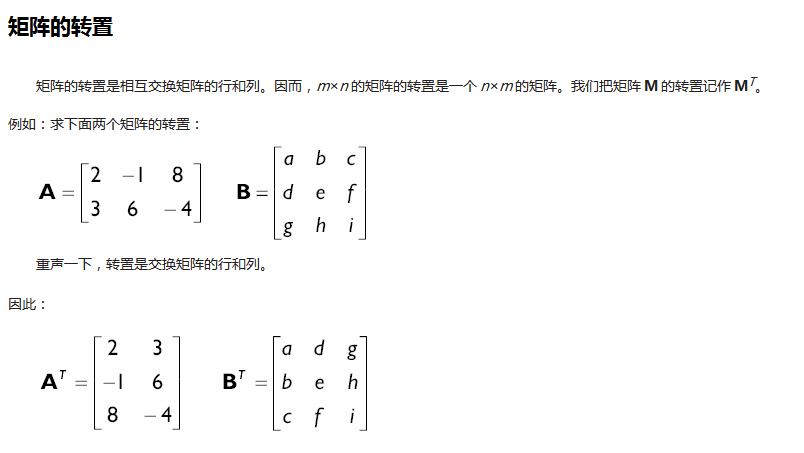
D3DX库也提供下列有用的函数:将D3DXMATRIX转化为单位矩阵,转置D3DXMATRIX矩阵以及求逆矩阵。

D3DXMATRIX *D3DXMatrixIdentity(

              D3DXMATRIX *pout // 将矩阵转换为单位矩阵

);

D3DXMATRIX M;

D3DXMatrixIdentity( &M ); // M = 单位矩阵

D3DXMATRIX *D3DXMatrixTranspose(

       D3DXMATRIX *pOut, // 输出的转置矩阵

       CONST D3DXMATRIX *pM // 原矩阵

);

D3DXMATRIX A(...); // 初始化矩阵A

D3DXMATRIX B;

D3DXMatrixTranspose( &B, &A ); // B = 输出的转置矩阵

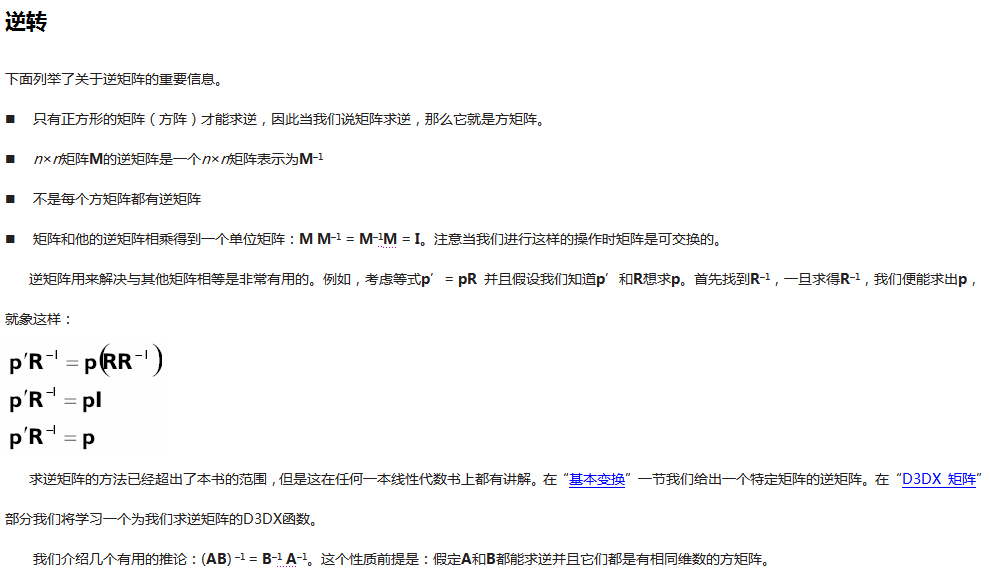
假如我们将不能求逆的矩阵用求逆函数,那么函数将会返回null.同样的,这本书我们忽视第二个参数,并且总是把它设置为0。

D3DXMATRIX *D3DXMatrixInverse(

       D3DXMATRIX *pOut, // 输出的逆矩阵

       FLOAT *pDeterminant, // 除非是必需的,一般设为0

       CONST D3DXMATRIX *pM // 原矩阵

);

D3DXMATRIX A(...); // 初始化矩阵

D3DXMATRIX B;

D3DXMatrixInverse( &B, 0, &A ); // B = A的逆矩阵

基本变换

当用Direct3D编程时,我们使用4×4矩阵来进行矩阵变换。用它的原因是:我们设置一个4×4矩阵X是为了更精确的描述矩阵变换。同样我们设置一个相匹配的点或者把向量的分量放置到一个1×4的行矩阵V中。VX的乘积返回一个新的向量V’。例如:让X沿着x轴平移10个单位同时V = [2, 6, –3, 1],乘积VX = V’= [12, 6, –3, 1]。

有一些东西需要阐明。我们使用4×4矩阵是因为这样的大小能表现我们需要的所有变换。最初看来一个3×3的好象更适合3D。然而这里有很多种我们喜欢用的变换是不能用一个3×3的矩阵来表示的,比如平移、投影、反射。我们使用向量-矩阵相乘来工作,因此我们至少要通过一个矩阵乘法来完成相应的变化。增大到4×4的矩阵后,它允许我们用一个矩阵描述更多的变换,并且向量-矩阵乘法是可行的。

我们说过把一个相匹配的点或者一个向量的成员放置到一个1×4的行矩阵中。但是点和向量是3D的!为什么我们要用一个1×4的行矩阵呢?我们必需把3D点/向量增大为4D的单行矩阵,是为了符合向量与矩阵的乘法定义,而1×3的单行矩阵和4×4的矩阵相乘是不允许的。

那么,我们怎么使用第四个成员(我们用w来表示)呢?当我们把一个点放置到一个1×4的行矩阵中时,我们设置w为1。允许对点进行适当的平移。因为向量和位置无关,所以向量的平移没有被定义,如果试图这样做会返回一个无意义的向量。为了防止对向量进行平移,当在把一个向量放置到一个1×4行矩阵中时我们把w设置为0。例如:

把点p = (p1, p2, p3)放置到一个单行矩阵中就象这样:

[p1, p2, p3, 1]

同样把向量v = (v1, v2, v3) 放置到一个单行矩阵中就象这样:

[v1, v2, v3, 0]

注意:我们设置w = 1是为了让点可以被恰当的移动,同样我们设置w = 0是为了防止向量被平移。当我们检查矩阵实际平移时这是一个非常清晰的模型。

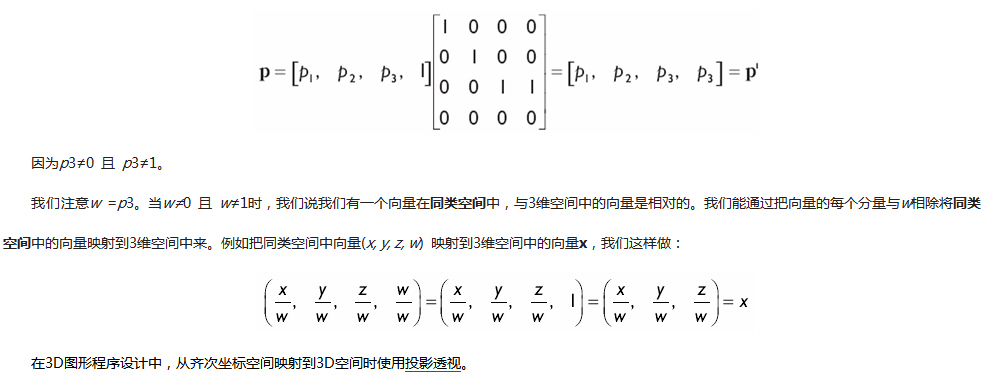
有时一个矩阵变换时我们改变向量成员w的值,即w≠0 且 w≠1。考虑下边例子:

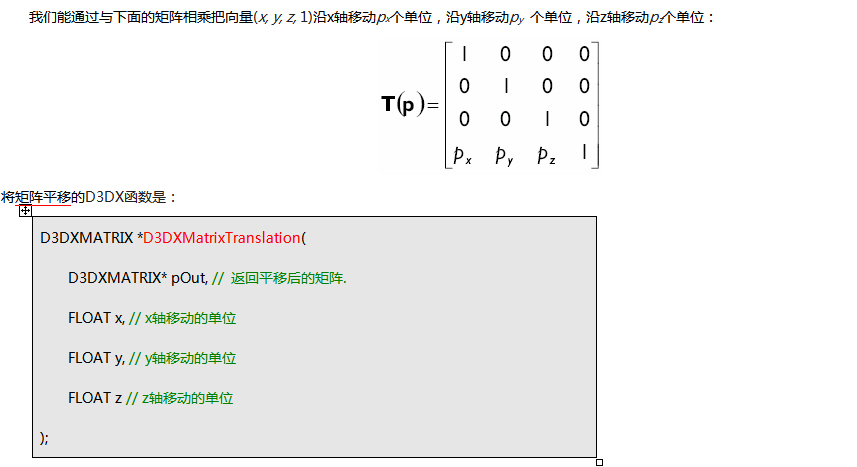
矩阵平移

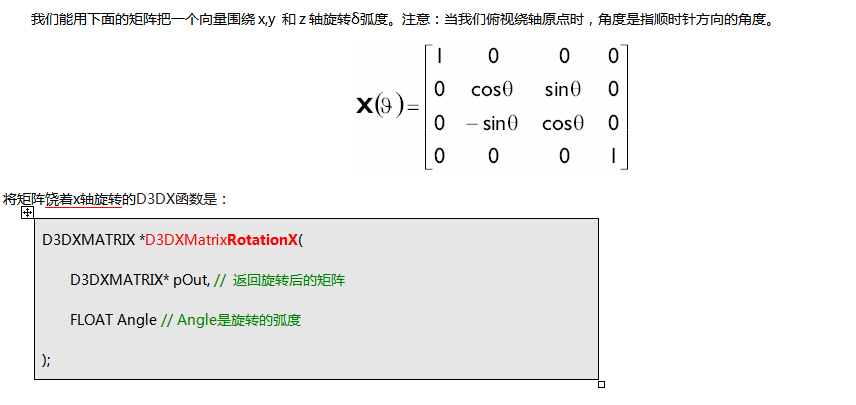
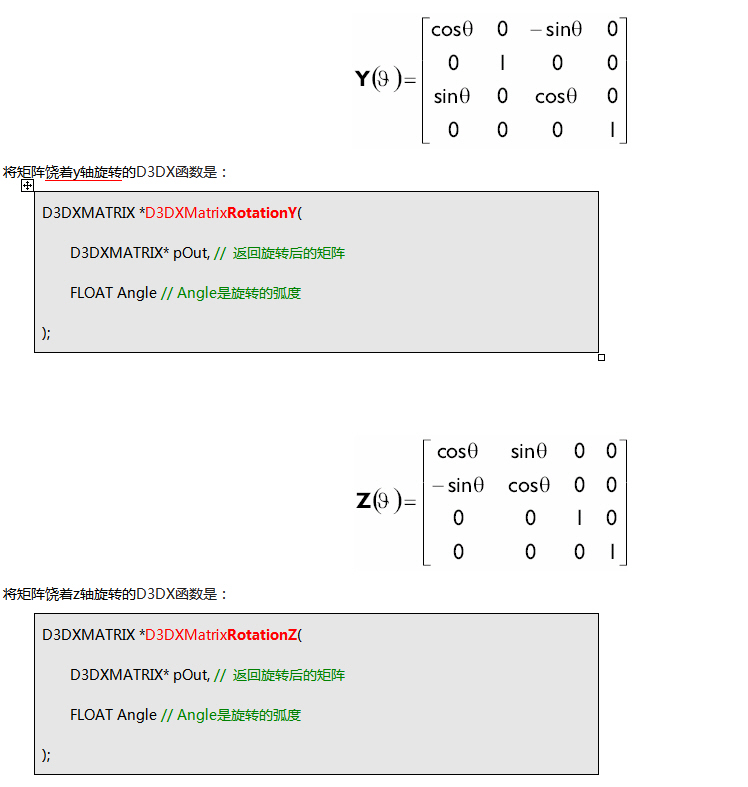
矩阵旋转

旋转矩阵R的逆矩阵等于它的转置矩阵:RT= R-1。这样的矩阵我们说它们是正交矩阵的。

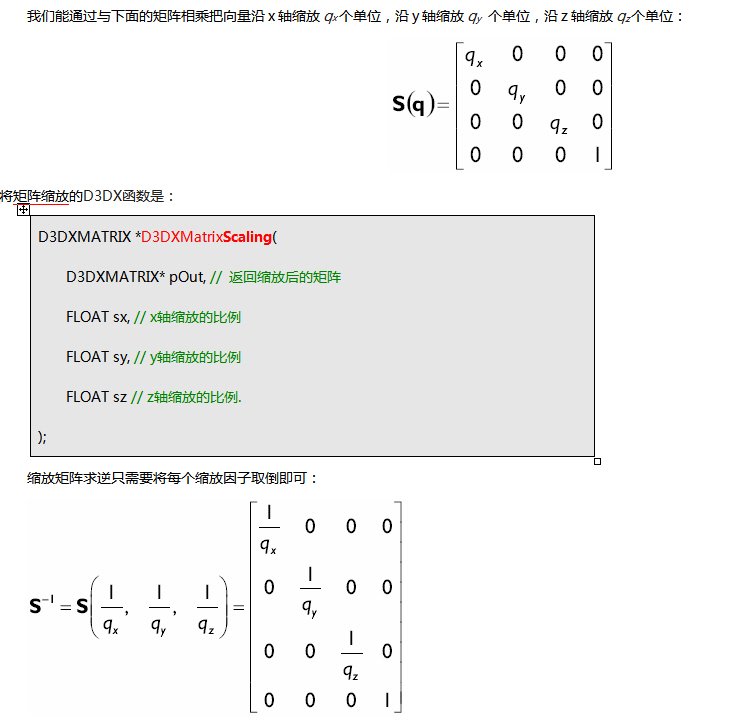
矩阵缩放

综合变换

       常常我们要对一个向量进行一系列的变换。比如,我们可能先缩放一个向量,然后旋转它,最后把它平移到指定的位置。

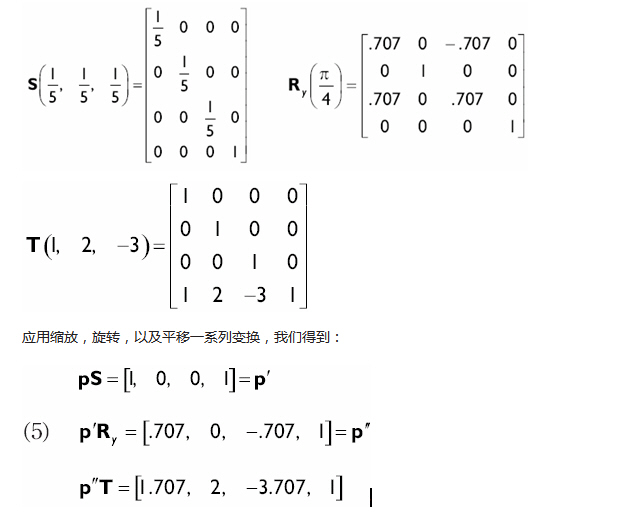
例如:先把向量p = [5, 0, 0, 1] 在所有轴上缩小为原来的1/5,然后沿着y轴旋转π/4,最后把它在x轴上移动1个单位,在y轴上移动2个单位,在z轴上移动3个单位。

解答:注意我们必须完成缩放,沿y轴旋转,以及移动。我们设缩放、旋转、移动的变换矩阵分别是S, Ry, T,如下:

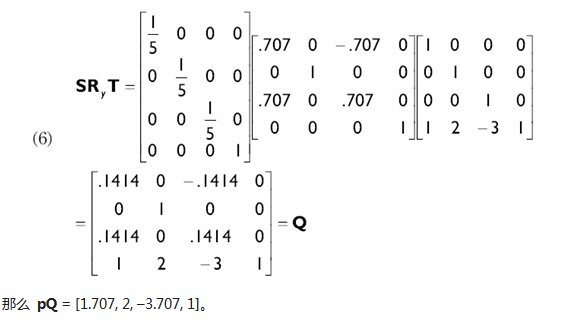
我们能用矩阵乘法把几个变换矩阵转换成一个矩阵,它是非常有益的矩阵。比如,重新考虑这部分开始的例子。通过使用矩阵相乘把3个变换矩阵合成一个矩阵。注意我们必须按实际应用的顺序来进行矩阵相乘。

联合变换有提高效率的能力。假如我们需要对一组数量巨大的向量(在3D图形任务中是很普遍的)进行同样的缩放,旋转以及移动变换。替换这一系列的变换,即就象等式(5)中对每一个向量的做法,我们能把所有3个变换转换到一个矩阵中,即就象在等式(6)中的做法。这样我们只需要对每一个向量进行一次乘法就可以实现3种变换。这就减少了大量的向量-矩阵乘法操作。

一些向量变换函数

D3DX库分别提供了下边两个对点和向量的变换函数。D3DXVec3TransformCoord函数变换点同时设置向量第4个成员为1(用于变换点向量)。D3DXVec3TransformNormal函数变换向量并且设置第4个成员为0(用于变换方向向量)。

D3DXVECTOR3 *D3DXVec3TransformCoord(

              D3DXVECTOR3* pOut, // 返回的点向量

              CONST D3DXVECTOR3* pV, // 点向量

              CONST D3DXMATRIX* pM // 变换矩阵

);

D3DXMATRIX T(...); // 初始化矩阵

D3DXVECTOR3 p(...); // 初始化点

D3DXVec3TransformCoord( &p, &p, &T); // 变换一个点

D3DXVECTOR3 *WINAPI D3DXVec3TransformNormal(

              D3DXVECTOR3 *pOut, //返回的方向向量

              CONST D3DXVECTOR3 *pV, // 方向向量

              CONST D3DXMATRIX *pM //变换矩阵

);

D3DXMATRIX T(...); // 初始化变换矩阵

D3DXVECTOR3 v(...); // 初始化方向向量

D3DXVec3TransformNormal( &v, &v, &T); // 变换方向向量

注意:D3DX库也提供D3DXVec3TransformCoordArray和D3DXVec3TransformNormalArray来分别变换一个点数组和向量数组。

三维空间中的向量

几何学中,我们用有向线段表示向量,如图1。向量的两个属性是他的长度和他的顶点所指的方向。因此,可以用向量来模拟既有大小又有方向的物理模型。例如,以后我们要实现的粒子系统。我们用向量来模拟粒子的速度加速度。在3D计算机图形学中我们用向量不仅仅模拟方向。例如我们常常想知道光线的照射方向,以及在3D世界中的摄象机。向量为在3维空间中表示方向的提供了方便。

向量与位置无关。有同样长度和方向的两个向量是相等的,即使他们在不同的位置。观察彼此平行的两个向量,例如在图1中u和v是相等的。

我们继续学习左手坐标系。图2显示的是左手坐标系和右手坐标系。两者不同的是Z轴的方向。在左手坐标系中Z轴是向书的里面去的,而右手坐标系是向书的外边去的。

因为向量的位置不能改变它的性质,我们可以把所有向量平移使他们的尾部和坐标系的原点重合。因此,当一个向量在标准位置我们能通过头点来描述向量。图3显示的是图1中的向量在标准位置的样子。

我们通常用小写字母表示一个向量,但有时也用大写字母。如2、3和4维向量分别是:

u = (ux, uy),

N = (Nx, Ny, Nz),

c = (cx, cy, cz, cw)。

我们现在介绍4个特殊的3D向量,就象图4显示的。首先是都由含有0的零向量;它被表示成加粗的0 = (0, 0, 0)。接下来3个特殊的向量标准基向量。它们被叫做i, jk向量,分别沿着坐标系的x轴,y轴和z轴,并且有1的单位长:i = (1, 0, 0), j = (0, 1, 0), and k = (0, 0, 1)。

注意:只有1个单位长度的向量叫做单位向量(模长为1的向量)。

在D3DX库中,我们能用D3DXVECTOR3类表示3维空间中的向量。它的定义是:

typedef struct D3DXVECTOR3 : public D3DVECTOR {
public:
    D3DXVECTOR3() {};
    D3DXVECTOR3( CONST FLOAT * );
    D3DXVECTOR3( CONST D3DVECTOR& );
    D3DXVECTOR3( FLOAT x, FLOAT y, FLOAT z );
    // casting
    operator FLOAT* ();
    operator CONST FLOAT* () const;
    // assignment operators
    D3DXVECTOR3& operator += ( CONST D3DXVECTOR3& );
    D3DXVECTOR3& operator -= ( CONST D3DXVECTOR3& );
    D3DXVECTOR3& operator *= ( FLOAT );
    D3DXVECTOR3& operator /= ( FLOAT );
    // unary operators
    D3DXVECTOR3 operator + () const;
    D3DXVECTOR3 operator - () const;
    // binary operators
    D3DXVECTOR3 operator + ( CONST D3DXVECTOR3& ) const;
    D3DXVECTOR3 operator - ( CONST D3DXVECTOR3& ) const;
    D3DXVECTOR3 operator * ( FLOAT ) const;
    D3DXVECTOR3 operator / ( FLOAT ) const;
    friend D3DXVECTOR3 operator * ( FLOAT,
                                    CONST struct D3DXVECTOR3& );
    BOOL operator == ( CONST D3DXVECTOR3& ) const;
    BOOL operator != ( CONST D3DXVECTOR3& ) const;
} D3DXVECTOR3, *LPD3DXVECTOR3;

Note that D3DXVECTOR3 inherits its component data from D3DVECTOR, which is defined as:

typedef struct _D3DVECTOR {
    float x;
    float y;
    float z;
} D3DVECTOR;

向量有它们自己的算法,就象你在D3DXVECTOR3定义中看到的数学运算。现在你不需要知道它们怎么使用。以后介绍这些向量运算以及一些有用的函数和关于向量的,重要的详细资料。

注意:在3D图形程序中,虽然我们主要关心3D向量,但有时也会用到2D和4D向量。在D3DX库中提供了D3DXVECTOR2和D3DXVECTOR4类来分别表现2D和4D向量。不同维数的向量有着和3D向量一样的性质,也就是它们描述大小和方向,仅仅是在不同的维数中。所有这些向量的数学运算对于不同维数向量都有效只是有一个除外,就是向量积。这些运算我们可通过论述3D向量扩展到2D, 4D甚至n维向量。

向量相等

几何学上,有同样方向和长度的两个向量相等。数学上,我们说有同样维数和分量的向量相等。例如:如果ux = vx, uy = vy, 且 uz = vz.那么(ux, uy, uz) = (vx, vy, vz)。在代码中我们能够用“==”判断两个向量相等。

D3DXVECTOR u(1.0f, 0.0f, 1.0f);

D3DXVECTOR v(0.0f, 1.0f, 0.0f);

if( u == v ) return true;

同样的,我们也能用“!=”判断两个向量不相等。

if( u != v ) return true;

注意:当比较浮点数时,必须注意。因为浮点数不是精确的,我们认为相等的两个浮点数是有细微差别的;因此,我们测试它们近似相等。我们定义一个常数EPSILON,把它当作非常小的“buffer”。假如两个数和EPSILON相差很小我们说它们近似相等。换句话说,EPSILON让浮点数有一定的精度。接下来的实例函数是怎样用EPSILON比较两个浮点数相等。

bool Equals(float lhs, float rhs)

{

       // if lhs == rhs their difference should be zero

       return fabs(lhs - rhs) < EPSILON ? true : false;

}

当我们用D3DXVECTOR3类时不必担心,因为它已经帮我们处理了,但是在一般情况下适当注意比较两个浮点数是很重要的。